

If you’ve ever opened a design tool, picked a template, and still felt stuck trying to make your post look and sound right, this comparison will help.
In this post, we’ll look at Canva AI vs ChatGPT from a real small business content workflow, so you can see which tool helps with planning, writing, visuals, branding, and saving time without turning one simple graphic into a whole afternoon project.
Affiliate Disclosure: This post contains affiliate links. If you purchase through my link, I earn a small commission at no extra cost to you. You can find the full disclosure here.
- Introduction
- Quick Answer: Canva AI vs ChatGPT
- Canva AI vs ChatGPT Comparison Table
- Why Canva AI vs ChatGPT Matters for Small Business Owners
- ChatGPT for Content Creation
- Canva AI for Content Creation
- Can Canva AI Do the Writing Too?
- How to Use ChatGPT with Canva
- ChatGPT's Canva Plugin and App Options
- Which Tool Should You Use First?
- FAQ: Canva AI vs ChatGPT
- Final Thoughts on Canva AI vs ChatGPT
- Want Better Results From AI Tools?
Introduction
Comparing Canva AI vs ChatGPT for content creation can get confusing fast. At first, it seems like a simple question: which tool is better? However, for small business owners, that question is not always the most useful one.
A better question to ask yourself is which tool helps you create clearer, branded, editable, and usable content without wasting half the day, because faster doesn’t always mean better.
Sometimes a tool can create something quickly, but you still end up fixing the message, changing the design, editing the text, resizing the graphic, or wondering why the whole thing feels off.
That’s why this comparison matters. Canva AI vs ChatGPT is not just about features or what each tool claims it can do. It’s about how each tool fits into a real content creation workflow for small business owners.
For me, that workflow usually starts with ChatGPT for content planning, message clarity, brainstorming, and writing support. Then I use Canva or another design tool for branded visuals, blog images, social graphics, and designs I can edit and reuse.
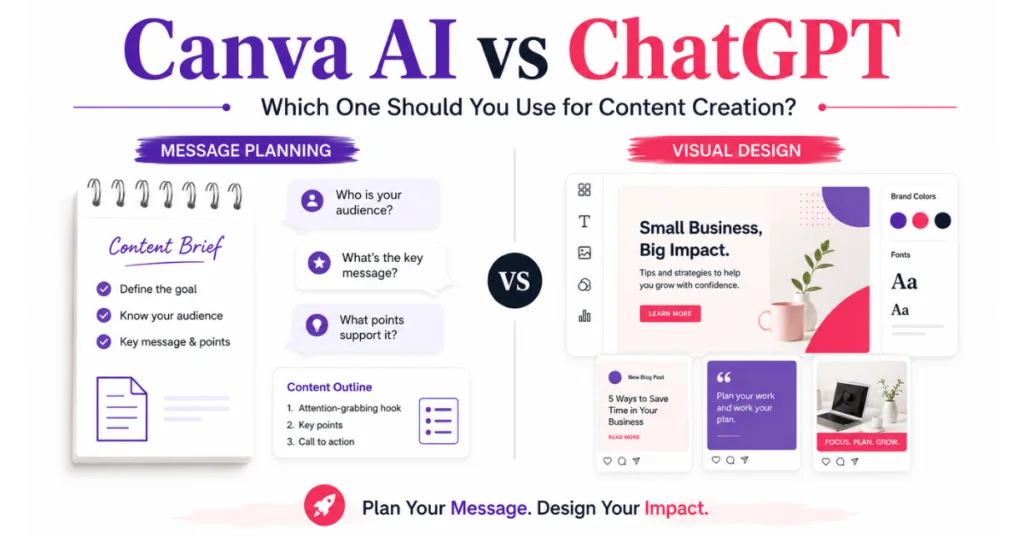
ChatGPT is stronger for planning, writing, brainstorming, and clarifying your message. Canva AI, on the other hand, is stronger for visuals, graphics, branded designs, and editable content.
However, the biggest time-saver may be using them together instead of forcing one tool to do everything.
Quick Answer: Canva AI vs ChatGPT
Canva is not better than ChatGPT for every type of content creation. It depends on what you are trying to create and where you are getting stuck.
If you need branded graphics, Pinterest pins, social media designs, presentations, or visual content that you can easily edit, resize, and reuse, I would choose Canva.
If you need help figuring out what to say, brainstorming ideas, writing captions, outlining blog posts, planning content, or shaping your message before you create it, I would choose ChatGPT.
Both tools can now help with writing and images, so there is more overlap between them than there used to be. For my small-business content workflow, I still find the simplest approach is to start with ChatGPT when I need help with the message, then move to Canva when I want to turn that message into a polished, branded design.
The comparison below shows which one I would choose for different content creation tasks.
Canva AI vs ChatGPT Comparison Table
| Content Task | Better Tool | Why |
|---|---|---|
| Blog post ideas | ChatGPT | Better for brainstorming and structure |
| Social media captions | ChatGPT | Better for hooks, tone, and variations |
| Facebook graphics | Canva AI | Better for visual layout and design |
| Pinterest pins | Canva AI | Better for templates and resizing |
| Design briefs | ChatGPT | Better for clarifying the message first |
| Brand visuals | Canva AI | Easier to keep graphics editable and branded |
| Email drafts | ChatGPT | Better for written content |
| Presentations | Canva AI | Better for slide design and visuals |
| Repurposing content | ChatGPT | Better for turning one idea into many formats |
| Quick promo graphics | Canva AI | Better for creating visual assets fast |
They both help in different ways but work well together. That’s why it helps to look at where each tool fits in your workflow, not just which one is better.
Why Canva AI vs ChatGPT Matters for Small Business Owners
Most small business owners are not trying to become full-time designers, copywriters, or tech experts. They just need content that helps them show up online.
For example, that might include Facebook posts, Instagram graphics, Pinterest pins, blog images, email headers, promotional graphics, lead magnets, simple presentations, or product and service announcements.
The problem is that content creation can eat up your day when you’re starting from scratch. ChatGPT can help with the thinking part, while Canva AI can help with the visual part.
However, if you skip the thinking part and jump straight into design, things can get messy. You might end up with a pretty graphic that doesn’t clearly say anything.
That is one of the biggest mistakes people make with AI content tools. Pretty is nice, clear is better, but useful is what you really need and want.
ChatGPT for Content Creation
When it comes to ChatGPT, its biggest strength is helping you figure out the message before you create the final piece.
Using ChatGPT for the writing side?
If you’re not always sure what to ask it, my free 25 AI Prompt Toolkit gives you ready-to-use prompts for content ideas, outlines, captions, emails, and more.
For example, ChatGPT can help you:
- Brainstorm content ideas
- Write social media captions
- Create blog outlines
- Turn one idea into multiple posts
- Simplify a confusing topic
- Write hooks and headlines
- Draft emails
- Create content calendars
- Build a mini design brief before opening Canva
Because of that, ChatGPT can save small business owners a lot of time at the beginning of the content process. Instead of opening Canva first and wondering what to say, you can use ChatGPT to get clear on the message, audience, headline, and call-to-action.
This matters because once the message is clear, the design has a much better chance of working for you.
If you want a deeper look at how I use ChatGPT for small business content, you can read my ChatGPT review for small businesses here.
Canva AI for Content Creation
Canva AI is better when you need something visual.
It’s already popular because it makes design easier for people who are not designers. Canva AI adds another layer by helping you create visuals, adjust designs, and turn ideas into graphics without starting from a blank page.
It can help with things like social media graphics, presentations, branded designs, image generation, design layouts, visual content ideas, resizing content, promotional graphics, and editable templates.
The biggest advantage is that Canva starts with design. That is why, for business graphics, Canva AI makes more sense once the message is already clear.
So, if you need a graphic, a visual post, or a branded image, Canva AI usually makes more sense than trying to do everything inside ChatGPT.
ChatGPT can help you plan the message. After that, Canva is where you can make the post look polished and platform-ready. That matters because business content needs to be clear, branded, and easy to reuse.
If you already use Canva for your brand colors, fonts, and templates, Canva AI may fit nicely into your existing workflow.
Can Canva AI Do the Writing Too?
Yes, Canva AI can help with writing. It can create captions, short copy, summaries, rewrites, outlines, and content ideas while you’re working inside Canva. So the difference isn’t that Canva AI cannot write.
The difference is where each tool feels strongest. In my experience, Canva AI can help with simple writing tasks, but it isn’t there yet for these types of things, like ChatGPT is.
For me, ChatGPT is a better option for planning the message, shaping the angle, building stronger outlines, and thinking through the content before I start designing. Canva AI is more helpful once the message is mostly clear and I’m ready to turn it into something visual, branded, editable, and ready to use.
If you want to see how Canva’s AI features fit into a real small business content workflow, you can read my Canva AI testing for small business owners here.
You can also visit Canva AI tools to see the current features Canva offers, since AI features and plan access can change over time.

How to Use ChatGPT with Canva
Rather than starting with a blank Canva template and trying to force your message into it, start by using ChatGPT to create a simple direction for your content.
Here is a simple workflow for how to use ChatGPT with Canva:
Step 1: Choose the Content Goal
Before creating your image, decide what the post is supposed to do.
Maybe it is supposed to teach something, maybe it needs to get clicks, promote a blog post, build trust, grow your followers, or send people to an offer. Once you know the goal, the design has a much clearer job.
Step 2: Use ChatGPT for the Message
Next, ask ChatGPT to create a mini design brief.
You can ask for the target audience, main message, headline idea, supporting text, visual direction, and call-to-action. This doesn’t need to be long. You’re not writing a book. You’re simply giving the image a purpose.
Where This Works Best for Social Media Content
This is also why the Canva vs ChatGPT for social media content question works better as a workflow than a competition.
For social posts, ChatGPT can help with the hook, caption, main idea, and call-to-action. Then Canva AI or Canva can help turn that message into a Facebook graphic, Instagram post, Pinterest pin, or simple promo image.
A simple workflow would be:
ChatGPT for the hook and caption → Canva AI for the graphic → edit it for your brand → post.
That usually works better than starting with a random template and trying to force your message into it. For small business content, the goal is not just to make something pretty. The goal is to make the message clear enough that people understand it quickly and know what to do next.
Step 3: Use Canva AI for the Visual
After the message is clear, open Canva or Canva AI.
Now you can create the graphic with direction instead of guessing. You can choose a template, create a visual, resize the design, or build something branded from scratch, because you already know the message. The design process should feel less scattered, and you should get better results.
Step 4: Edit for Your Brand
Before publishing, check the design carefully.
Look at your brand colors, fonts, spacing, readability, headline size, image style, and call-to-action placement. This step matters because AI-generated content can look nice, but at the same time, it can still feel disconnected from your business.
Step 5: Resize and Reuse
Finally, turn the same idea into more than one piece of content.
For example, you could create a Facebook post, Pinterest pin, Instagram graphic, blog featured image, or email image. That’s where content creation starts to feel more like a system instead of a daily fight with templates, and truly, fewer template fights are good for everyone.
ChatGPT’s Canva Plugin and App Options
If you’ve wondered whether Canva and ChatGPT can work together, you may have seen people mention the ChatGPT Canva plugin or Canva app.
Canva and ChatGPT do have ways to connect, but access can depend on your account, plan, and current app settings. Since these features can change, it’s best to check inside ChatGPT and Canva for the most current options before relying on one specific setup.
Canva has a helpful page that explains how its ChatGPT connection works, and you can also check the Canva app inside ChatGPT to see what options are currently available.
The important thing to remember is that an integration does not replace the workflow. You still need to start with a clear message, review the design, check that it matches your brand, and make sure the final content is something you can edit and use.
AI can speed things up, but it still needs direction, and that direction comes from you.

Which Tool Should You Use First?
The best tool to start with depends on where your content usually gets stuck.
If your content slows down before you even know what to say, start with ChatGPT. If your content slows down once it is time to make the graphic look clean, branded, and ready to post, Canva AI may be the better next step.
For me, the most useful workflow is not picking one tool and ignoring the other. It is using the tool that solves the problem in front of you first, then bringing in the other one when the content is ready for the next step.
The same idea applies when thinking about Canva AI vs ChatGPT price and value. I would not look at pricing as a reason to choose one tool and ignore the other. I’d look at whether each tool helps with the part of the workflow where you lose the most time.
If pricing is part of your decision, I’d still check the current Canva pricing and ChatGPT pricing pages so you can see what each one includes before choosing what fits your workflow.
FAQ: Canva AI vs ChatGPT
Canva or ChatGPT: Which should a small business owner start with?
Start with the tool that solves the part of content creation you struggle with most. If you need help brainstorming ideas, planning content, writing captions, creating outlines, or figuring out what to say, ChatGPT is usually the better place to start.
If you already know what you want to say but need help turning it into polished, branded graphics, presentations, social posts, or other visual content, Canva may be the better choice.
Can Canva replace ChatGPT for content creation?
Not completely. Canva and ChatGPT now overlap in several areas, including writing and AI-generated visuals, but they are still built around different content workflows. ChatGPT is especially useful for developing ideas, messaging, research, planning, and written content, while Canva makes it easier to turn ideas into editable, branded visual content.
Depending on what you create, you may find that using both saves more time than trying to make one replace the other.
Can I use ChatGPT with Canva?
Yes. You can use ChatGPT and Canva together as part of the same content workflow. You can plan your message, headline, caption, or content idea with ChatGPT and then use Canva to turn it into an editable visual design. Canva also offers an app for ChatGPT that can help you create, edit, preview, and work with Canva designs from inside ChatGPT.
Is the Canva app for ChatGPT free?
The Canva app for ChatGPT is currently available for both free and paid ChatGPT personal accounts. What you can do in Canva may still depend on the Canva features and plan available to your account, so check your current Canva account if a specific feature is important to you.
Which is better for social media posts, Canva or ChatGPT?
It depends on which part of the social media post you are creating. ChatGPT is especially useful for brainstorming the angle, writing hooks and captions, developing calls-to-action, and creating different versions of your message.
Canva is especially useful for turning that message into polished, branded graphics and adapting designs for different social platforms. For many small business owners, using ChatGPT for the message and Canva for the finished design is the simplest workflow.
Final Thoughts on Canva AI vs ChatGPT
When comparing Canva AI vs ChatGPT, the real answer is not about picking one tool and ignoring the other. It is about using each one for the part of content creation it handles best.
ChatGPT helps you get the message clear, and Canva AI helps you turn that message into a branded visual.
For small business owners, the better workflow is simple: get clear before you design. Use ChatGPT to work through the message first, then use Canva AI or Canva to create the visual.
That is where these tools can save the most time, not by replacing your judgment, but by helping you move from idea to finished content with less guessing, less fixing, and fewer template fights.
Related Posts That May Help Next
Content Creation System for Beginners
How to Use AI to Create Content Faster Without Sounding Robotic
7 AI Content Repurposing Tools That Save Time
AI Image Generators That Save Small Businesses Time
ChatGPT vs Gemini for Small Business
Additional AI Tools That Can Help Your Content Workflow
ChatGPT and Canva AI can help with a lot, but depending on what kind of content you create, a few other AI tools may be worth looking at too.
Predis AI – Helpful for creating social media posts, captions, and content ideas when you want more support with social content.
Try Predis AI
FlexClip – Helpful for turning ideas, blog posts, or simple tips into short videos without starting from scratch.
Create Videos Faster
InVideo AI – Helpful for creating AI-assisted videos from prompts, scripts, or content ideas for social media or business promos.
Explore InVideo AI
Simplified – Helpful if you want an all-in-one tool for writing, graphics, social content, and basic marketing tasks.
Try Simplified
Start with the tool that fixes your biggest content bottleneck first. More tools only help if they actually save you time.
Want Better Results From AI Tools?
One thing this Canva AI vs ChatGPT comparison makes clear is that AI works better when you give it direction first.
Whether you’re using ChatGPT to plan the message or Canva AI to create the visual, the result is usually stronger when you know the goal, audience, main point, and call-to-action before you start.
That’s where my free AI Prompt Toolkit can help.
It gives you simple prompts for blog ideas, outlines, captions, rewrites, content planning, and clearer messaging, so you’re not sitting there wondering what to type or trying to fix a messy first draft later.
You’ll also get my weekly AI tool reviews, comparisons, and online business tips to help you choose tools smarter and save time in your business.
Just fill out the form below.
We respect your privacy. You can unsubscribe at any time.
Thanks for reading. I hope this comparison helped you see where Canva AI and ChatGPT fit in your content workflow, and why the best results usually come from using the right tool at the right step.

If this post helped you think differently about creating content with AI, please share it with another small business owner or content creator who is trying to save time without making their content harder to use.


Hi Meredith – This was such a well thought out and genuinely helpful comparison. I really appreciated how you kept bringing the focus back to what actually matters for small business owners, which is not just creating content faster, but creating content that is clear, useful, branded, and purposeful. That point about “pretty is nice, clear is better, but useful is what you really need” really stood out to me because I think a lot of people get distracted by flashy tools and forget that the message still comes first.
I also really liked how practical and realistic your workflow approach was instead of turning it into a “this tool versus that tool” battle. The way you explained using ChatGPT to clarify the message first and then Canva to bring the visual side to life made a lot of sense, especially for everyday business owners who are already wearing ten different hats. Your writing style made a potentially technical topic feel approachable, conversational, and easy to apply immediately. Really great job on this one because it brought value without making people feel overwhelmed. Have a great week!
Hi Ernie,
Thank you so much. I really appreciate that.
That was exactly what I hoped came through. A good-looking graphic is nice, but if the message is not clear, it will not help much. That is why I like using ChatGPT first to get the idea straight, then Canva to make it look good.
Thanks again for reading and for always leaving such thoughtful comments. I appreciate you!
Sorry for being late on your blog Meredith, I’ll use the fact that it was a long week-end & my birthday as an excuse 🙂
That being said, another great blog entry that helps everyone. Like Ernie mentioned, clear is definitely better than anything else when it comes to graphics and with todays AI, you definitely can make some great graphics.
As you rightly point out as well, giving clear, concise directions can make it that much more easier. I also love the fact that you’re not telling users which one to use but to take the necessary steps in making sure that the proper product helps them attain the desired end result.
Appreciate your continued help in that area, it ain’t easy!
Cheers,
Hey Marc!
Thank you so much, and no need to apologize at all… A long weekend and birthdays are a very valid excuse. Happy birthday btw, and I hope you had a great one!
I really appreciate you taking the time to read my post and share this. I agree, being clear is always better, especially with graphics. AI can help a lot, but only when we tell it what we really want instead of hoping it reads our minds. 😅
And yes, that’s exactly what I was hoping to come across. It’s not always about picking the “best” tool. It’s about figuring out which tool helps you get the result you need without making things more complicated.
Thanks again for your kind words and support. It really means a lot!