

Trying to figure out how to use AI to create content faster without ending up with stiff, awkward writing? This post breaks down a better workflow so you can save time, keep your voice, and create content that still sounds natural.
Affiliate Disclosure: This post contains affiliate links. If you purchase through my link, I earn a small commission at no extra cost to you. You can find the full disclosure here.
- Introduction
- Why AI Content Starts Sounding the Same
- How to Use AI to Create Content Faster in the Right Places
- The Mistake That Creates More Editing Work
- A Better Workflow to Use AI to Create Content Faster
- What I Let AI Do
- What I Still Do Myself
- What Makes AI Writing Sound Obvious
- How to Make AI Content Sound More Human
- Final Takeaway
- Frequently Asked Questions
- Here's A Few AI Tools You Might Want to Check Out
Introduction
AI tools can absolutely save time, but only when they’re being used for the right things. That’s the real key to how to use AI to create content faster without constantly fixing the output later.
Using AI is not usually the problem. It’s how people use it in their workflows.
A lot of content starts to sound obvious when AI is doing too much of the thinking, writing, and shaping. Then you’re left trying to fix a draft that never really sounded right in the first place.
The better way is to let AI help with the parts that slow you down, while still keeping the parts that need your voice, your judgment, and your real-life experience.
Why AI Content Starts Sounding the Same
A lot of AI content doesn’t sound bad because it’s full of errors.
It sounds off because it’s usually:
- Overly polished
- Flat and neutral
- Easy to predict
- Missing any real substance
AI gets the structure right, but it misses the personality that we humans like to have.
It gives you sentences that are technically fine, but they don’t sound like what a real person would naturally say. Or it leans so hard into “helpful” wording that your content starts sounding like every other AI-assisted article online.
That’s usually what people mean when they say AI content sounds robotic. Not that it literally sounds like a robot wrote it, but that it just feels flat.
How to Use AI to Create Content Faster in the Right Places

AI is most useful when you stop expecting it to deliver the final version of your content and start using it to reduce friction.
That’s a big part of how to use AI to create content faster without leaving yourself a bunch of editing to clean up later.
For me, the best use cases are:
- Narrowing down an angle when the topic feels too broad
- Organizing ideas when my thoughts are all over the place
- Building a rough outline faster
- Drafting messy starter copy, I can shape later
- Reworking sections that feel clunky or repetitive
- Getting me unstuck when I know what I want to say, but not how to say it
That’s where AI tends to save you the most time. It’s not by replacing the work completely, but by helping you get through the slower parts faster.
If you want to see another way this can work in a real workflow, I also shared how I Batch Content Creation with AI to save time when I’m planning content.
For example, if I already know I want to write about a problem my audience is having, but the angle still feels fuzzy, I’ll use AI to help narrow it down first.
Then I’ll have it help me map out the sections before I write anything. That saves me a lot more time than asking it to write the whole post and fixing everything later.
The Mistake That Creates More Editing Work
One of the biggest mistakes people make is using AI like a vending machine. They drop in one prompt, expect a fully finished blog post, and then they hope it comes out to be something they can use.
Sometimes it looks decent at first, but once you start reading closely, you realize it sounds a little off.
Something like this:
- Wording feels unnatural.
- Points are too broad.
- The transitions sound fake
- Examples lack depth.
- The tone is not yours
Now, instead of saving time, you’re basically rewriting the whole post. That’s why AI can feel helpful and frustrating at the same time. What usually works better is asking it to do less at once and using it more intentionally.
That’s something I’ve noticed over and over. The more I ask AI to do in one shot, the more likely I am to end up with content that sounds polished on the surface but still needs heavy editing underneath.
A Better Workflow to Use AI to Create Content Faster
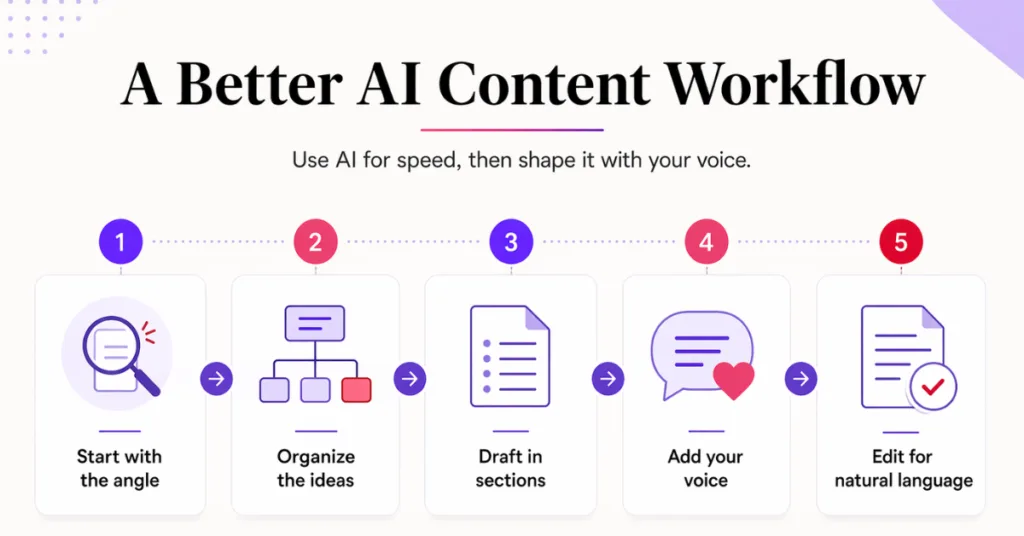
The biggest shift is this…
Don’t use AI to write the finished piece. Use it to help build the finished piece faster.
That one change makes a huge difference. Here’s the workflow that makes the most sense if you want content that moves faster but still sounds natural.
1. Start With the Angle, Not the Article
Before asking AI to write anything, I clarify the post’s true focus, not just the topic, but also the angle.
That part matters more than people think, and it’s also one reason better prompts make such a difference. I talk more about that in my ChatGPT Prompts That Work for Better Results post.
That looks like:
- What is the main pain point?
- Where is the mistake being made?
- What are people misunderstanding?
- What is the key takeaway?
That matters because, when you give AI a vague input, it usually gives you a vague output.
2. Use AI to Organize the Mess
Once I know the angle I want, I use AI to help structure the content. This is one of the best places to use it.
It can take a rough idea and turn it into:
- Sections
- Talking points
- Possible headings
- A basic flow I can react to
That saves me time because I’m not trying to organize everything from scratch, but I still go back and clean it up before moving on.
3. Draft in Parts, Not in One Big Block
This is where a lot of people go wrong.
If you ask AI for the whole article in one shot, the output usually gets too generic. What works better is building it section by section.
That gives you better control over:
- Tone
- Depth
- Clarity
- Repetition
It also makes it easier to catch weak phrasing before it takes over the whole piece of content.
4. Add the Parts That AI Can’t Fake Well
This is where the content starts sounding more real. Once the rough draft and structure are there, I go back through and add the parts AI can’t fake well.
Such as:
- My opinion on what actually works
- The way I’d naturally explain it
- What surprised me while using it
- where the process started getting frustrating
- What I’d warn someone about
- What I’d do differently next time
That is usually the missing layer. Without it, your content may be clear, but it will still feel generic.
Tools like ChatGPT can help you get moving faster, but they still need your input to make the writing feel more real.
5. Edit for Language, Not Just Mistakes
This part matters more than people think. When I edit AI-assisted content, I’m not just looking for grammar issues. I’m also looking for wording that I wouldn’t ever use.
A good example is the word “actually.” AI loves using it, so I watch for that in my drafts and take it out where it doesn’t fit my tone.
Some of the biggest things I look for are:
- Overly polished phrases
- Transitions that sound too formal
- Vague statements that say a lot without saying much
- Sentences that feel technically fine but emotionally flat
This is where AI-generated content starts sounding more human. Not because you’re forcing personality into it, but because you’re taking out the parts that just don’t sound natural.
That was one of the big things I noticed in my ChatGPT vs Claude for Blog Writing comparison too. One helped more with getting the draft moving, while the other was stronger at helping the writing sound better.
What I Let AI Do
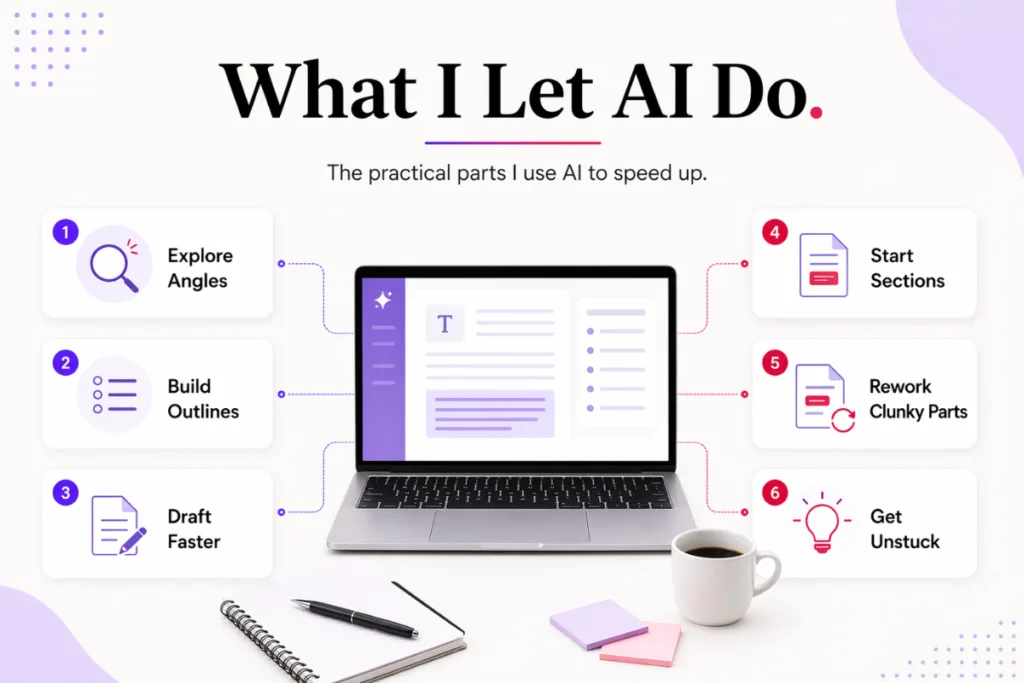
I let AI help me with the parts that make sense in a real workflow. Since I use and test AI tools in my own business before I recommend them, I pay attention to whether they’re truly helping me move faster or just leaving me with more cleanup later.
- Exploring angles
- Building outlines
- Messy first-pass wording
- Section starters
- Reworking clunky parts
- Helping me move when I feel stuck
Those are the parts that help me save the most time.
What I Still Do Myself
I still handle:
- Final wording that sounds natural
- Real examples from my own experience
- Stronger opinions and takeaways
- The tone I want it to have
- Details that make it sound like me
That’s what keeps the content from sounding like every other piece of AI-written content out there, because that part wasn’t.
From what I’ve seen, that’s usually the difference between content that feels usable and content that still feels like a draft. AI can help me get there faster, but the final pass is where it starts sounding more real.
What Makes AI Writing Sound Obvious
If your content keeps sounding like AI, these are usually the reasons why.
You’re asking for the whole thing too soon
The more you expect AI to complete in one shot, the more likely it is to flatten the content.
Keeping too much of the original wording
Even when the draft is decent, there are usually lines that need to be reworded so they sound natural.
Not bringing enough of yourself into it
If the content has no opinion, no perspective, and no real-life texture, it will usually feel generic.
Editing for correctness instead of your own voice
A sentence can be grammatically correct and still sound off.
You’re using AI to replace thinking instead of supporting it
This is a big one… AI works better when it helps you move faster through the process, but it doesn’t work as well when it’s expected to do the whole thing for you.
How to Make AI Content Sound More Human
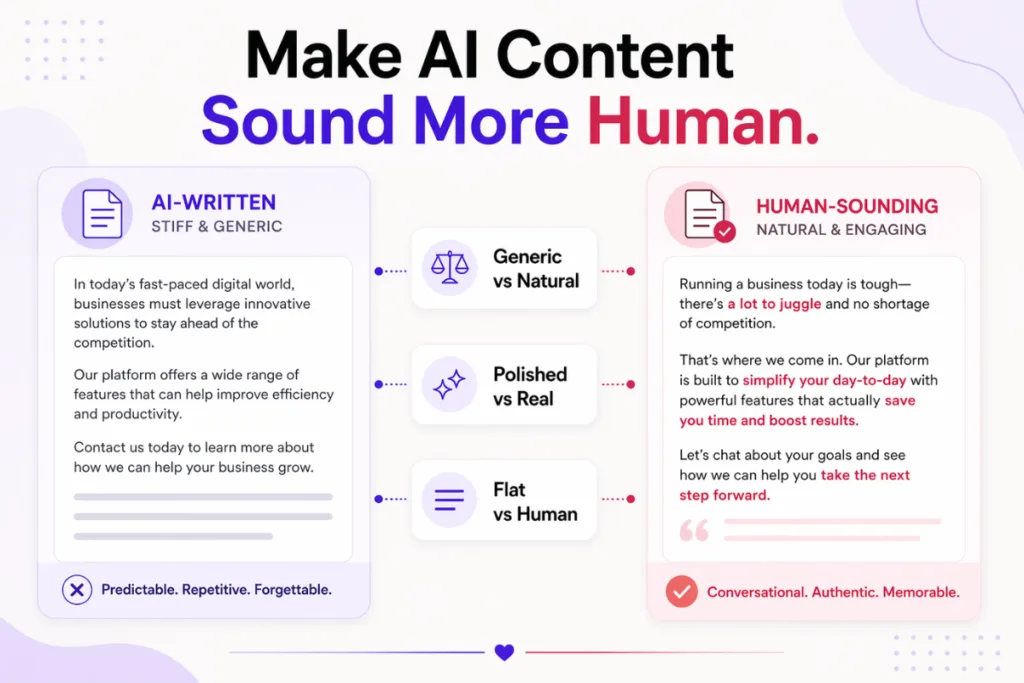
If you want to make AI content sound human, the goal is not to hide the fact that AI helped you. The goal is to make sure the final result still feels like it came from a real person with a real point of view.
If this is something you’ve been struggling with lately, I also wrote a full post on how to humanize AI content that goes deeper into the editing side of it.
Tools like Claude can also be helpful when you’re trying to improve tone and clean up awkward wording.
Most of the time, it comes down to three things:
- Using AI for support, not substitution
- Rewriting the parts that feel too polished or too generic
- Adding the details only you would naturally include
That is what makes the content feel more grounded. It is also what keeps the content useful, because the truth is, people aren’t just looking for faster content. They are looking for content that still feels real.
Final Takeaway
AI can absolutely help you create content faster, but learning how to use AI to create content faster the right way is what keeps the process from backfiring.
But the biggest win usually doesn’t come from asking it to do more; it comes from using it more intentionally.
Let it help with the ideas, the structure, the rough draft, and the parts that usually slow you down. Then step in and shape the content so it still sounds like you.
That is the difference between content that feels usable and content that still feels like one more thing to fix.
If AI has been helping you start but not helping you finish well, that is usually the issue. Not that you’re using AI wrong, but that you just need a better way to use it.
If you’re still figuring out which tools are really worth using, start with my Best AI Tools for Small Business Owners guide.
So now I’m curious what that has looked like for you. What part of creating content with AI has been the biggest headache for you lately? Is it finding the right angle, fixing your tone, or trying to make the draft sound less generic and more like you?
Leave a comment below and let me know. There’s a good chance someone else reading this is running into the same problem as you.
If you want an easier place to start with creating content, then grab my 25 AI Prompt Toolkit. It includes beginner-friendly prompts for blog ideas, outlines, social posts, and more, so you can spend less time guessing and more time getting useful content done.
We respect your privacy. You can unsubscribe at any time.
I hope this gave you a clearer way to think about using AI for content. There are plenty of tools out there, but using them the right way is what really makes the difference. Here’s to saving time, keeping your voice, and making the whole process feel less frustrating.

Frequently Asked Questions
Yes, but usually only if you use it for the right parts of the process. AI works best for ideas, outlines, and rough drafts, while you still shape the final wording and tone.
It usually happens when the tool is asked to do too much at once or when the draft is used with very little editing. The content may be clear, but it often sounds too polished, generic, or not natural.
The best way is to use AI to speed up the early stages of content creation, like brainstorming, outlining, and rough drafting. Then you step in and add your own voice, your examples, and final edits.
The biggest fix is rewriting the parts that feel too polished or generic and adding the details, opinions, and wording you would naturally use yourself.
Usually not. It tends to work better as a support tool than something that should write the whole thing for you. Most beginners will usually get better results when they use AI to help build the draft, but not finish it for them.
Here’s A Few AI Tools You Might Want to Check Out
If you want extra help with content creation, these are a few tools I’ve tested that may be worth looking at for yourself.
Typli.ai — useful for blog drafts, writing support, and getting ideas moving faster. Try Typli.ai here.
Predis.ai — helpful if social content is the part that keeps slowing you down. Try it out here.
Simplified — a good option if you want one tool that helps with several content tasks in one place. Let Simplified do it for you.
If this post helped you see why AI can feel useful and frustrating at the same time, send it to someone else who’s trying to create content faster without sounding like everybody else online.




Hi Meredith,
I actually believe that you’re actually correct! (Couldn’t help myself).
If only everyone would take the time to read your blog entry; so many think that AI can « write it for you » when in fact, if they’d follow the sequence you mention above, it would take less time than anticipated.
One thing AI can’t do is put it in your own words and include the emotion you want to convey.
Thanks for the reminder that AI is there to help and not replace!
Hey Marc!
Haha, I love it! I caught that “actually” right away. 😂 That made me laugh…
Thank you so much! That’s the point I was hoping people would pick up on.
AI can be a huge help, but when people expect it to write the whole thing perfectly from one prompt, it usually ends up creating more work for you in the end. I have found it works much better when I use it in pieces to help me get unstuck, but the final message still needs to sound like yourself. So yes, AI is there to help us move faster, but the heart of the message still has to come from us.
Thanks for coming by and for the laugh!
Great post, thanks for sharing 😀
For those that use AI the right way it’s a great way to stand out now in a landscape that’s flooded with lazy folk who won’t take the effort.
I get so much value from your emails and blog, keep up the amazing work!
Thank you so much, Dean. That really means a lot coming from you.
I agree, AI can be a very useful tool when people take the time to use it properly instead of just letting it do everything for them. The effort you put into it still matters, and that’s what helps your content feel different from everyone else’s.
I really appreciate your kind words. 😊 Thank you!
Hi Meredith – This was such a refreshing and honest take on using AI the right way. I appreciate how you described it as a tool to support the process, not replace it. I think a lot of people, myself included at times, expect too much out of it too quickly and then wonder why it feels off. Your breakdown of keeping your voice in the final product is exactly where the real value lives.
I also appreciated how practical this was. You did not just explain the problem, your honest and clear insights based on your experience and what you’ve learned helped me see a clear path to using AI as a tool and not a replacement of me. This was a great read and a strong reminder that faster does not have to mean less personal. Have a wonderful and productive week!
Hey Ernie!
Yes, that is exactly how I feel too. AI can be so helpful, but only when we use it as a helper and not expect it to do all the thinking, feeling, and personal touches for us.
I’ve definitely learned that faster doesn’t always mean better if we lose our own voice in the process. The real value comes when we use AI to get started, help organize our thoughts, or work through the messy parts, and then we still make it sound like us.
I’m so glad this helped you, and I hope you have a wonderful and productive week too! 😊