

AI can give you a perfectly decent draft and still leave you thinking, “I would never say it like that.”
That was one of the first things I noticed when I started using ChatGPT. The information could be useful, but the writing often sounded too formal, too polished, or like it could have been written for almost anybody.
I still use AI to help me brainstorm, organize ideas, create outlines, and get a first draft started, but I’ve learned that making AI content sound human is less about finding a magic “humanize this” prompt and more about knowing what to change after AI gives you the draft.
In this guide, I’ll show you the things I now look for when AI writing sounds generic, what I change first, and where AI tools can help without stripping away the parts that make the content sound like you.

Affiliate Disclosure: This post contains affiliate links, which means I may earn a small commission at no extra cost to you. I only recommend tools I’ve personally tested and believe will genuinely help your business. See full disclosure here.
- Quick Answer: How Do You Make AI Content Sound Human?
- Why Does AI Writing Sound Generic in the First Place?
- Give AI More Than a Tone Word
- Read It Out Loud, and Pay Attention to Where You Stumble
- Add Something AI Couldn’t Know Without You
- 5 Things I Change First When AI Writing Sounds Too Generic
- Can AI Humanizer Tools Make Writing Sound Human?
- Common Mistakes That Can Make AI Content Sound Even Less Natural
- My Simple Workflow for Humanizing AI Content
- Example: Generic AI Writing vs. What I Would Actually Publish
- What Should You Change First?
- Final Thoughts: AI Should Help With the Writing, Not Replace You
- Want Better AI Drafts Before You Start Editing?
Updated post: October 2026
Quick Answer: How Do You Make AI Content Sound Human?
The fastest way to humanize AI content is to stop treating the AI draft as the finished product.
I usually look for five things first:
- Generic wording
- Sentences that are too polished
- Vague examples
- Opinions that could belong to anyone
- Phrases I would never normally use
Then I add my own examples, opinions, word choices, and experience. I may also ask AI to rewrite a specific section, but I don’t expect another AI pass to automatically make the writing sound like me.
The goal isn’t to hide that AI helped. It’s to make sure the finished content still has a real person’s point of view behind it.
Why Does AI Writing Sound Generic in the First Place?
AI is very good at producing writing that is clear and organized. The problem is that clear and organized is not the same thing as personal.
When I notice that AI writing doesn’t sound like me, it is usually because the draft has one or more of these problems.
- It explains everything in a very even, polished way.
- It uses phrases I would never naturally use.
- The examples are broad instead of specific.
- It repeats the same sentence patterns.
- It gives information without much opinion or judgment.
- It sounds confident about something I would probably explain with more nuance.
That is why simply telling AI to “sound more human” does not always fix the problem. Sometimes it just gives you a different version of generic writing.
What usually makes the biggest difference is adding the information AI could not know unless you gave it to it. For example: your experience, your decision, your example, your frustration, or what you really think about the subject.

Give AI More Than a Tone Word
One thing I learned fairly quickly is that telling AI to make something sound “friendly,” “conversational,” or “human” is usually not enough.
Those words mean different things to different people, and AI tends to fill in the gaps with its own idea of what conversational writing should sound like.
I get better results when I give it more context.
For example, instead of:
“Make this sound conversational.”
I would give it something closer to:
“Rewrite this for beginners who feel overwhelmed by AI. Keep the sentences natural and straightforward. Don’t make it sound like a polished marketing article. Keep my opinions and examples, and don’t add expressions I wouldn’t normally use.”
Even better, give the AI a paragraph you wrote and say:
“Study the tone and sentence style in this paragraph. Tell me what you notice about how I write, then use those characteristics when revising the next section.”
I use this kind of approach because it gives AI something real to work from instead of asking it to guess what “sounds like me.”
If your prompts are still giving you vague or overly generic answers, my guide to ChatGPT prompts that work shows the prompt structure I use to give AI better context from the beginning.
Read It Out Loud, and Pay Attention to Where You Stumble
Reading AI-generated content out loud is still one of the easiest things I do. I read every piece of content out loud before I publish it because hearing it sounds different than reading it in my head. It helps me catch mistakes, awkward wording, or anything that just doesn’t sound right. It’s weird, but it really works for me.
When I read it out loud, I can usually hear right away if something sounds awkward or just doesn’t sound like something I would normally say. If it doesn’t sound right, I change it.
I’m not trying to make every sentence sound exactly like spoken conversation. Blog writing still needs structure, but reading it aloud makes too much formal wording and awkward sentence patterns much easier to catch.
I also look for repeated patterns. AI has a habit of making paragraphs feel very balanced, with similar sentence lengths, predictable transitions, and neatly wrapped-up conclusions.
Real writing is usually a little less perfect than that. Sometimes the easiest fix is shortening one sentence, combining two others, or deleting a transition completely.
Add Something AI Couldn’t Know Without You
You don’t need to turn every blog post into a personal story, but somewhere in the content, there should be something that came from you rather than the AI.
That could be:
- Something you tested
- A mistake you made
- What you liked or disliked
- A decision you made and why
- A specific example from your business
- Something that surprised you
For example, when I review an AI tool, I don’t just want to tell you what features the company says it has. I want to be able to tell you what happened when I used it, what worked, what didn’t work, and whether I think a beginner really needs it or not.
That’s the kind of information AI cannot create for me. You don’t need a dramatic story. Even one small, specific detail can make a section feel much more grounded.
5 Things I Change First When AI Writing Sounds Too Generic
When I look at an AI draft that doesn’t sound right, I don’t rewrite every sentence immediately. What I do is I check these five things first.
1. Could This Have Been Written for Anybody?
If I read a paragraph and feel like it could have been written for almost any business, I know it needs something more specific. I’ll usually add a detail about my audience, what I’m talking about, or the point I really want to make.
2. Is It Too Polished?
AI often tries to make every idea sound complete and professional. Sometimes I deliberately simplify the sentence because that is closer to how I would actually explain it.
3. Are the Examples Too Vague?
Phrases like “save time,” “increase productivity,” and “connect with your audience” sound good, but they’re pretty general and could apply to almost anything. I try to give a more specific example so the reader understands exactly what I mean.
4. Is There an Actual Opinion?
AI is usually pretty good at showing you both sides of something, and sometimes that’s helpful. But I also think people want to know what I actually found, what I would do, and whether I think something is really worth using. That’s the part I make sure to add myself.
5. Would I Ever Say This?
This is usually my final check. If I come across a word or phrase that just doesn’t sound like something I would actually say, I change it. It’s a simple thing to look for, but it helps me catch a lot.
Can AI Humanizer Tools Make Writing Sound Human?
They can help, but I wouldn’t rely on them to do the entire job.
I have tested tools that rewrite or “humanize” AI text, and sometimes they can improve an awkward sentence or give you another way to phrase something, but I have also seen them make perfectly natural writing sound more formal, more polished, and less like the original person.
That’s the limitation beginners need to understand. A humanizer tool can change wording.
It cannot automatically know:
- What you really think
- Which example came from your experience
- What you would leave out
- What your audience already knows
- Which phrases actually sound like you
I would use these tools for ideas and rewrites, not as a button that magically turns generic AI writing into your voice.
And I would not rewrite content just to make an AI detector give you a different score. The goal is useful, accurate content that sounds like you, not trying to “beat” a detector.
I’ve also tested QuillBot specifically, including where its rewriting tools help and where I think ChatGPT may already be enough. You can read my QuillBot review for content creators if you’re deciding whether you need another writing tool.
Common Mistakes That Can Make AI Content Sound Even Less Natural
One mistake is trying to fix the entire draft with another broad prompt such as “Make this more human.” That can improve some sections, but it can also replace one kind of generic writing with another.
Another mistake is over-editing. If you keep running the same paragraph through several AI tools, eventually you can smooth out everything that made it sound personal in the first place, and the biggest mistake is asking AI to invent personality for you.
AI can help organize or express something you already think. It should not be creating fake personal experiences, opinions, or stories just to make the writing seem more human.
If you don’t have a personal example for a section, that is fine. Give the reader a useful explanation instead.
My Simple Workflow for Humanizing AI Content
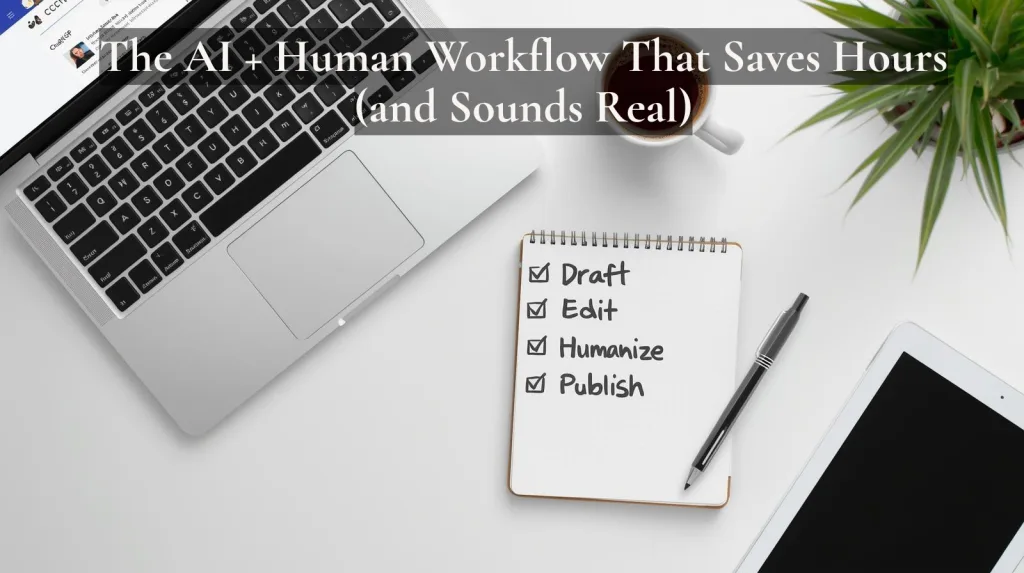
I don’t use the same process for every piece of content, but this is roughly what I do now:
- Use AI for the starting work. I may use ChatGPT or Claude for ideas, an outline, research help, or a first draft.
- Read the draft for meaning first. Before worrying about individual words, I make sure the content actually says what I want it to say.
- Add what came from me. I add my experience, opinion, examples, testing, or anything the AI could not have known on its own.
- Fix the generic sections. I rewrite anything that sounds too polished, vague, repetitive, or unlike me.
- Step away when I can. Even a short break makes it easier for me to notice strange wording when I come back.
- Read it aloud. This is usually where I catch the final awkward sentences.
- Fact-check anything important. Sounding human doesn’t matter if the information is wrong.

AI still saves me time, but I no longer expect the first draft, or one “humanize this” command, to give me something I would publish without checking.
If you want to see how I fit AI into a broader content workflow, my content creation system for beginners will show you how I plan, draft, and organize content without starting from scratch every time.
Example: Generic AI Writing vs. What I Would Actually Publish
Here is the kind of difference I mean.
Generic AI version
AI tools can help small business owners streamline their content creation process, save valuable time, and maintain consistency across multiple marketing channels.
There is nothing technically wrong with that sentence, but it could have come from almost any business article.
What I would write instead
AI does save me time, especially because it helps me get past that blank page, but I still have to decide what I really want to say, fix anything that sounds too generic, and make sure the final version sounds like something I would really write.
The second version tells you more about how I actually use AI.
That’s what I mean by humanizing AI content. You’re not trying to make the writing imperfect on purpose. You are adding back the judgment and specificity that disappeared when AI created the first draft.
What Should You Change First?
If all of this feels like too much, don’t try to fix everything all at once. Just start with the paragraph that sounds least like you. Then ask yourself what is missing here that I would probably explain differently if I were talking to someone.
It might just need a specific example, or you may realize you don’t completely agree with what AI wrote. Sometimes the wording is too formal, or the whole thing just needs to be shorter and simpler. Start with the one thing that stands out the most and fix that first.
You don’t need to make every sentence clever or deeply personal. The goal is simply to make sure the useful information is coming through your perspective instead of disappearing behind the AI wording.
Final Thoughts: AI Should Help With the Writing, Not Replace You
I use AI because it saves me time. I don’t want to go back to staring at a blank screen and building every outline, email, or blog post from scratch, but saving time is only useful if the finished content still says something worth reading.
One of the biggest changes I’ve made is that I don’t really ask, “How do I make this sound more human?” anymore. Now I ask myself what the content still needs from me before I would feel good putting my name on it.
Sometimes the answer is a personal example. Sometimes it’s a stronger opinion, a simpler sentence, better context, or deleting a paragraph AI added that I don’t really need.
That is usually what makes the biggest difference.
Want Better AI Drafts Before You Start Editing?
A lot of generic AI writing starts with a prompt that doesn’t give the tool enough context.
My free 25 AI Prompt Toolkit gives you ready-to-use prompts for content ideas, outlines, emails, social posts, rewrites, and planning, so you have a better starting point before you begin the human editing part.
You can still change the wording and add your own examples so the final result sounds like you. The toolkit just gives you a better starting point.
Fill out the form below to get the free 25 AI Prompt Toolkit.
We respect your privacy. You can unsubscribe at any time.
Use AI to get started faster, then add the part no tool can supply for you. Your own experience, judgment, and point of view.

Share this post with a friend or family member who needs to hear this. It might just be the push they need to finally get started.


Hi Meredith,
Some great tips here. I often read content that screams AI, and I just don’t understand why people publish it ‘as is’ when it’s so easy to adapt it and make it a thousand times more engaging.
Storytelling is probably my favourite technique. We all relate to those little anecdotes from life, and it always helps to throw in some humour too.
And, like you, I also always step away before publishing. Read it again the next day or even a few hours later and you always spot so many things you want to change.
One other thing I’ve been doing a lot lately is creating ‘projects’ within the AI tool and asking the AI to reference what it knows about you already – like your story or anything else you’ve mentioned in chats. Think of it like a personal assistant. 🙂
Dan
Thanks, Dan! I couldn’t agree more. Storytelling really is the secret sauce. It’s what turns plain words into something people actually feel. And yes, stepping away before hitting publish is such a lifesaver! Funny how a short break can make those little tweaks pop right out at you.
I love your idea about creating projects within the AI tool. That’s such a smart way to keep your voice consistent and make the AI work with you instead of for you. Kind of like having that sunset calm moment before the creative spark kicks in again. Appreciate you sharing that tip!
Hi Meredith, your insights here are invaluable because AI needs to be humanized as you say. I have found that my ChatGPT knows who I am and knows my voice and knows what it is that I wish to accomplish. That is no small feat.
Nevertheless, I may not pay as much attention as I should to my message as ChatGPT outlines for me. It has been brought to my attention for instance, that the dashes that AI uses is a red flag for others reading that I have just used AI. My generation hates AI. They simply do not understand it and perhaps neither do I but at least using it helps me to navigate around its potential.
Thanks for this insight into how AI is only humanized if we make it happen.
Thank you so much for sharing that, Kate. I really appreciate your thoughtful perspective. You’re absolutely right, AI on its own can feel a bit robotic, but when we add our own personality, stories, and voice, that’s when the magic happens. It’s amazing that your ChatGPT has gotten to know you so well. That’s exactly how it becomes a true creative partner instead of just a tool.
I totally get what you mean about your generation’s hesitation with AI. It can feel unfamiliar or even intimidating at first, but you’re already ahead of the curve by using it and learning as you go. That curiosity is what makes all the difference!
Hi Meredith,
Great post which is definitely “à propos” these days! AI can definitely be of help when building your online business and it definitely can also make it easier to bring it forward.
I like the fact that you also pushed the importance of “making it your own”. When you can use AI and put your own voice on it, you’ve definitely got a winner!
Thank you so much! I’m really glad you enjoyed it. 😊 You’re absolutely right, AI can be such a powerful tool for building and growing a business, but the real magic happens when we blend it with our own voice and personality. That’s what makes everything feel genuine and unique. I appreciate you taking the time to share your thoughts, it means a lot!
I would imagine that this topic will be around for quite awhile considering the speed at which this technology is evolving. The next thing you know AI will sue everyone for plagiarism. LOL
Haha, right?! 😄 Technology is moving so fast, it’s wild to even try to keep up sometimes. But you’re right… As AI evolves, these conversations about ethics, originality, and how we use it are only going to get more important. Thanks for the laugh and for sharing your thoughts!
Hi Meredith – This is an extremely timely post as it seems everybody around me has discovered AI. And for those that are new to this technology it is often painfully obvious that they are not the ones speaking but some AI bot in the background. You give very practical tips on how to utilize this resource as a tool and not the author of content. Do you know if Quill bot and AI detector have free versions or are they paid? As usual, your blog posts hit home and are very relevant!
Hey Ernie! Thanks so much for your kind words! 😊 I’m glad my post was helpful for you.
About your question:
Yes, QuillBot does have a free plan, which lets you paraphrase up to 125 words at a time and use basic features. It also gives you access to the AI Detector, but with some limits, you can check up to about 1,200 words at a time.
I tested it for a week for free and liked it enough that I upgraded to the $20/month Premium plan. With Premium, you get unlimited paraphrasing, all writing modes, advanced grammar suggestions, and full access to the AI Detector, and more. It just makes creating content so much smoother and faster.
I hope this helps you. If you have any other questions just ask. 😊