

If you’re juggling Canva for design, Grammarly for writing, and Buffer for social scheduling, all while trying to build an affiliate marketing business, this Simplified review for beginners will show you if this all-in-one AI platform can actually replace your entire toolbox.
I spent weeks testing Simplified’s AI writing tools, graphic design features, video creation, and social media scheduling to see if it lives up to the hype. Here’s what I discovered
Affiliate Disclosure: This post contains affiliate links, which means I may earn a small commission at no extra cost to you. I only recommend tools I’ve used or thoroughly researched for beginners. See full disclosure here.
Quick note on how I test AI tools
I use AI to handle the heavy lifting. That means for outlines, first drafts, structure, and ideas. Then I step in to edit, refine, and make everything sound like me. Every tool I share is something I’ve personally used and measured for real time savings in a working business.
What Is Simplified AI?
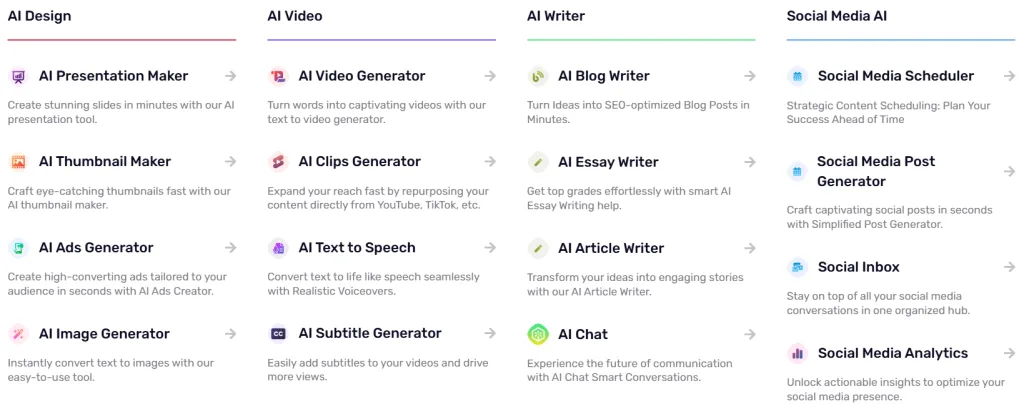
Simplified is an AI-powered, all-in-one marketing platform that combines your design studio, copywriter, video editor, and social media manager all into one dashboard.
Here’s What Simplified Actually Does:
AI Writing Tools: It creates blog posts, social media captions, ad copy, and even full articles in just minutes. The Graphic Design Studio is where the magic happens! You can create stunning, professional-looking graphics with thousands of templates (kind of like Canva, but with serious AI superpowers).
Video Creation: Will take your blog posts and turn them into videos, add AI voiceovers, and even let you edit clips, no Adobe Premiere skills required.
Social Media Management: This feature will schedule everything, Facebook, Instagram, LinkedIn, TikTok, and more, all from one simple calendar.
Brand Management: keeps your colors, fonts, and logos perfectly on point so everything you create stays consistent and on-brand.
Who Should Use Simplified?
After testing this platform extensively, I’d say Simplified AI is good for beginners who are:
Solopreneurs and affiliate marketers creating content solo. Bloggers who are tired of paying for Canva Pro, Grammarly, and Buffer separately. Small teams (1-5 people) who need speed over advanced features
However, if you’re a Fortune 500 company or a professional graphic designer, this probably isn’t for you.
Looking to Simplify Your Content Creation?
If you’re tired of paying for multiple tools and wasting hours switching between platforms, then start with Simplified’s free plan, no credit card required. Test the AI blog writing and social scheduler to see if it fits your workflow.
My Simplified Review: Honest Testing Process (What I Actually Did)
I didn’t just click around for 20 minutes. I used Simplified like a real business for several weeks.
Here’s What I Tested:
- AI Blog Writing: Created an 872-word blog post in under 30 minutes (used to take me 2-3 hours). Of course, that’s just the writing part; there’s still all the other work that goes into a full blog post, like graphics, design, and formatting.
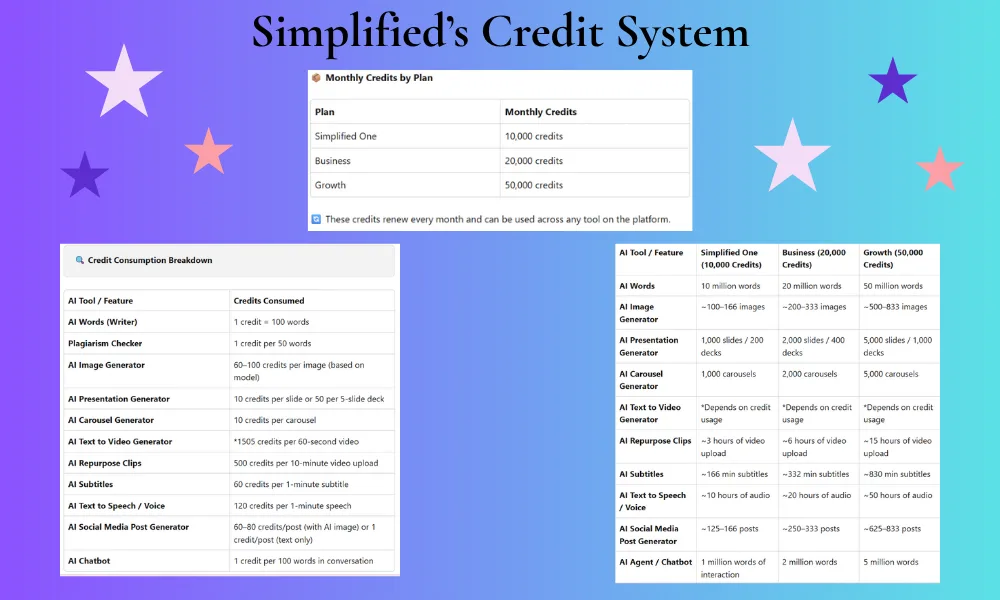
- Blog-to-Video Conversion: Turned a blog post into a 60-second video with AI voiceover (this alone took 1,505 credits).
- Social Media Graphics: Designed Facebook and Instagram posts using templates and custom photos.
- Social Media Scheduling: Connected my Facebook and Instagram accounts, scheduled three weeks of content.
- Brand Management: Created a brandbook that auto-applied my colors and fonts to every design.
- Credit Testing: Started with the free plan, then upgraded by adding credits to test the full platform.
The time savings alone (30 minutes vs. 3 hours for blog posts) convinced me to dig deeper into every feature.
The Good: 6 Things I Loved About Simplified
1. The AI Blog Writer Actually Saves Hours (Not Kidding)
I’ve tested dozens of AI writing tools, and most produce robotic content that needs heavy editing.
Simplified’s AI blog writer is a totally different story.
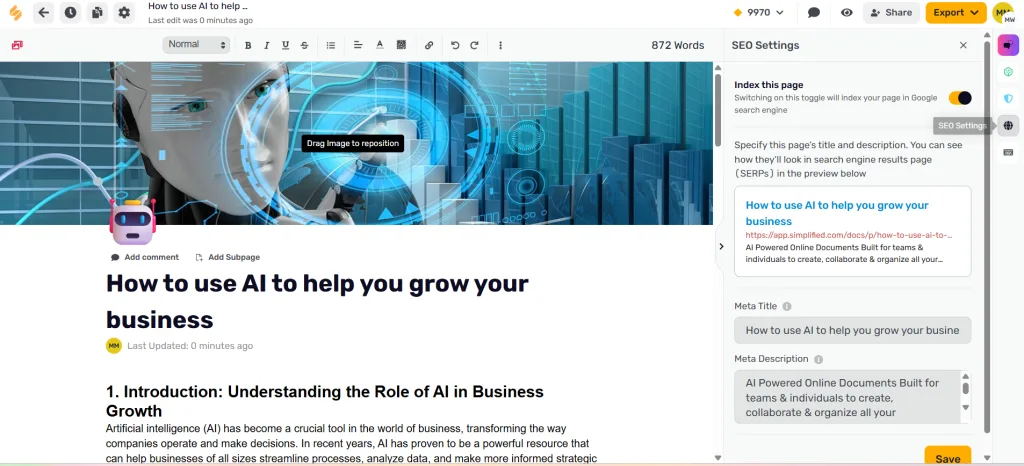
First, I gave it a topic, selected my tone (Professional, friendly, but laid back), chose my creativity level (Original), and picked my language (US English). Within minutes, it generated a 7-point outline.
From there, I clicked “generate full article” and then boom! I had 872 words of surprisingly decent content. I didn’t use this content since I was just testing it out, but I’ll tell you what, it was amazing how quickly it produced content with such little input.
What I loved:
- The outline feature helped me structure my thoughts
- I could adjust tone (Professional, Casual, Copywriter, etc.) for different audiences
- Built-in SEO settings let me optimize meta titles and descriptions
- Plagiarism checkers gave me peace of mind if I decide to use this content at some point.
- It even has a real-time word count that will keep you on track
Did I publish it exactly as is? Nope! I tweaked about 20–30% of it to add my own voice, real examples, and personality. You should never post AI content straight out of the box. Make it yours first. The AI gave me a solid foundation and saved me hours. What would’ve taken all afternoon only took about 30 minutes to finish.
2. Social Media Scheduling
Simplified’s social media scheduler, finally one that works the way it should.
Why it’s different:
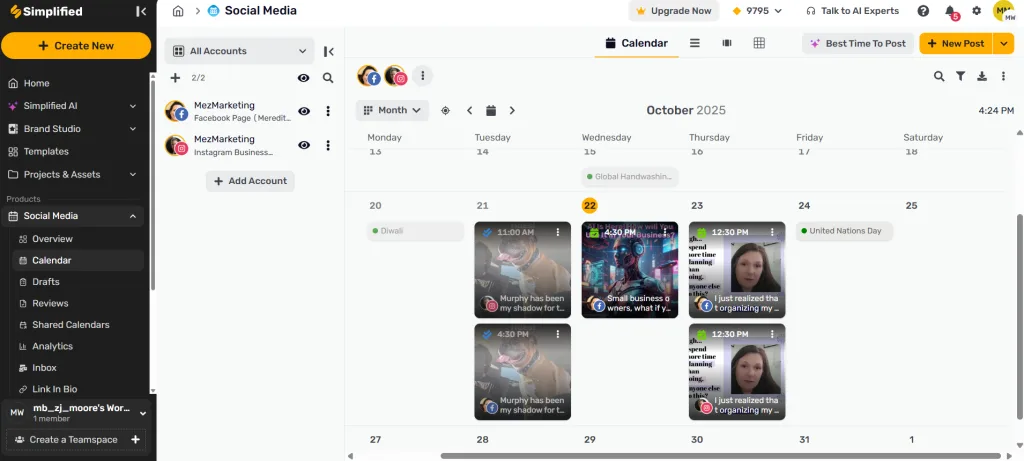
- One dashboard for everything: I connected my Facebook Page and Instagram Business account in under 2 minutes
- Visual monthly calendar: I could see all my scheduled posts with thumbnails and timestamps, no more guessing what was going live when
- Bulk scheduling: I scheduled an entire week of posts in one sitting, including personal stories and business content
- Best Time to Post AI: The platform actually told me when my audience was most active
- Hashtag management: I added my go-to hashtags (#affiliatemarketing #makemoneyonline #entrepreneurslife) and saved them as groups for one-click adding
3. Design Features: Templates + Brand Consistency
Simplified offers thousands of professional templates (Facebook graphics, Instagram posts, stories) that are actually modern and easy to customize. The standout feature?
Brand Management automatically applies your saved colors, fonts, and logo to every design—no more hunting for hex codes or inconsistent branding across platforms.
This alone saves me 15-20 minutes per design session.
4. Blog-to-Video Conversion
Okay, this feature was so cool…
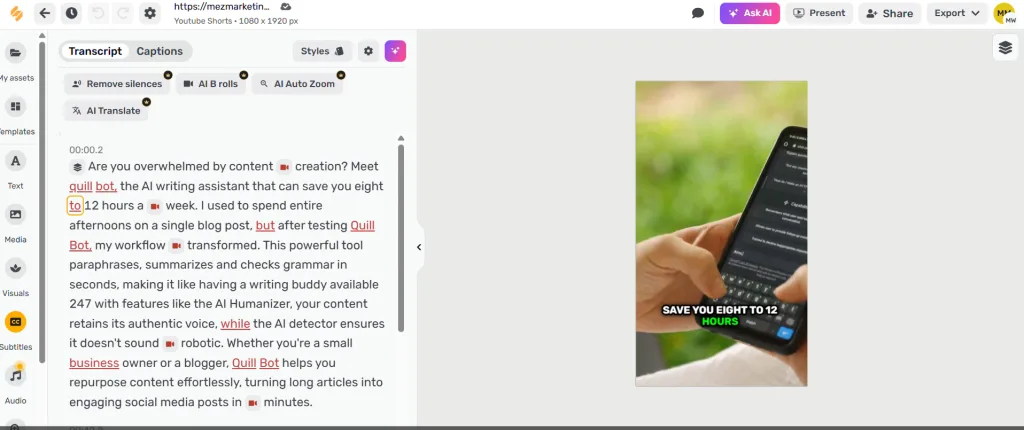
First, I pasted my QuillBot review blog URL into the blog-to-video section. Then, I watched Simplified generate a video with:
- AI-generated script (163/240 words)
- Key hooks identified
- Attention-grabbing title
- Video size options (9:16 for Stories, 16:9 for YouTube, 1:1 for feed posts)
- Media sources (Stock Videos, Stock Images, AI Images, or my own uploads)
I didn’t do any editing or anything, so I’m sure if I did, it could come out so much better. This is what I got on my first try. It costs about 1,505 credits per 60-second video, which isn’t cheap if you’re on the free plan. However, if you’re creating video content regularly, this saves HOURS of editing time…
So, you have two choices. You’ll either invest your money in Simplified or give up your time on editing. Which will it be for you?
5. The Free Plan Lets You Test Before Committing
Simplified’s free plan actually includes access to AI writing tools, thousands of templates, design features, and three social media connections.
However, Simplified’s free forever and starter plans actually include access to AI writing tools, thousands of templates, design and video features, and three social media account connections.
The catch? You get one-time credits that don’t refresh monthly. So you can thoroughly test the platform, but you’ll need to upgrade once you’re convinced it works for you.
Furthermore, when you’re ready to upgrade, the Pro Plan is $19/month—way cheaper than paying for Canva Pro ($15/month), Grammarly Premium ($12/month), and Buffer ($6/month) separately.
The Bad: 4 Honest Drawbacks You Need to Know
Let me be real with you. No tool is perfect, and Simplified has some frustrations.
1. Credit System Can Feel Confusing
You’ll find that every major function, writing, design, and videos, has quota limits, especially on the Free Forever plan. For example, the Free plan gives you: 5,000 AI words, 5 AI designs, 1 AI video (60 min clip), 30 min AI subtitles, and connects up to 3 social accounts.
Once you hit those limits, you’ll need to either wait for your renewal (if it’s a monthly quota) or upgrade to a paid plan to increase your usage.
Paid plans such as “One” or “Business” offer much larger quotas. If you’re planning to use the video features regularly (which consume a lot of quota), you should budget for a paid plan from the start.
My advice: Use the Free plan to test the waters, but for serious, consistent business usage, consider starting with the paid Pro/Business tier.
2. AI Content Still Needs Human Editing
The AI content needs human editing.
Specifically, I’d say 70-80% of what it generates is usable, but you’ll need to put your own touches to it:
- Add your personal stories and experiences
- Tweak awkward phrasing
- Inject your unique voice
- Fact-check statistics
- Make it sound less… robotic
So, if you’re expecting to hit “generate” and publish immediately, you’ll be disappointed. Instead, think of it as a smart assistant, not a replacement for your brain.
Related Article >> How to Humanize AI Content: Make Your Writing Sound Human
3. Learning Curve for All the Features
Simplified has SO MANY features that it can feel overwhelming at first. I certainly was overwhelmed when I first started working with it.
For example, I spent the first hour clicking through menus thinking, “Wait, where’s the blog writer again? And how do I schedule this post?”
Also, the interface is cluttered if you’re not organized. For sure, you’ll need to invest time learning where everything lives. The good thing is, they don’t leave you hanging and expect you to figure it all out yourself. They do have a ton of tutorials within the platform to help you navigate.
Pro tip: Focus on one feature at a time. Master the AI blog writer first, or the video creation. Then move to graphics. Then, after that, tackle social scheduling. Don’t try to do everything at once; you will get overwhelmed fast!
4. Customer Support Can Be Hit or Miss
I didn’t have any issues, but I’ve read reviews where people have mentioned they have slow customer support responses.
Therefore, if you run into a technical problem, be prepared to wait 24-48 hours for a reply. That’s not ideal if you’re on a deadline, but it’s common on most platforms.
Simplified Review for Beginners Pricing Breakdown
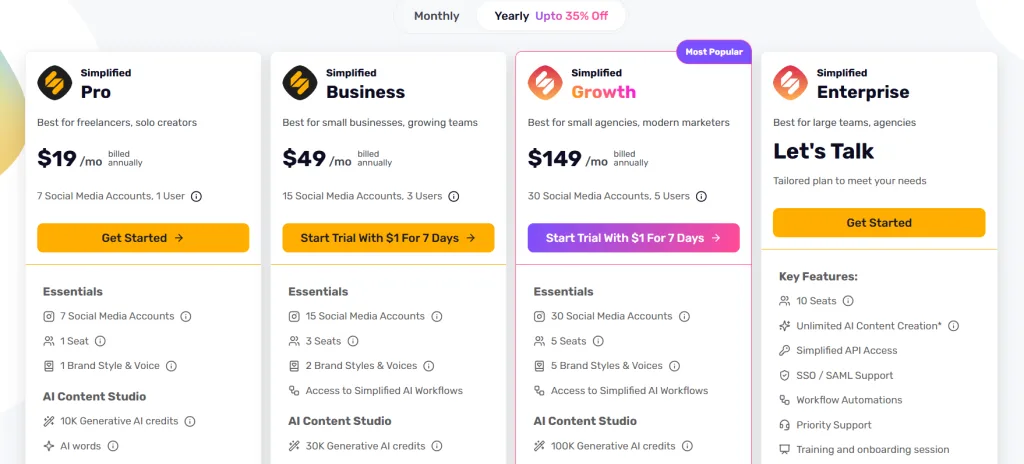
Free Plan (Always $0)
- Includes a one-time credit/quota for most AI design/image/video features (after you use it, it doesn’t renew).
- Provides basic access to AI writing, design & social tools; however, storage is limited.
- Ideal for experimenting and testing the platform before committing.
Pro Plan ($19/month)
- Designed mostly for solo creators or bloggers.
- Offers monthly-renewing quotas for generative AI (designs/videos) instead of one-time limits.
- Additionally, includes enhanced features vs. the Free plan (storage, full writing suite, more flexibility).
Business Plan ($49/month)
• Geared toward small teams/freelancers managing multiple accounts.
• Higher quotas, user-seats/team features, advanced collaboration & API access.
My Honest Recommendation:
If you’re serious about using Simplified long-term (especially for your affiliate marketing + content creation flow), start with the Pro Plan. The Free plan is solid for testing, but if you’re creating consistently, its limits will hold you back.
Is it worth it?
Compare what you might spend monthly using separate tools (e.g., design tools, writing tools, video editing, scheduling), and you’ll see how one all-in-one platform like Simplified might save you a bundle.
Let’s do the math:
- Canva Pro: $15/month
- Grammarly Premium: $12/month
- Buffer (social scheduling): $6/month
- Video editing software: $20+/month
Total: $51+/month
Simplified Pro Plan: $19/month
Therefore, you’re saving $32/month minimum. That’s $384/year back in your pocket.
My Simplified Review Verdict: Is It Worth It?
★★★★☆ (4 out of 5 stars)
Best for:
- Solopreneurs who need to do everything themselves
- Affiliate marketers creating content on a budget
- Bloggers are tired of juggling multiple subscriptions
- Side-hustlers who value speed over perfection
Skip if:
- You’re a professional designer who needs advanced tools (use Adobe instead)
- You have a big budget and want specialized software for each task
- You’re impatient with AI and expect 100% perfect content
My Bottom Line:
For beginners building an online business on a budget, Simplified is worth it.
According to HubSpot’s latest marketing research, content creators are increasingly turning to AI tools to save time, and I saved 10+ hours weekly by utilizing this platform.
So, if you’re just starting out and overwhelmed by all the tools you “should” be using, give Simplified a try. Based on this Simplified review for beginners, I recommend you start with the free plan, test it for a week, then decide if the Pro Plan makes sense.
Alternatives to Consider (If Simplified Isn’t Your Vibe)
Not convinced? Here are two solid alternatives:
1. Canva Pro + Buffer
If you prefer specialization over all-in-one, use Canva for design and Buffer for social scheduling. More expensive, but more polished.
2. Jasper AI + Predis.ai
If you want top-tier AI writing (Jasper) and AI social media management (Predis.ai), this combo is powerful. However, it’ll cost you $100+/month. If you want to see if Predis.ai is worth it, I wrote a review on 7 things I learned in one week using this platform.
Related Article >> QuillBot Review: Powerful Tool That Saves You 10+ Hours Weekly
FAQ: Your Simplified Review Questions Answered
Is Simplified AI free?
Yes, there is a Free plan (often called “Free Forever”) that gives you access to basic tools and restrictions or quotas on usage.
Is Simplified good for beginners?
Absolutely. The interface is quite friendly, the templates and AI features simplify content creation, and it works well for non-designers or tech novices starting out.
How much does Simplified cost?
Paid plans begin at roughly the Pro tier (≈ US $18-20/month) and go up for more features or team seats. These paid tiers unlock higher usage quotas, more social accounts, team/collab features, etc.
Can I use Simplified for affiliate marketing?
Yes, you can use it to create blog posts, social graphics, videos, and other content to promote affiliate offers. If Simplified has an affiliate program, you will want to promote it. Check the specific commission rate directly from their affiliate program page.
Does Simplified work with Instagram and Facebook?
Yes, you can connect various social media channels (including Facebook Pages, Instagram Business accounts, and others) for scheduling/publishing via Simplified’s social media tools.
Don’t Forget to Grab Your Free Guide
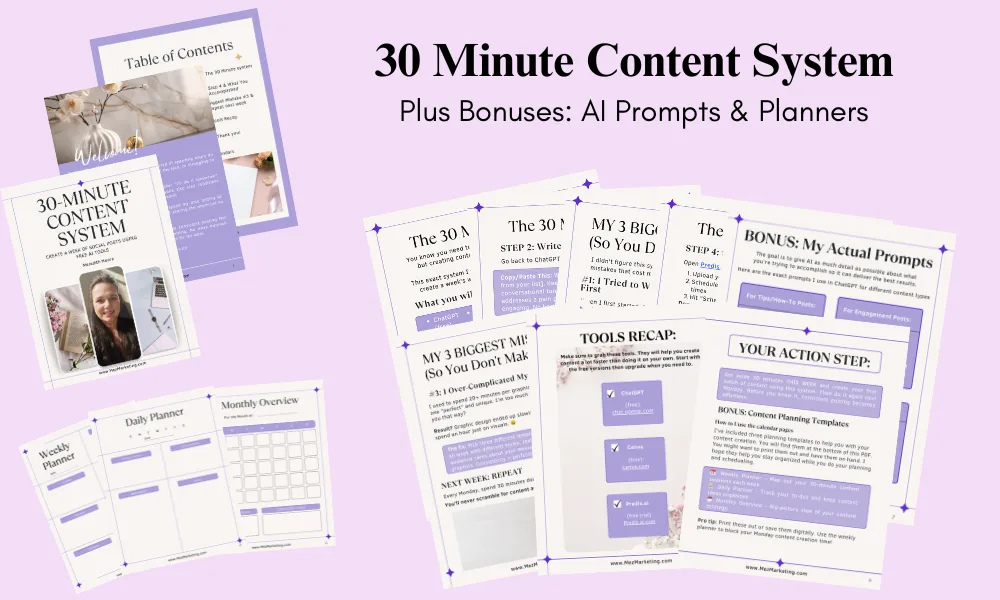
Grab your free guide: ‘The 30-Minute Content System.” Create a week of social posts using free AI tools. Learn how to plan, write, and schedule your content without stress or burnout.
Just fill out the form below, and your free guide will be sent straight to your inbox.
We respect your privacy. You can unsubscribe at any time.
Related Articles >> 7 Simple Content Creation AI Tools to Help Beginners Start Quickly
After seeing what Simplified offers, do you think it could replace a few of the tools you’re using now? Let me know in the comments below.
Here’s to simplifying your strategy, staying consistent, and building an online business that works for you, without burning out.

If you know any entrepreneurs drowning in subscriptions. Share this review. It might help them consolidate their tools and save time.



You did some great research on this post! It sounds like a great platform. AI tools are springing up all over!! In fact, Tony Robbins is doing a 3 day workshop w Dean Graziosi on the systems we can develop w AI. I will refer to it as the days go on. As you know, the Saas some of us are working on will be 100% AI as the system moves forward. Right now it is in its infancy. Maybe most of AI is only just getting started!! These are exciting times!!
Hey Kate, thanks so much! You’re absolutely right, AI is popping up everywhere these days, and it’s fascinating to see how fast it’s all moving. That’s why I decided to test all platforms to help people decide which works best for their business. The SAAS product you are selling sounds amazing! I’m sorry I missed out on that.. I hope it works out well for you. That workshop with Tony Robbins and Dean Graziosi was fantastic. I joined their group in Skool and attended the summit too, and it was such a great experience! I’m really interested to see how AI continues to shape things. Very exciting times ahead!
Meredith, this is certainly a powerful write-up on an all-in-one AI platform. There are so many tools out there these days. And I appreciate the weeks of testing you’ve done.
I loved reading the 6 things you loved about Simplified. And the social media scheduling item really jumped out at me. There’s nothing like having a tool that works the way it should. In the end, all anyone wants is to have a consolidated toolset and be able to save time so we can get to doing the things we love – outside of the business.
Thank you so much, Robert! I really appreciate your kind words. You’re absolutely right, having a tool that actually works the way it should makes such a big difference. Using AI has really helped me move faster in my business. It takes care of the little things that used to eat up so much time, so I can focus on the fun, creative parts instead. It’s amazing how much smoother everything runs when the right systems are in place, and it definitely gives me more freedom to enjoy life outside of work, too. Thank you for your comment and for stopping by!
Hi Meredith! Great breakdown of Simplified AI. I appreciate how thoroughly you tested the platform and shared both the pros and cons. It’s interesting to see how all-in-one tools like this are evolving to make content creation more efficient, especially for solo entrepreneurs and small teams. While I’m still weighing whether an integrated system or specialized tools are the better fit for me, your review definitely helped clarify what Simplified brings to the table. Thanks for the detailed and balanced insight! Have a great week!
Hi Ernie!
Thank you! I’m really glad the breakdown helped. These all-in-one tools keep changing so fast, and it can be tough to know what’s worth using. One thing I’ve found helpful is to list out the features you use most and the tasks you want to simplify, then see which platform handles those best. That way, you can choose something that actually fits your workflow instead of just trying the newest shiny tool. Or you can always come back here to see what other platforms I have used and tested to see what might work best for you too. Hope that helps, and have a great week!
Hi Meredith,
Definitely a great read. Your review has helped me answer quite a few questions as to what to use and costs that are involved. I also love the fact that you did your homework and provide the good and the not so good side of it all.
I know from a financial side, it works in our favour if this software does what we anticipate. Appreciate the time you took to get this done for us possible users! Cheers!
Hey Marc!
Thank you! I’m so glad it helped answer your questions. I always try to show both sides so people can make a clear choice, especially when money’s involved. Fingers crossed it works out just like you hope! Appreciate you taking the time to comment. Have a great day!
Hi Meredith,
I’ll be honest – I hadn’t actually heard of Simplified before reading your post. It sounds like a good platform though, and you did a great job in breaking everything down and showing us what it can do.
There some incredible AI tools, but I do agree that it can all start to become a bit confusing and overwhelming. They did a good job in choosing their brand name in that respect. 🙂
Dan
Thanks, Dan! I’m glad the breakdown helped you get a clear picture. You’re right, there are so many AI tools now, it can definitely feel overwhelming. That’s exactly why I wanted to test different platforms myself, to help people see the good and the not-so-good based on real use, so they can make a smarter choice for their business without feeling lost in all the options. I really appreciate you taking the time to comment!