

If creating videos for your affiliate business feels overwhelming, time-consuming, or like something you keep putting off because you don’t want to deal with the learning curve, this post is for you.
In this FlexClip review, I share exactly what it’s like to use the platform as a beginner. What saves time, what’s frustrating, and what no one really explains upfront.
You’ll see if FlexClip really fits into a busy workflow, how quickly you can get comfortable using it, and whether it’s worth your time and money, so you can stop guessing, skip wasted hours, and confidently pick a video tool that works for you.
This image was created in FlexClip
Affiliate Disclosure: This post contains affiliate links, which means I may earn a commission at no extra cost to you if you purchase through my links. I only recommend tools I’ve personally tested and believe will add value to your business. You can find the full disclosure here.
Quick note on how I test AI tools:
I use AI to handle the heavy lifting. That means for outlines, first drafts, structure, and ideas. Then I step in to edit, refine, and make everything sound like me. Every tool I share is something I’ve personally used and measured for real time savings in a working business.
Introduction
Creating videos for your affiliate business shouldn’t feel like you need a film degree, right? That’s why I’m sharing this honest FlexClip review.
I spent hours for a couple of weeks testing FlexClip to see if it lives up to its “beginner-friendly” reputation. During this time, I customized templates, played with AI features, and created multiple videos from scratch. The truth? It’s not quite as simple as the glowing reviews make it sound, and I’m going to give you the real story.
If you’re a busy affiliate marketer wondering whether FlexClip is worth your time (and money), I’ve got you covered. I’ll share what works, what is frustrating, and who this tool is really designed for. Just honest insights from someone who’s been testing it.
This post is all about my FlexClip review and an in-depth look at whether this online video editor is worth your time and money.
- Introduction
- What is FlexClip?
- FlexClip Review: My Honest Testing Experience & Learning Curve
- FlexClip Review: Template Quality and Customization for Beginners
- FlexClip Features That Matter for Affiliate Marketers
- FlexClip Affiliate Program: Is It Worth Promoting?
- FlexClip Pricing: Is This Video Editor Worth It for Beginners?
- FlexClip Review vs Canva: Which Video Editor Wins?
- Who Should (and Shouldn't) Use FlexClip
- Try This Now: Test FlexClip With This Simple Exercise
- Final Verdict: My Honest FlexClip Review for Beginners
- People Also Ask
- Related Questions
- Your Next Steps
- Tools & Resources
What is FlexClip?
FlexClip is a browser-based video editor that promises to help you create professional videos without technical skills. It’s marketed heavily to content creators, marketers, and small business owners who need quick video content for social media, YouTube, or promotional purposes.
The platform offers templates, stock media, AI-powered features, a drag-and-drop editor, and much more. Sounds perfect for affiliate marketers who need to pump out product reviews, tutorials, and social content, right?
That’s what this FlexClip review is all about. Finding out if it lives up to the hype.
FlexClip Review: My Honest Testing Experience & Learning Curve
Let me be real with you… FlexClip wasn’t as “click and done” as I expected. There were some bumps, but overall it did some great things.
FlexClip First Impressions as a Beginner Video Editor
When I first started this FlexClip review and opened the platform, I was greeted with a clean interface that reminded me of Canva. That’s actually a good thing if you’ve used Canva before. However, here’s what happened during my first 15 minutes.
I started customizing a template and quickly found myself frustrated. Unfortunately, the features weren’t where I thought they’d be, and I ended up clicking around, trying to make sense of the basic editing tools.
I haven’t done much video editing lately, so I was a bit rusty. Many users who are already comfortable with Canva or have recent video editing experience will find FlexClip intuitive right away.
For instance, if you have done simple TikToks or Instagram Reels, you’ll pick this up faster than a complete beginner would.
However, if you’re like me, coming back to video editing after a year-long break from doing TikTok videos or are completely new to it, expect to spend some time exploring. A short tutorial or pop-up tooltips would have been incredibly helpful during those first 15 minutes.
The Reality of Using FlexClip for True Beginners
FlexClip isn’t as intuitive in my opinion as some competitors make video editing seem. Expect to invest 30-60 minutes exploring before you feel comfortable. However, once you figure it out, the templates are wonderful and were my favorite. The output quality is genuinely great, and the stock library is comprehensive.
FlexClip Review: Template Quality and Customization for Beginners

I tested templates for social media and product showcases. Here’s one of the videos I created below, and what the process looked like:
Step 1: Pick a Template (Easy)
First, search by category or use case. Then, preview templates before selecting.
Step 2: Customize (Learning Curve)
- Click text to edit (straightforward)
- Replace images/video clips (took me a minute to find the “replace” button)
- Change colors and fonts (easy once you locate the style options)
- Finally, adjust timing (drag clips in the timeline)
Advertisement video of what I do, created in FlexClip
Time investment: My first template took me about 25 minutes, but after I got the hang of it then it went faster.
The Output Quality
The final videos looked professional. Specifically, they featured clean animations, smooth transitions, and branded elements. Overall, I was genuinely impressed with what I could create once I figured out the workflow.
Brand Kit Feature: FlexClip has a Brand Kit where you can save your logo, brand colors, and fonts. Once set up, you can quickly apply your branding to any template. Therefore, maintaining consistent branding becomes effortless.
FlexClip Features That Matter for Affiliate Marketers
For this FlexClip review, let me break down the features you’ll actually use as an affiliate marketer creating content:
1. FlexClip Template Library: The Workhorse Feature for Beginners
FlexClip offers 6,000+ templates across different categories: social media promos, product demos, tutorials, announcements, and more.
What I loved:
- First, the templates are professionally designed, as you can see from my video above.
- Additionally, they’re easy to swap out text, images, and clips once you know where everything is.
- Also, they automatically adjust to different aspect ratios (16:9 for YouTube, 9:16 for Reels/TikTok, 1:1 for Instagram posts).
The catch:
- It takes practice to customize them smoothly.
- In some cases, templates have more elements than you need, which can feel cluttered. It all depends on what you need.
Once you become comfortable using it, you can create a branded video in 10-15 minutes using templates. Ultimately, this is where FlexClip shines. As a result, template-based workflows are the fastest way to create content. I was really impressed with the quality of the templates and videos.
2. Stock Media Library
FlexClip includes millions of royalty-free videos, images, and music tracks.
For instance, I searched for common affiliate marketing terms like “laptop work,” “money,” “success,” and “online business.” The results were solid, professional-looking footage that didn’t scream “cheesy stock video.”
Consequently, you won’t need separate subscriptions to stock sites. Everything’s built in FlexClip.
3. AI Video & Creation Tools
FlexClip offers multiple AI features, and I was pleasantly surprised by how useful several of them are. Let me break down what I tested:
Short-Form Video Generation

This is a quick example of a 5-second video I created in FlexClip using the AI video generator, featuring an image of myself, as shown here. There is no volume to this video.
The process is straightforward: all I did was pick an AI model, upload my image, type a prompt explaining what I wanted, choose a 5 or 10-second duration, and hit generate. Within seconds, FlexClip creates the video for you.
AI Video Generator (Text/Image to Video) – For Short Clips: First, this tool creates quick 5-10 second video clips from text or image prompts
- Creates quick 5-10 second video clips from text or image prompts
- Perfect for generating b-roll footage or social media snippets
- Best used as supplemental content, not standalone videos
What it’s good for: Quick visual elements to drop into larger projects.
Full-Length Video Creation
This video was created in FlexClip
AI Text-to-Full Video (Script to Video) – For Complete Videos:
- This is the more powerful option for creating full-length videos
- Takes a script or outline and builds a multi-scene video with narration, transitions, and music
- Can create videos 3+ minutes long (up to 10 minutes on free plan, unlimited on paid)
The AI Blog URL to Video is One of My Favorite Features: This is the blog post I used for this video (AI Market Research Tools: Use AI for Free Market Research)
- Paste your blog post URL, and FlexClip creates a complete video automatically
- Generates multiple scenes with relevant stock footage, voiceover, subtitles, and music
- For example, I tested this with one of my blog posts, and it created a 3+ minute video with 4 distinct scenes
This video was created in FlexClip
My experience: The AI did a solid job matching visuals to my content. I spent about 10-15 minutes tweaking clips and adjusting timing to better match my brand, but that’s still WAY faster than creating a video from scratch. Instead of staring at a blank timeline, you get a complete video draft to refine. For busy affiliate marketers, that’s huge.
Multiple AI Models Available
AI Models You Can Choose From: FlexClip doesn’t limit you to one AI engine. For image and video generation, you can select from multiple AI models, including Nano Banana Pro, Google Imagen, Flux, and others. This flexibility lets you experiment with different AI styles to find what produces the best results for your content.
The reality: These aren’t “type and forget” solutions, you’ll want to customize the output. However, they give you a fantastic starting point that saves hours of work.
Automatic Subtitle Generation
AI Auto Subtitles:
- Automatically generates captions for your videos
- Accuracy was around 85-90% in my testing
- Easy to edit and customize the style
Why this matters: Most social media videos are watched without sound. Auto subtitles save 15-20 minutes per video, which adds up fast.

AI Photo Tools: Surprisingly Powerful Features
Beyond video, FlexClip has several AI photo editing tools that genuinely impressed me.
Professional Headshot Creation

All you do is put a clear image of yourself and pick what type of image you want to create. It is so easy and convenient. These are headshots of me in the images below that I created for fun.

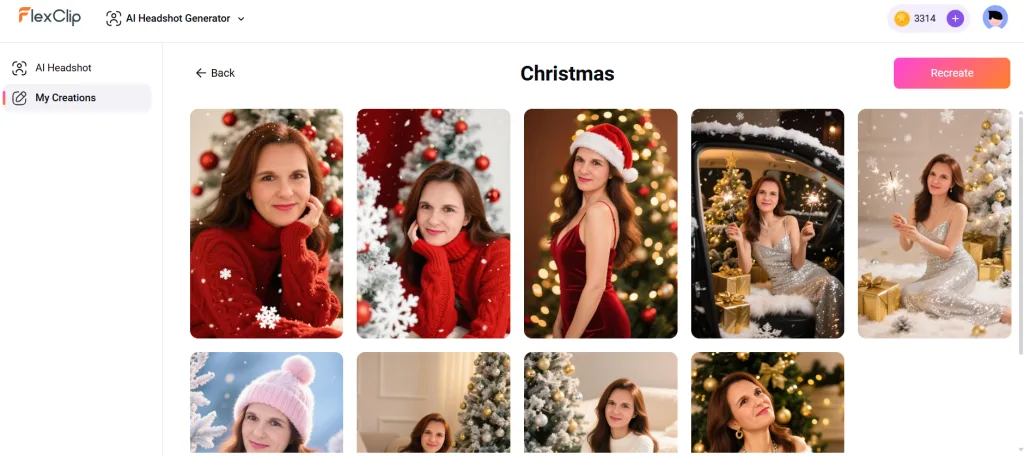
AI Headshot Generator: This feature is pretty cool if you need professional headshots for business or even fun holiday photos. The results look wonderful, polished, and natural. Fair warning, though, the processing time is pretty long, expect 5-10 minutes per generation. That’s not for one image, it’s for a group of different images like you see above.
Don’t sit there waiting, go make coffee, check emails, do something else. It takes several minutes to generate, but the final images are well worth the wait. I couldn’t believe how nice these came out and made me look so good.
Smart Photo Enhancement with AI


AI Photo Editor (My Pleasant Surprise): I tested this with a blurry nighttime photo of my son and sister in the car. The image was dark and unclear, so I typed in the prompt: “make it brighter and clearer.”
Here’s where it gets good: FlexClip has an “Improve Prompt” button right next to where you type in your prompt. When I clicked it, the AI expanded my simple request “make it brighter and clearer” into this detailed prompt below:
Prompt: “Make this image clearer and brighter by enhancing its overall brightness and contrast levels. Adjust the sharpness to emphasize details and improve visibility in shadowed areas. Consider increasing the saturation to make colors more vibrant and lifelike, ensuring that skin tones appear natural and true to life. Additionally, remove any noise or grain that may detract from the image’s quality.
Fine-tune exposure settings to avoid overexposure or underexposure, thereby creating a balanced and visually appealing outcome. Finally, apply any necessary filters or effects subtly, aiming to preserve the image’s original intent while making it more eye-catching and engaging.”
How awesome is that!
The result? Amazing. The whole image became significantly brighter and clearer. In fact, my son’s face came out sharp and detailed. My sister’s image was so blurry in the original that the AI couldn’t fully restore her features.
She doesn’t look like what you see in the improved photo because of how blurry the original image was, but the overall brightness and clarity improvement was impressive. This tool is genuinely useful for salvaging imperfect photos.
Quick Background Removal
Here’s an example of an AI image background remover using FlexClip. The first image shows the full original image, and the second shows the final result after the background has been removed.
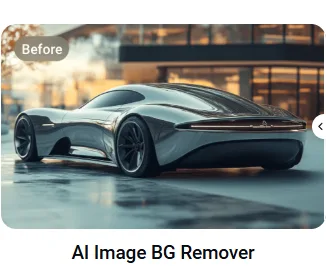

AI Image Background Remover: Works just like Canva’s version; it’s a clean, quick background removal. Handy for creating product images or isolating subjects.
AI Old Photo Restoration: Got old family photos that are faded or damaged? This tool can restore them. I didn’t test this extensively, but it’s a nice bonus feature.
4. Music and Audio Library
The music library is extensive. For example, I searched “upbeat background music” and found dozens of tracks that didn’t sound like elevator music. Also, the quality was professional enough for client work.
AI Text-to-Speech: FlexClip offers AI voiceovers in 400+ voices across 140+ languages. While I found some voices a bit robotic for my taste, there are enough options to find one that works for your content style.
AI Voice Cloning: This feature lets you clone your own voice for consistent narration across videos. I didn’t test this personally, but it’s available for creators who want their voice without recording every time. It sounds like it would be very valuable to some people.
AI Music Generator: If you need custom background music? The AI can generate tracks based on your preferences. This is useful if you want original music rather than stock tracks.
What Else Does FlexClip Offer?
FlexClip really has a lot to offer, and it all depends on what you need for your business. I truly couldn’t list and test every feature it has because there are so many, so take a look for yourself here and see what works for you.
Beyond what I’ve tested extensively, I have listed some others I didn’t discuss in this post here for you:
Video Editing Essentials:
- Screen recorder with webcam overlay
- Video trimmer, merger, and speed controls
- Chroma key (green screen)
- Transitions and effects library
AI-Powered Tools:
- AI video background remover
- AI object remover from images
- AI image upscaler
- AI 3D photo animation
Content Creation:
- GIF maker
- YouTube thumbnail creator
- Slideshow maker
…and more. FlexClip has an extensive toolkit covering most video and image editing needs. While you won’t use every feature, it’s nice knowing they’re available when you need them.
FlexClip Affiliate Program: Is It Worth Promoting?
If you create content about video tools or affiliate marketing, FlexClip’s affiliate program might be worth considering for yourself.
Commission Structure
FlexClip offers at least a 35% commission per sale with a 90-day cookie, which is strong compared to many software affiliate programs. Commissions are one-time payouts (not recurring), and the program is managed through Awin (formerly ShareASale), so tracking and payouts are reliable. The minimum payout is typically $50, depending on your payment method.
How It Compares
Compared to other video editing tools:
- Higher commission than many competitors
- Longer cookie duration than average
- Furthermore, FlexClip is managed through a reputable affiliate network (ShareASale is trustworthy)
Promotional Resources
FlexClip provides banners, text links, and promotional materials through ShareASale. While nothing groundbreaking, the basics are covered.
Bottom line for affiliates: If you’re creating content about video editing or marketing tools, FlexClip’s affiliate program is competitive. Notably, the 90-day cookie is a huge plus.
FlexClip Pricing: Is This Video Editor Worth It for Beginners?
One crucial part of any FlexClip review is pricing. Here is what the platform offers as of January 2026:

Note: FlexClip offers up to 40% savings when you choose annual billing over monthly. Pricing is subject to change, so check their official pricing page for the most current rates.
Free Plan
- 720p HD video quality
- Watermarked videos
- 1 stock video/audio per project
- Maximum 12 projects
- 10-minute video length limit
Good for: Testing the platform before committing
Not good for: Professional affiliate content (the watermark is too prominent)
Plus Plan ($11.99/month billed annually, or $19.99 monthly)
You can save 40% with annual billing ($143.88/year)
- 1080p Full HD video quality
- No watermark
- 5 stock videos per project/5 stock audio per project
- Unlimited video length
- Brand Kit
- 30GB cloud storage
- 3,600 AI credits bonus/year
- FlexClip premium resources
Good for: Most affiliate marketers creating social content and product reviews
Business Plan ($19.99/month billed annually, or $29.99 monthly)
You can save 40% with annual billing ($239.88/year)
- 4K Ultra HD video quality
- Unlimited stock videos per project/Unlimited stock audio per project
- Unlimited video length
- Brand Kit
- 100GB cloud storage
- 9,600 AI credits bonus/year
- FlexClip premium resources
- Priority support
Good for: Agencies or high-volume content creators
My Take
For beginner affiliates, the Plus plan at $11.99/month (billed annually) offers the best value. You get professional 1080p Full-HD output without the watermark, which is essential for branded content. You also get 5 stock media assets per project, which covers most social media and YouTube videos.
Annual billing gives you 40% off, saving you nearly $100 per year. If you’re serious about video content, this is the smart choice.
Pro tip: Test the FlexClip free plan first. If it clicks, upgrade to the annual Plus plan to maximize savings.
FlexClip Review vs Canva: Which Video Editor Wins?

Since everyone asks this, here’s my take:
When to Choose Canva Video:
- You’re already comfortable with Canva’s interface
- You primarily create static or simple animated content
- You want the easiest possible learning curve
- Additionally, if you want both graphic design and video tools in a single, beginner-friendly platform.
When to Choose FlexClip:
- You need more advanced video editing features
- You’re creating longer-form content (tutorials, product reviews)
- You want AI tools specifically for video (blog-to-video, auto subtitles)
- Or if you need a comprehensive stock library focused on video
My verdict: Canva Video is perfect if you want a simple, all-in-one way to create graphics and videos quickly. Although Canva can’t create long-form videos. That’s where FlexClip shines if you need more long-form, advanced video editing and extra creative control. Both are excellent choices depending on what you’re looking to create.
Who Should (and Shouldn’t) Use FlexClip
✅ FlexClip is Great For:
- First, affiliate marketers with some video editing experience
- Content creators comfortable with Canva-style interfaces
- Anyone willing to invest 30-60 minutes learning the platform
- Marketers who need templates + stock media in one place
- People repurposing blog content into videos
❌ FlexClip Might Not Be For:
- Complete beginners expecting instant “one-click” results
- Users who want the absolute simplest tool (consider Canva Video instead)
- Professional video editors needing advanced features (try Premiere Pro)
- Anyone not willing to spend 30-60 minutes exploring the interface if you’re new to video editing
Try This Now: Test FlexClip With This Simple Exercise
Want to see if FlexClip works for you? Try this:
- First, sign up for the free plan
- Next, pick one social media template (vertical format for Instagram/TikTok)
- Spend 15 minutes customizing it with your own text and images
- Export the video (watermarked is fine for testing)
- Evaluate: Did you feel comfortable? Could you see yourself doing this regularly?
If the answer is “yes, but I need more practice,” you’re a good fit. If it feels overwhelming even after 15 minutes, consider trying Canva Video first.
Final Verdict: My Honest FlexClip Review for Beginners
Here is my final FlexClip review verdict after hands-on testing:
FlexClip is a solid browser-based video editor with great templates, a comprehensive stock library, and useful AI features. Moreover, the output quality is professional, and once you get comfortable, you can create videos quickly.
However, it’s not as “beginner-friendly” as the marketing suggests. If you’re brand new to video editing, expect a learning curve. It’s manageable, but it exists.
My Rating: 8/10
Pros:
- Professional template library
- Excellent stock media selection
- AI blog-to-video actually works well
- Auto subtitles save time
- Competitive affiliate program (35%, 90-day cookie)
- Reasonable pricing for Plus plan
Cons:
- Not as intuitive as competitors like Canva
- AI video generator is limited (only 5-10 sec clips)
- Features are scattered across the interface
- Steeper learning curve for true beginners
Who I Recommend This For:
If you have any prior video editing experience (even TikTok or Instagram Reels), and you’re willing to invest an hour learning the platform, FlexClip can become a powerful tool in your affiliate marketing arsenal.
On the other hand, if you’re a complete beginner who wants the absolute easiest option, start with Canva Video and graduate to FlexClip when you’re ready for more advanced features.
People Also Ask
Is FlexClip really free? Yes, FlexClip offers a free plan with limitations: 720p quality, watermarked videos, and restricted stock media access. For professional use, you’ll need a paid plan starting at $11.99/month billed annually, or $19.99 monthly.
Can I use FlexClip for YouTube videos? Absolutely. FlexClip supports up to 4K video quality on the Business plan and can export in YouTube-friendly formats (16:9 aspect ratio). The Plus plan (1080p Full-HD) is sufficient for most YouTube creators.
Is FlexClip better than Canva? It depends. Canva Video is simpler for beginners and integrates with graphic design. FlexClip offers more advanced video editing features and AI tools. Choose based on your experience level and needs.
Does FlexClip have AI features? Yes. FlexClip includes AI video generation (5-10 sec clips), AI blog-to-video, auto subtitles, text-to-speech, and AI image tools. Some features require paid plans.
Can beginners use FlexClip? Yes, but with a caveat. True beginners should expect to spend 30-60 minutes learning the interface. Those with any video editing experience will pick it up faster.
Related Questions
What video editor is best for affiliate marketing beginners? For absolute beginners, Canva Video offers the easiest learning curve. For those with some experience, FlexClip provides more features. InVideo AI is another option worth considering for AI-powered creation.
How long does it take to create a video in FlexClip? Once comfortable with templates, most videos take 10-20 minutes. Your first few will take longer as you learn the interface.
Can FlexClip help me make money with affiliate marketing? Yes. Creating video content (product reviews, tutorials, social media clips) can boost affiliate conversions. FlexClip makes video creation accessible, though you’ll need to invest time learning it.
Your Next Steps
If you’re serious about adding video to your affiliate marketing strategy in 2025, FlexClip is worth testing. The free plan lets you explore without commitment, and the Plus plan is reasonably priced if you decide it fits your workflow.
My advice? Give yourself permission to be a beginner. Remember, your first video won’t be perfect, and that’s okay. However, the more you practice, the faster you’ll get. Before you know it, you’ll be pumping out professional-looking videos in 15 minutes or less.
Remember: every successful affiliate marketer started exactly where you are now. In the end, the only difference is they took action.
Want more honest reviews like this FlexClip review? I test AI tools and platforms so you don’t have to waste time or money on duds. Therefore, check out my free affiliate marketing guide below to get started building your online income the smart way.
You will get affiliate marketing tips, AI platform reviews, and comparison reviews sent straight to your inbox every week, with helpful tips on how to grow your business. Just fill out the form below.
I respect your privacy. Unsubscribe anytime.
Let’s connect and follow me on all my social media platforms for daily tips on AI tools and affiliate marketing strategies that actually work.
To our success,

Related Posts:
Claude AI Review: My Honest Take for Affiliate Marketing Beginners
AI Image Generators That Save Small Businesses Time
Simplified vs. Predis.ai Comparison
Batch Content Creation with AI: Save 8+ Hours Weekly
Tools & Resources
The Iceberg Effect: Discover the hidden strategies successful affiliates use to build sustainable income. Learn more about The Iceberg Effect.
Free Affiliate Marketing Guide: If you’re new to affiliate marketing? Download my free step-by-step guide that walks you through finding profitable niches, choosing the right tools, and creating content that converts. Get the free guide
Recommended Video Tools I Have Tested
- Predis.ai – AI-powered social media content creation. Try it out here
- InVideo AI – Text-to-video with AI voiceovers. Get it now
- Simplified – All-in-one content creation suite. Let Simplified do it
Website Essentials
- Bluehost – Reliable hosting for your website. Start with Bluehost
- ConvertKit – Email marketing for affiliates and creators. Start your list with Kit
P.S. If you found this FlexClip review helpful, please share it with a friend who’s struggling with video creation. Every share helps another entrepreneur discover tools that can help grow their business!


Hi Meredith,
This is such a refreshing and honest review! I really appreciated your transparency about the learning curve. It’s helpful to know that even with a beginner-friendly tool, it’s worth setting aside that first hour to really explore the interface. Your tip about using the ‘Brand Kit’ to keep logos and colours consistent is huge for anyone trying to build a professional-looking affiliate brand quickly. Thanks for testing it out so we don’t have to guess 🙂
Hey Denny!
I really appreciate you saying that. 😊 I wanted to be honest about the learning curve because I know how frustrating it can be when people make tools sound too easy. Once you take that little bit of time to explore the platform, it really does get easier. And yes, the Brand Kit was such a win for me too. I’m glad the review helped and saved you some guesswork!
Hi Meredith,
Have to say, this saves quite a bit of time for anyone looking to use another software other than Canva for their videos. Love the breakdown and pros and cons; as always, you provide a non-biased review that will definitely help everyone!
Thanks for taking the time and getting this up on your blog. Cheers!
Hey Marc!
I’m so glad you found it helpful! Videos can really take up a lot of time if you’re not careful, so if this review helps someone skip the trial-and-error, that’s a win for me! Thanks for noticing the pros and cons breakdown. I wanted to make it as practical as possible. I appreciate you taking the time to read and comment!
Hi Meredith – This is an excellent and thoughtful review that feels both practical and genuine. I really appreciate how you share the real experience of learning FlexClip as a beginner, because it encourages people (like me, if I’m honest 😉) who may feel hesitant or intimidated by video creation. The way you talk about the learning curve with honesty and patience is refreshing, because it reminds readers that progress in this journey often comes from curiosity, practice, and giving ourselves permission to improve one step at a time.
Your focus on workflow, templates, and realistic time expectations is especially valuable for affiliate marketers who are juggling busy lives while trying to build their businesses. Instead of hype, you offer clarity and reassurance, helping people see whether FlexClip truly fits their goals and work style. This review does more than evaluate a tool. It gives readers confidence to keep moving forward and trust that they can grow into the skills they need over time.
Thank you for this review, and for that matter, all of your posts! They truly have helped me make some decisions or at least make me think. Have a wonderful week and Happy New Year!
Wow, thank you so much, Ernie! I really appreciate you taking the time to share that… it means a lot! 😊 I wanted to be honest about the learning curve because I know how intimidating video tools can feel at first. It’s so great to hear that it gave you some clarity and confidence instead of just adding more overwhelm. Wishing you a wonderful week too, and a very Happy New Year!
This review prompted me to sign up for a free account.
One AI tool I use is called BigView. I write a script and can deliver a video without looking to the side at my notes. It has the capacity to use filters on your face, puts lipstick on your mouth, inserts captions. and much more. I use Canva for thumbnail creation. I’ve only scratched the surface of what Canva is capable of!
Happy creation!
That’s awesome to hear, Kate! I love how you’re experimenting with BigView and Canva. I will have to check BigView out. It sounds like you’re already getting a lot out of them. I actually thought of you, Kate, while I was writing this post, remembering your videos on YouTube and how this platform, FlexClip, might be good for you to try. I’m so glad you’re gonna sign up for the free plan and going to give it a try. Let me know how you like it. 🙂 Happy creating, and I can’t wait to see what you make next!