

Ever feel like content creation takes much longer than it should while your to-do list keeps growing? I used to spend entire afternoons working on a single blog post, which is why I originally tested QuillBot to see whether it could help me rewrite and polish content faster without sounding robotic.
Affiliate Disclosure: This post contains affiliate links, which means I may earn a small commission at no extra cost to you. I only share tools I’ve personally tested or carefully researched and believe may genuinely help your business. See full disclosure here.
- Quick Answer: Is QuillBot Worth Trying?
- Why I Originally Tested QuillBot
- What Is QuillBot & What Is It Best Used For?
- My Real QuillBot Review for Content Creators: Testing Its Writing Tools
- Is QuillBot Reliable? My Honest Review and What Current Users Say
- QuillBot Free vs Premium for Content Creators: Is Premium Worth It?
- QuillBot Pricing: What Does Premium Cost in 2026?
- QuillBot vs. Grammarly: Which Is Better for Content Creators?
- How QuillBot Can Help Solve Common Content Problems
- Final Verdict: QuillBot Pros, Cons, and Who Should Try It
- Make Content Creation Easier With This Free 30-Minute Content System
Quick note on how I test AI tools:
I use them on real business tasks, compare the results with what I would normally create, and then edit everything myself. I pay attention to whether a tool actually makes the work easier, improves the result, or simply adds another step.
Updated Post: August 3, 2026
QuillBot is no longer part of my current workflow, but I tested it myself and updated this review using current official information and recent feedback from active users.
I’ll show you what QuillBot does well, where it might not do so well, and whether the Free or Premium plan makes sense for the way you create content.
Quick Answer: Is QuillBot Worth Trying?
QuillBot is worth trying if you regularly get stuck rewording, summarizing, or polishing existing content. The free plan may be enough for occasional short tasks, while Premium is better suited to frequent long-form work. You can probably skip it if ChatGPT, Grammarly, or another tool already handles those jobs for you.
Why I Originally Tested QuillBot
At the time, writing and editing were taking up far too much of my day. I could spend hours adjusting the same few paragraphs while emails, social posts, and older content stayed on my to-do list.
My Honest Testing Approach
Before recommending QuillBot, I tested it for several days using real blog posts, social content, emails, and business writing. I wanted to see how it handled everyday content, not polished sample sentences.
My biggest concern was whether QuillBot would remove my personality and make my writing sound generic. During my initial testing, it helped me reword and polish certain sections more quickly without completely changing my voice. I still needed to review and adjust its suggestions instead of accepting every rewrite automatically.
This review combines that original experience with current information about QuillBot’s tools, plans, and limitations so you can decide whether it would really improve your workflow or just add another tool to your monthly expenses.
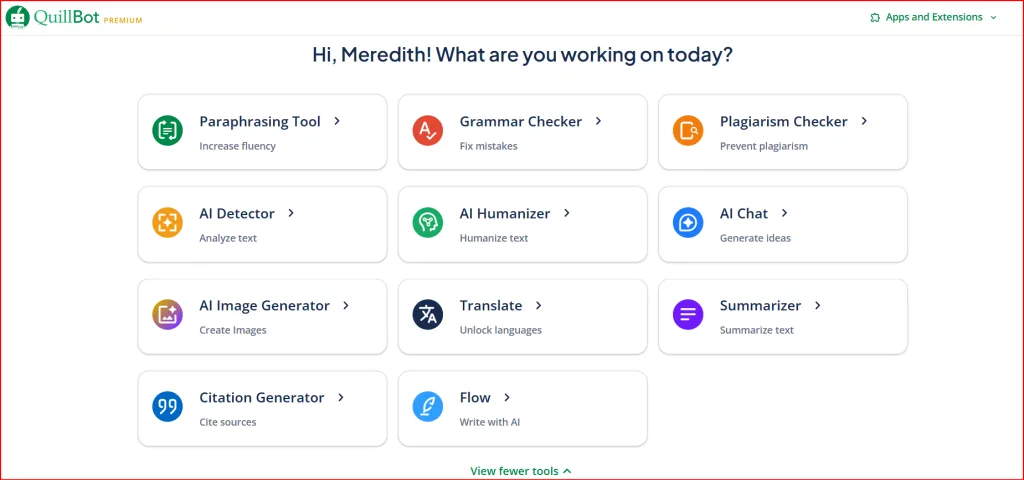
Note: The dashboard and available features may have changed since this screenshot was taken.
What Is QuillBot & What Is It Best Used For?
QuillBot is an AI writing platform that includes tools for paraphrasing, grammar checking, summarizing, translating, generating citations, detecting possible AI-written text, and more. Its best-known feature is the Paraphraser, which rewrites text using different wording and styles.
QuillBot has expanded considerably since I originally tested it. Its current dashboard also includes AI Chat, an AI Humanizer, an AI Image Generator, and Flow, which combines several writing and research tools in one workspace.
For content creators, QuillBot is most useful for rewording awkward sentences, shortening longer passages, creating alternate versions, and catching mistakes before publishing. You still need to review the results for accuracy and tone.
The tools most relevant to content creators include
- Paraphraser: Rewrites existing text using different wording and writing styles.
- Grammar Checker: Identifies grammar, spelling, and punctuation problems.
- Summarizer: Condenses longer text into a shorter version.
- AI Humanizer: Reworks AI-assisted text to make your writing sound more natural.
- AI Detector: Estimates whether text may be AI-generated, but should not be treated as proof.
- Plagiarism Checker: Scans for matching or insufficiently cited content.
- Translator: Translates text and documents into more than 50 languages.
- Citation Generator: Helps format citations when you use information from outside sources.
- Browser extensions and apps: Bring QuillBot tools to supported websites and devices.
Is QuillBot Useful for Small Business Owners and Beginners?
During my original test, I found the basic Paraphraser easy to use. You paste in your text, choose a rewrite style, review the result, and edit it before using it.
QuillBot may help if you regularly get stuck rewording sentences or polishing short sections. It may not be necessary if ChatGPT, Grammarly, or another tool already handles those jobs well enough.
The real question is whether QuillBot solves a repeated problem without duplicating a tool you already use.
My Real QuillBot Review for Content Creators: Testing Its Writing Tools
I tested QuillBot’s main tools on real blog and business content. The screenshots below show what worked, where I still needed to edit, and what each tool offers today.
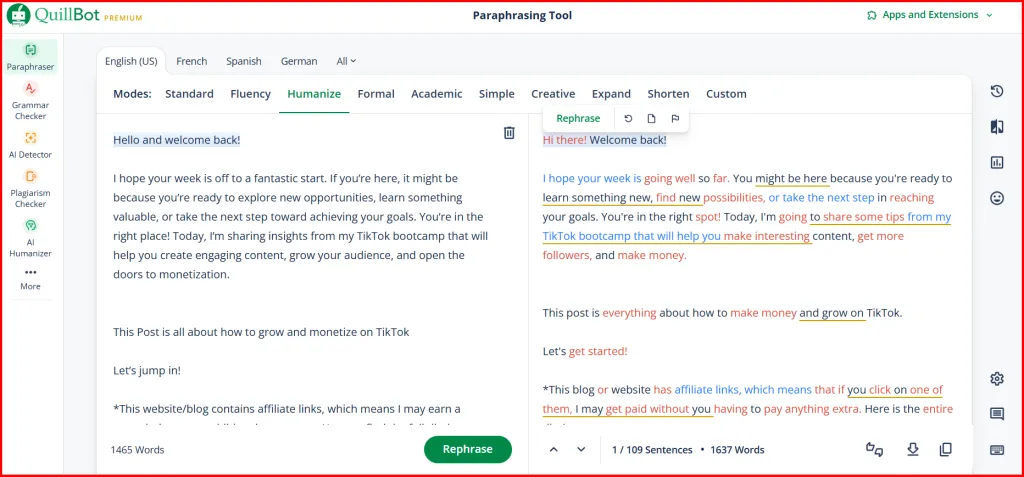
QuillBot Paraphrasing Tool Review: Is It Good for Rewriting Blog Posts?
For my original test, I used an older blog post from my business that needed better wording and a smoother flow. Instead of staring at the same sentences and trying to rewrite them from scratch, I placed the content into QuillBot’s Paraphraser.
My first impression was positive. QuillBot did more than replace a few words with synonyms. It restructured some sentences, shortened sections that felt too wordy, and gave me another way to express the same general ideas.
Unlike ChatGPT’s open-ended rewriting, QuillBot gives you a dedicated workspace with built-in modes for comparing and controlling different versions of the same text.
That is one of QuillBot’s biggest advantages for content creators who regularly rework existing writing.
You can choose different rewriting modes, control how many synonyms are changed, click individual words to see alternatives, and with Premium, compare results from different modes side by side.
I still had to compare the rewrite with my original, check the meaning, and restore some of my natural wording.
It worked best for awkward sentences, wordy paragraphs, and getting unstuck. For repurposing, you still need to add a platform-specific hook, your perspective, and a call to action.
What‘s current now: The free plan paraphrases up to 125 words at a time using Standard and Fluency modes. Premium removes the word limit and includes nine built-in modes, unlimited Custom modes, Compare Modes, and paraphrasing history.
This dedicated paraphrasing setup may give QuillBot an advantage over ChatGPT for people who want more control over several versions of the same writing.
However, that advantage only matters if you regularly rewrite existing content and find those controls easier than prompting ChatGPT to produce different versions.
For additional ways to reuse one piece of content across different formats, HubSpot’s “20 Creative Ways to Repurpose Content” still offers helpful examples.
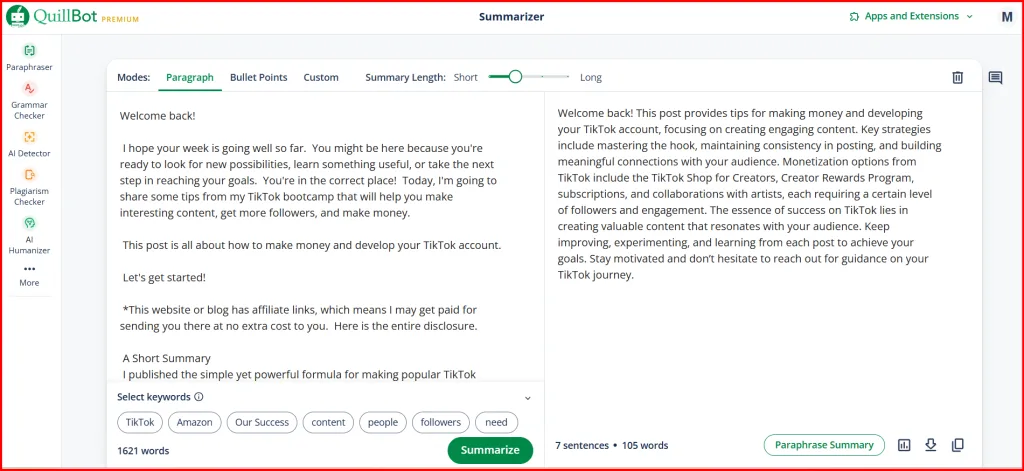
QuillBot Summarizer Tool: Condensing Articles for Social Media
Because I had Premium access during my original test, I summarized the full 1,500-word post at once. QuillBot reduced it to a short paragraph that captured the main ideas and still made sense.
The summary gave me a useful starting point for repurposing the post, but it was not ready to publish by itself. I still needed to add a stronger opening, my own perspective, and a call to action for the platform where I planned to share it.
For content creators, it can speed up the first draft of a shorter version without replacing final editing.
What’s current now: Free users can summarize up to 1,200 words at a time, while Premium increases the limit to 6,000 words and adds a Custom mode. Paragraph and Bullet Point summaries remain available on the free plan.
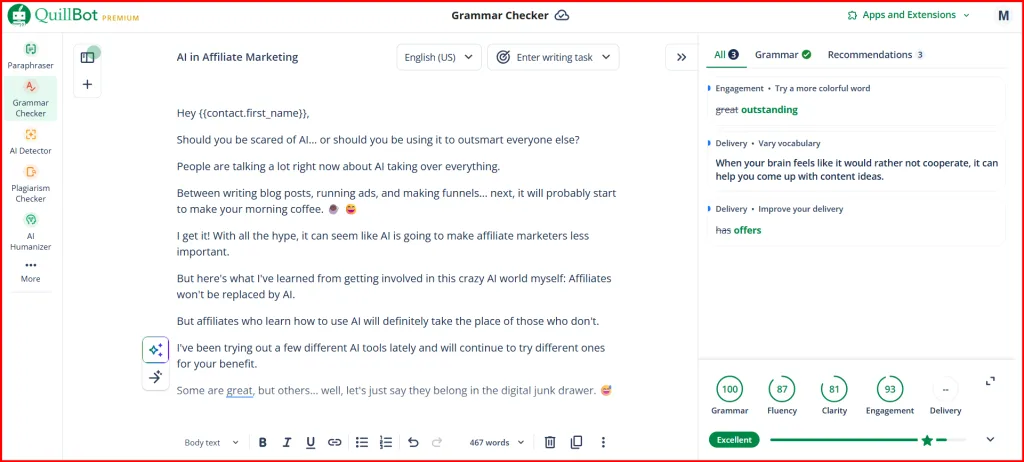
QuillBot Grammar Checker Review: Fix Mistakes Before You Publish
After reading the same draft several times, small mistakes are easy to miss. QuillBot caught spelling, punctuation, and wording issues I had overlooked.
It worked well as a final review, but I still checked each suggestion because the most correct option is not always the one that sounds most like you.
QuillBot also offers a Chrome extension that can check writing on many supported websites, making it useful for emails, documents, and social media content.
What’s current now: Most basic grammar, spelling, punctuation, and color-coded corrections are still free. Premium now adds deeper recommendations for passive voice, repetitive wording, clarity, conciseness, and tone insights.
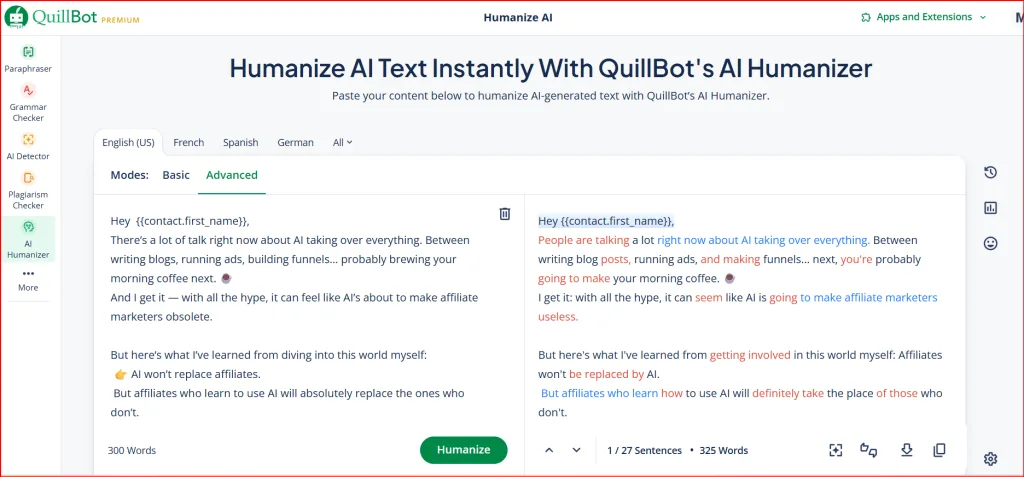
QuillBot AI Humanizer: Can It Improve AI-Generated Content?
During my original test, the AI Humanizer made stiff AI-assisted writing more conversational, but it did not make the content sound exactly like me. I still needed to add my own experiences, opinions, and natural expressions.
What’s current now: QuillBot’s Basic Humanizer allows up to 125 words and six uses per day. Premium adds deeper Advanced-mode rewrites and unlimited use. QuillBot’s Chrome extension can also humanize text while you work inside ChatGPT, Gemini, and other supported tools.

QuillBot AI Detector: Use the Score as a Clue, Not Proof
After testing the Humanizer, I ran the revised text through QuillBot’s AI Detector. It highlighted sections that seemed repetitive or overly polished.
I would treat the score as a second opinion, not proof. Review flagged sections, add personal detail, and decide whether the writing sounds natural.
What’s current now: QuillBot requires at least 80 words for a scan. Free accounts can check up to 1,200 words per scan, with 10 scans per day. Premium provides unlimited scans and no detection word limit. QuillBot also warns that the score is a useful signal, not a guarantee.
Is QuillBot Reliable? My Honest Review and What Current Users Say
During my original testing, QuillBot was easy to use and helpful for paraphrasing, summarizing, and catching writing mistakes. To keep this review current, I compared my original experience with QuillBot’s latest official information and recent feedback from active users.
Users often praise its ease of use, quick rewrites, and grammar support. The most common concerns are the free plan’s limits and occasional rewrites that change the original meaning.
Based on my testing and current feedback, QuillBot works best as an editing assistant—not a publish-ready content generator. Check the facts, tone, and meaning before using its suggestions.
Is QuillBot Safe and Legit?
Yes, QuillBot is a legitimate and widely used writing platform. It says its connections are encrypted and that it does not sell your content. However, some inputs and usage data may be used to improve its services, depending on your privacy settings.
I would still avoid entering confidential client information, financial details, or private unpublished content into any online AI tool.
QuillBot Free vs Premium for Content Creators: Is Premium Worth It?
QuillBot’s free plan may be enough if you only need occasional help rewriting short paragraphs or cleaning up basic mistakes. Premium becomes more useful when you regularly work with longer content or keep running into the free plan’s limits.
What You Get With QuillBot Free
- Paraphrase up to 125 words at a time
- Use the Standard and Fluency paraphrasing modes
- Summarize up to 1,200 words using Paragraph or Bullet Point mode
- Correct basic grammar, spelling, and punctuation
- Use limited versions of the AI Humanizer, AI Detector, and AI Chat
- Access QuillBot’s browser extensions
The biggest drawback for bloggers is the 125-word Paraphraser limit. Breaking a full article into small sections can slow you down and make it harder to keep the tone consistent.
What QuillBot Premium Adds
- Unlimited paraphrasing with nine built-in modes
- Custom modes, Compare Modes, and paraphrasing history
- Advanced grammar suggestions and tone insights
- Summaries up to 6,000 words with Custom mode
- Unlimited AI Humanizer and AI Detector use
- Plagiarism checking for up to 25,000 words per month
- Unlimited AI Chat, faster processing, and priority assistance
Premium now also includes higher limits for newer tools such as AI image and presentation generation. However, I would not upgrade for those extras alone unless you know you will actually use them.
Premium makes the most sense when the free limits repeatedly interrupt your work.

QuillBot Pricing: What Does Premium Cost in 2026?
As of August 2026, QuillBot lists these U.S. website prices:
- Free: $0
- Monthly: $19.95 per month
- Quarterly: $39.95 every three months, or about $13.31 per month
- Annual: $99.95 per year, or about $8.33 per month
The quarterly plan has replaced the six-month option shown in older pricing information. QuillBot also says prices may vary by location, currency, and current promotions, so check the official QuillBot pricing page before subscribing and compare what Free and Premium include before choosing a plan.
Which Plan Makes the Most Sense?
Choose monthly for a shorter commitment. Annual costs less per month, but only makes sense if you expect to use QuillBot regularly.
QuillBot subscriptions renew automatically unless you turn off renewal, so check your billing settings after subscribing.
QuillBot vs. Grammarly: Which Is Better for Content Creators?
During my original testing, I found Grammarly more useful for correcting grammar, improving clarity, and checking tone while I wrote. QuillBot stood out more for rewriting existing content and shortening longer articles.
The tools now overlap more than they once did. Grammarly offers rewrites, tone help, AI assistance, plagiarism checking, and AI detection. QuillBot combines paraphrasing and summarizing with grammar tools, AI detection, and AI Chat.
Choose Grammarly if you mainly want help correcting and improving your writing as you work.
Choose QuillBot if you regularly need to reword existing content, compare different rewrites, or summarize longer material.
You probably do not need both unless each solves a different problem. Test the free versions first.
For more beginner-friendly options, see my guide to 7 Simple Content Creation AI Tools.
How QuillBot Can Help Solve Common Content Problems
Based on my original testing and QuillBot’s current tools, here are the situations where it may be most helpful for content creators.
You Keep Rewriting the Same Sentence
The Paraphraser can show you different ways to structure an awkward sentence or explain the same idea.
Long Content Is Hard to Shorten
The Summarizer can pull the main points from a longer article and give you a starting point for emails or social posts.
Your Draft Needs a Final Cleanup
The Grammar Checker can catch spelling, punctuation, and wording problems you may miss after reading the same draft several times.
QuillBot is most useful when it helps you get unstuck or clean up a draft—not when it replaces your judgment or personal voice.
Final Verdict: QuillBot Pros, Cons, and Who Should Try It
Based on my testing, QuillBot’s current features, and recent user feedback, it works best as an editing assistant. It can help with rewrites, summaries, and cleanup, but every result still needs a final review.
QuillBot May Be a Good Fit If You:
- Frequently get stuck rewording sentences
- Need help shortening or repurposing longer content
- Want several writing and editing tools in one platform
You May Not Need QuillBot If You:
- You already use another tool that handles the same tasks
- You rarely rewrite or summarize long content
- You want publish-ready content without editing
My recommendation: Start with QuillBot Free and test it on the content you normally create. Consider Premium only if the free limits repeatedly interrupt your work or you need a specific paid feature.
The best tool is not the one with the longest feature list. It is the one that solves a repeated problem without adding another unnecessary subscription.
Make Content Creation Easier With This Free 30-Minute Content System
A writing tool can help, but you still need a simple system for turning ideas into content you can finish and publish.
That is why I created the free 30-Minute Content System for busy beginners and small-business owners who are tired of starting from scratch.
Inside, you’ll learn how to:
✅ Brainstorm a week of content ideas
✅ Write content that sounds more like you
✅ Create simple graphics without overthinking them
✅ Schedule your content so you can stay consistent
✅ Use AI tools without creating another complicated workflow
You’ll also receive planning templates to help you organize your daily, weekly, and monthly content.
Ready to Spend Less Time Stuck in Content Mode?
Fill out the form below, and I’ll send the free 30-Minute Content System directly to your inbox.
We respect your privacy. You can unsubscribe at any time.
After downloading it, read my guide to Creating Content That Converts for practical tips on building trust, using storytelling, and writing stronger calls to action.

If you know someone drowning in content creation, share this QuillBot review with them. One tool can completely change someone’s workflow, and this might be exactly what they need.


Hi Meredith,
Even on Sundays you can learn something useful! I’d never heard of this app but now that I’ve read your blog entry, you pretty much raised an eyebrow in finding out more about and how it can help me with my weekly blogs.
I also like the way you presented it: not just after having tried it, but also making sure that we understood its limitation with the free program and how much time & money (the old adage of time is money couldn’t be better said!) we can save.
Thanks, I’ll be looking into it.
Thanks so much, Marc! I’m glad you found MY blog helpful 😊. Yes, the app really does save a lot of time, and I wanted to ensure that people are aware of both the benefits and the limitations of the free version. I hope it helps make your weekly blogs easier!
Hi Meredith – Wow, what a review! I had never heard of this product even though it’s been around since 2017 is you identified in this article. I am beyond curious. Thank you for presenting in a way where you’ve tried the product and have given an honest opinion. This is absolutely something to consider as saving time and being efficient is key. I started to work online so that I could spend more time with the people that I love and oftentimes I find I spend more time with this business then when I was working a regular 9 to 5. Thanks for this review and have a fantastic week!
Thanks, Ernie! I’m glad you found the review helpful. It’s definitely one of those tools that can save a lot of time, which is so important when you’re balancing work and family. I hope it makes your online work a bit easier and more efficient. Have an amazing week! 😊
Hi Meredith – I remember commenting on this review when you first published it, and it was interesting to come back and read your updated version. Since then, AI tools have become a much bigger part of my own workflow, and like you, I’ve learned that the real value isn’t letting them do all the work. It’s using them to save time while still making sure the final result sounds like me.
I also appreciate that you updated the review instead of simply writing a new one. That says a lot about your commitment to keeping your content accurate and genuinely helpful. Thanks for taking the time to revisit it and share your latest thoughts. Have a wonderful weekend!
Hey Ernie,
Thank you so much! I completely agre. AI is most helpful when it saves us time without taking away our own voice. That’s exactly why I wanted to revisit this review and make sure it was still useful and accurate. I really appreciate you coming back to read it and leaving such a thoughtful comment. Have a wonderful weekend too! 😊