

If you’ve been wondering whether another AI writing tool is really worth your time, this Typli.ai review for content creation will help you decide before you spend money or waste hours testing features you may not even use.
I tested and used this AI platform for real blog posts, SEO, social media content, editing, and image tasks, so you can see where it helps, where it’s not so helpful, and whether it fits the way you create content in your business.
Affiliate Disclosure: This post contains affiliate links. If you purchase through my link, I earn a small commission at no extra cost to you. You can find the full disclosure here.
- Introduction
- What Is Typli.ai?
- How I Tested Typli.ai for Content Creation
- Typli.ai Article Generator Test
- Typli.ai AI Content Planner Test
- Typli.ai Meta Description Generator Test
- Typli.ai Blog Title Generator Test
- Typli.ai Blog Outline Generator Test
- Typli.ai AI Paraphrasing Tool Test
- Typli.ai AI Editor Test
- Typli.ai AI Chat Workflow Test
- Typli.ai Image Generator Test
- Typli.ai Ease of Use
- Typli.ai Pricing and Credits for Content Creation
- What Worked Best and What Felt Weak
- Pros and Cons From My Typli.ai Review
- Who Typli.ai Is Best For & Who Should Skip It
- My Best Advice: Is Typli.ai Worth It for Content Creation?
- Final verdict
- FAQ About Typli.ai
- Want Better Results From AI Tools?
Quick note on how I test AI tools:
I use AI to handle the heavy lifting. That means for outlines, first drafts, structure, and ideas. Then I step into edit, refine, and make everything sound like me. Every tool I share is something I’ve personally used and measured for real-time savings in a working business.
Introduction
AI tools always sound helpful at first. Then you use one in your business and realize the real test is not what it claims it can do. It is whether it gives you something you can really use.
So you ask yourself. Can this help me get content started faster? Will the writing sound natural? Will it help with blog posts, SEO pieces, social media content, and images, or will it just give me more stuff to clean up?
That is why I wanted this Typli.ai review for content creation to be based on real testing, not just a list of features. I started with the free credits first to see how far I would get with that. I used them up pretty quickly, then I upgraded to a paid plan, and kept testing so I could see what changed.
This review is based on how Typli worked when I used it for real content tasks, not just what the feature list says it can do. I tested the parts I think small business owners and content creators would really care about, then I broke down what helped, what felt weak, and what I would use again.
Some features were useful, some were just okay, and a few really surprised me. Here’s what I found.
I’ve been testing tools like this as part of my larger breakdown of the best AI tools for small business owners, so this review fits into that bigger picture of finding tools that are actually useful in a real business.
What Is Typli.ai?

Typli.ai is an AI content platform with writing tools, AI Chat, image generation, and task-specific generators for things like articles, outlines, headlines, rewrites, emails, meta descriptions, and more.
Typli’s pricing page currently lists 187 AI writing tools, AI writing tools, AI images from credits, and chat access to models like GPT, Claude, and Gemini.
If you want to look around while you read, you can check Typli.ai out here, but I’m not going to pretend the long tool list is the main reason to care. Most AI platforms can do a lot now.
For this Typli.ai review for content creation, I wanted to know something more practical. Are the tools easy to use? Does the output actually help? Would I come back to these features during a normal content workflow?
That is what I focused on in this review.
How I Tested Typli.ai for Content Creation
I tested Typli with the kind of content tasks I actually use in my business.
I looked at:
- Blog writing
- Keyword and topic planning
- Meta descriptions
- Blog titles
- Blog outlines
- Rewriting
- Editing
- Email, Facebook, and Pinterest content
- Blog image creation
- Pricing and credits
- Ease of use
For each test, I paid attention to:
- Ease of use
- Output quality
- How natural it sounded
- SEO usefulness
- How much cleanup was needed
- Whether it saved time
- If it were beginner-friendly
- Whether I would use it again
I wasn’t looking for the perfect content… I was looking for something practical that would save me time in my business. Here is how each feature performed during my Typli.ai review for content creation.
Typli.ai Article Generator Test
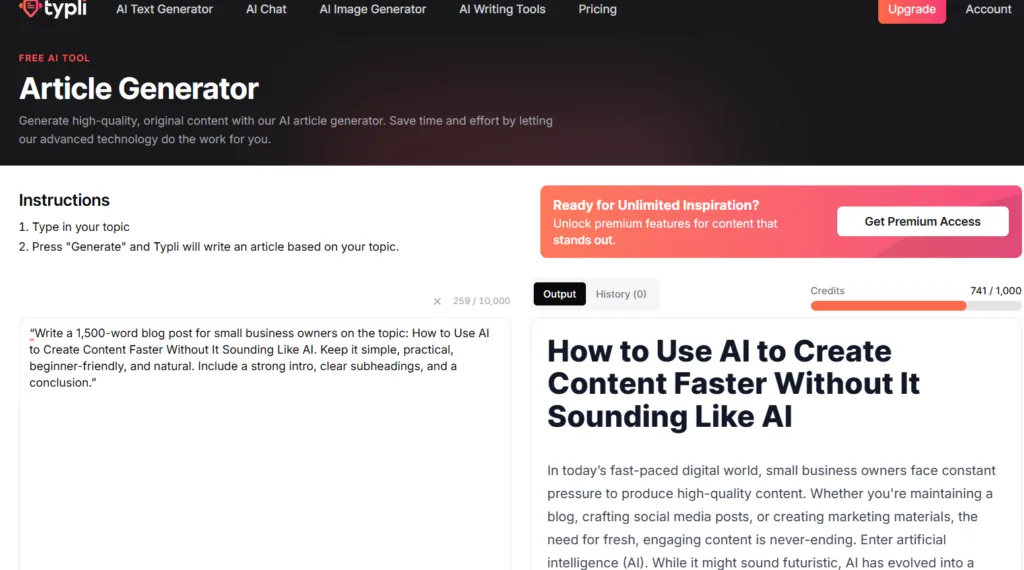
The first feature I tested was the Article Generator. Typli’s Article Generator page says you type in your topic, press generate, and Typli writes an article based on that topic. I asked it to write a 1,500-word blog post for small business owners.
The prompt I used:
“Write a 1,500-word blog post for small business owners on the topic: How to Use AI to Create Content Faster Without It Sounding Like AI. Keep it simple, practical, beginner-friendly, and natural. Include a strong intro, clear subheadings, and a conclusion.”
What Worked
The Article Generator did create a complete blog-style draft. It had a title, intro, headings, bullet points, SEO tips, editing tips, and a conclusion. It stayed mostly on topic and was easy to follow. For someone who struggles with the blank page, this could be very helpful.
What Didn’t Work as Well
The draft felt too generic in several places. It included sections like What Is AI? and Popular AI Platforms, which didn’t really fit the post I asked for.
The topic was supposed to focus on using AI to create content faster without sounding robotic. Instead, part of the article drifted into a basic AI explainer.
The writing also used phrases I would normally remove, like:
- “In today’s fast-paced digital world.”
- “Let’s dive in.”
- “With AI by your side.”
Those lines made the draft feel less personal and more like AI.
My Verdict
The Article Generator is useful for getting a rough draft started. I would use it for structure and ideas, but I wouldn’t publish the output as is.
Score: 3.5/5
If this is the part you struggle with most with your content, I also have a full guide on how to humanize AI content without making it sound over-edited.
Typli.ai AI Content Planner Test
The AI Content Planner was one of the features I was so excited to try. Typli’s AI Content Planner page says you can enter the type of content you want to plan and generate a content plan from there.
For this test, I entered:
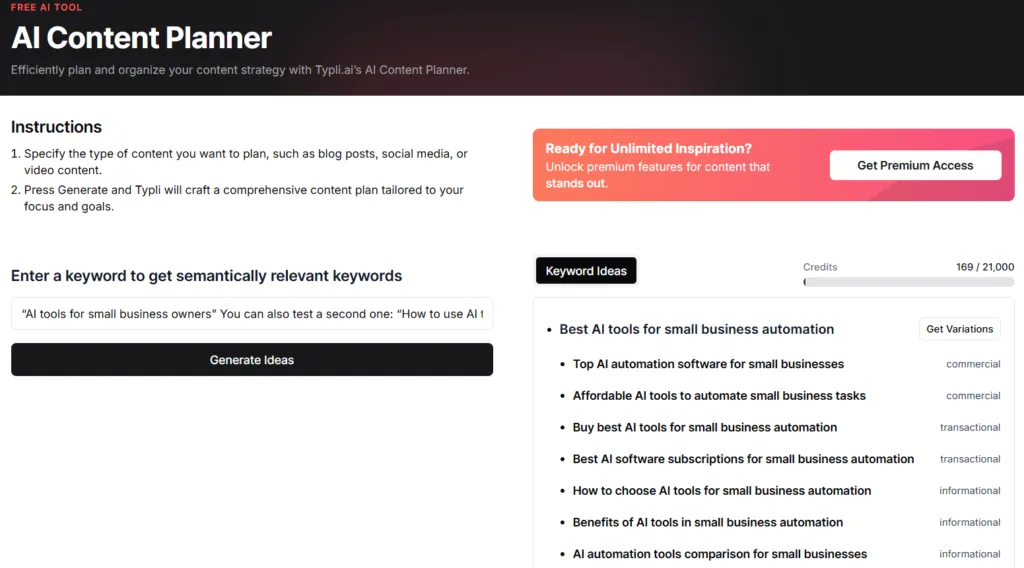
“AI tools for small business owners“
What Worked
This was one of the better features. It gave keywords and topic ideas that could help shape future blog posts.
Some of the stronger ideas included:
- Best AI tools for small business automation
- Top AI automation software for small businesses
- Affordable AI tools to automate small business tasks
- How to choose AI tools for small business automation
- Top AI chatbots for small business websites
Those are the kind of searches a small business owner might actually type into Google. This feature also helped me take a broad idea and turn it into something more focused, which is where the tool became more useful.
Instead of writing a vague post about AI tools for small business owners, it could help shape something stronger.
Something like this:
“Best AI Tools for Small Business Automation” or “How to Choose AI Tools for Small Business Owners Without Wasting Money”
What Didn’t Work as Well
Some suggestions were too broad or awkward.
For example:
“Leveraging AI for small business financial planning.”
It was not completely unrelated, but it didn’t fit my content angle as well.
Another one was:
“Buy best AI tools for small business automation.”
It didn’t sound really natural to me.
My Verdict
The AI Content Planner was one of Typli’s strongest tools, I thought in my testing. I would still check keywords with Google, Google Search Console, or another SEO tool before building a full post around them, but for brainstorming topics and future content ideas, this was useful.
Score: 4.5/5
Typli.ai Meta Description Generator Test
Next, I tested the Meta Description Generator. This is one of those small SEO tasks that is easy to forget when you’re trying to get a blog post finished and published.
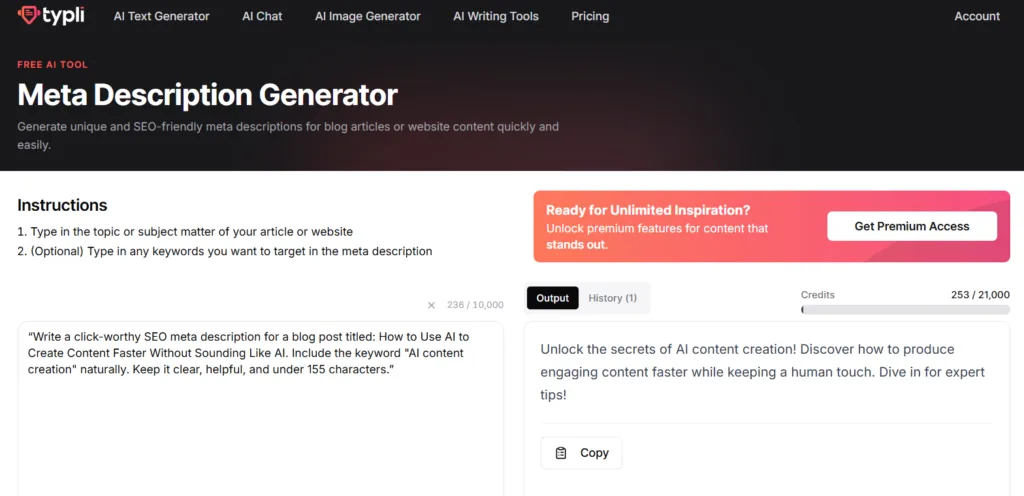
I asked Typli to write a meta description for:
“How to Use AI to Create Content Faster Without Sounding Like AI“
I also asked it to include the keyword:
“AI content creation“
What Worked
It included the keyword naturally.
The meta description it gave me was:
“Unlock the secrets of AI content creation! Discover how to produce engaging content faster while keeping a human touch. Dive in for expert tips!”
The topic matched, and the keyword was there.
What Didn’t Work as Well
The wording was not my style. Phrases like “Unlock the secrets” and “Dive in for expert tips” felt too generic to me. It wasn’t a bad starting point, but I wouldn’t put it straight into any SEO for a blog post.
My Verdict
This tool is fine for getting a first version started, but I would still rewrite the meta description so it sounds more specific and less like a marketing blurb.
Score: 3.5/5
Typli.ai Blog Title Generator Test
Then I tested the Blog Title Generator. Titles matter because they help people decide whether your post is worth clicking.
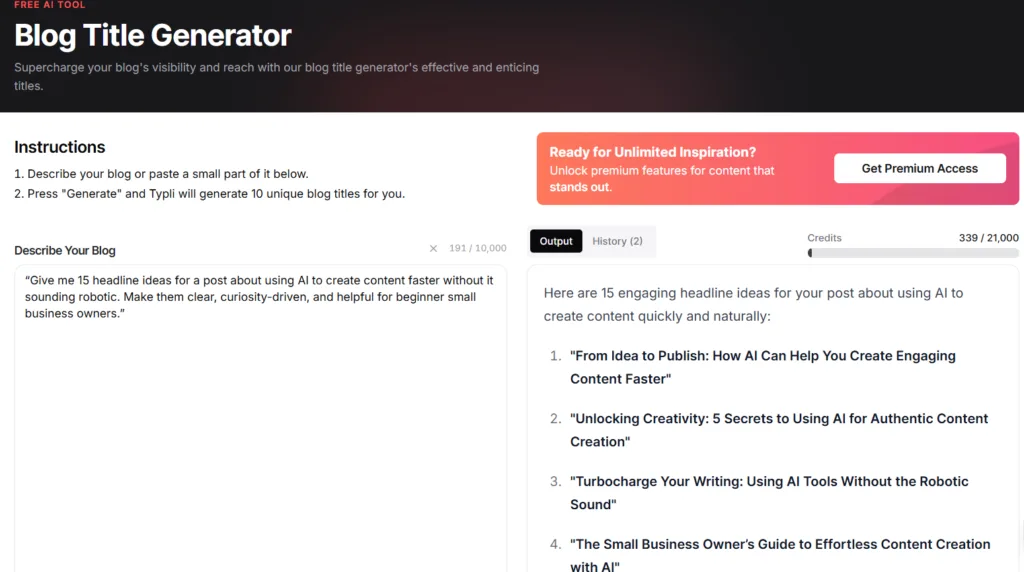
For this test, I used this prompt:
“Give me 15 headline ideas for a post about using AI to create content faster without it sounding robotic.”
What Worked
It gave me several ideas I could work with.
The best ones were:
- From Idea to Publish: How AI Can Help You Create Engaging Content Faster
- Create Like a Pro: Using AI to Write Faster Without Losing Your Style
- AI and Your Voice: How to Maintain Authenticity While Creating Content Quickly
I wouldn’t use those exactly as you see them, but they were good starting points.
What Didn’t Work as Well
Some titles sounded too dramatic. Words like unlocking, turbocharge, revolutionize, and dazzling made a few titles sound like they were trying too hard. That’s not unusual with AI title tools, but it does mean you need to sort through the results.
My Verdict
The Blog Title Generator is helpful for brainstorming. I would use it when I need ideas or get stuck, but I would still rewrite the final title before publishing.
Score: 4/5
Typli.ai Blog Outline Generator Test
The Blog Outline Generator was a useful test because sometimes you don’t need a full article at first. You just need help organizing your ideas.
I asked Typli to create a beginner-friendly outline for:
“How to Use AI to Create Content Faster Without Sounding Like AI“
I also used the keyword:
“How to use AI to create content faster”

What Worked
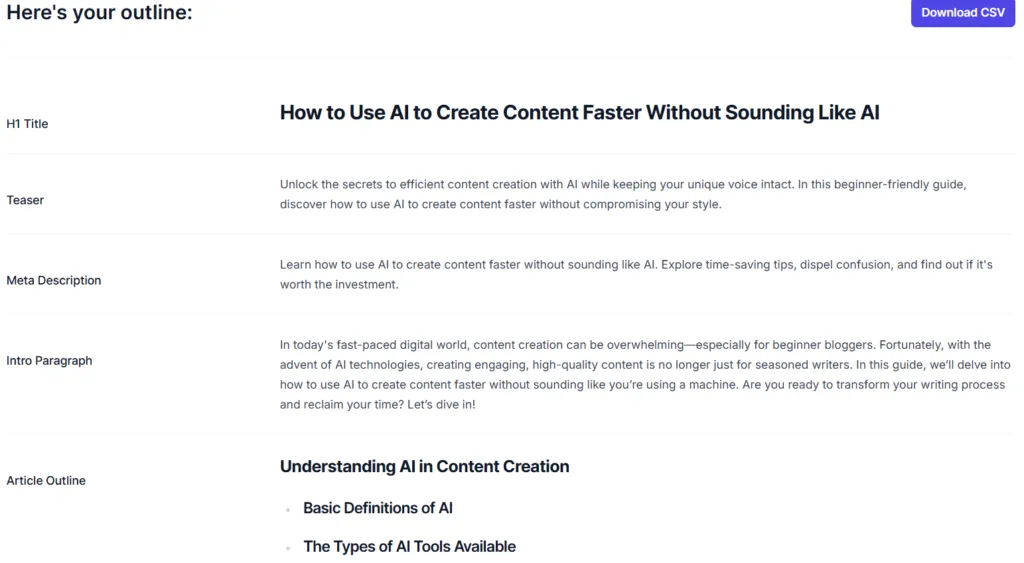
Typli created a full outline pretty quickly. It included an H1, teaser, meta description, intro paragraph, and article sections. This is very helpful if you’re stuck and need a structure to work from.
Some sections were useful, especially the ones about saving time, confusion, authenticity, and SEO.
What Didn’t Work as Well
The outline was too basic in some places.
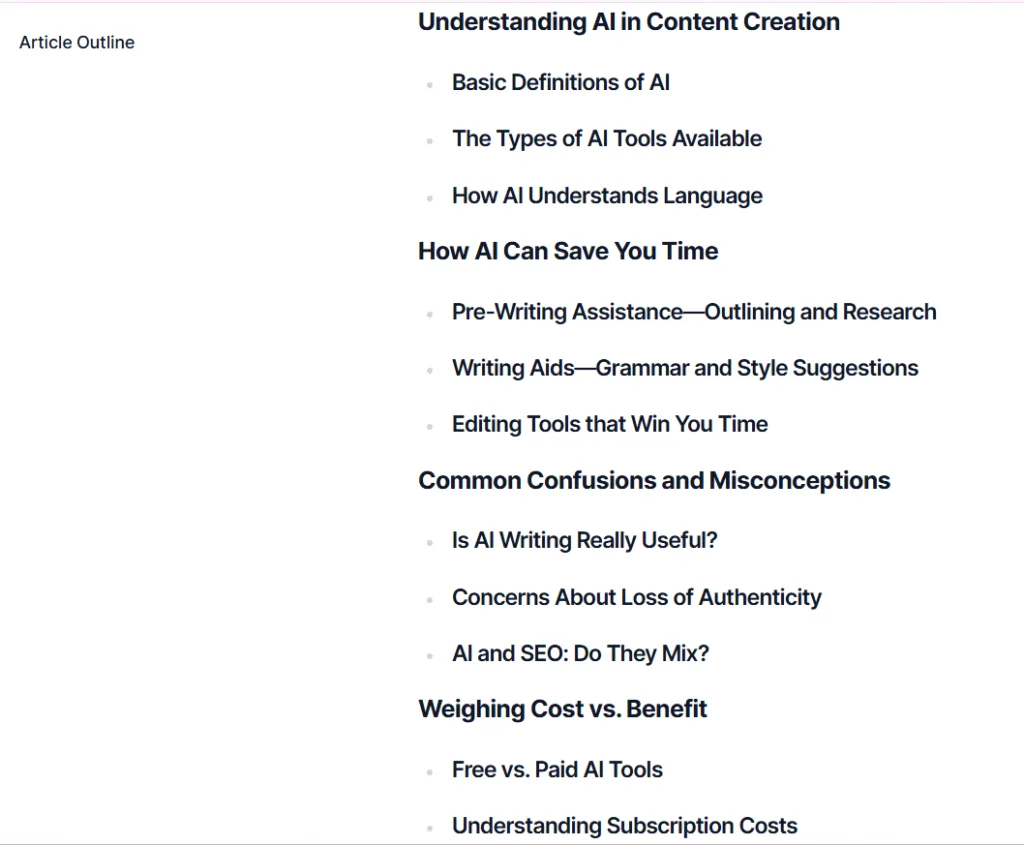
It included sections like:
- Basic Definitions of AI
- The Types of AI Tools Available
- How AI Understands Language
Those might work for a beginner AI explainer, but they were not the best fit for the post I wanted.
The outline needed more workflow-focused sections, like:
- How to use AI without asking it to do everything
- How to turn a rough AI draft into usable content
- How to add your own examples
- How to fix wording that sounds too stiff
- How to keep your voice in the final version
My Verdict
The Blog Outline Generator is good for getting unstuck. I wouldn’t follow the outline exactly, but I would use it as a starting point and reshape it around the reader’s real problem.
Score: 3.5/5
Typli.ai AI Paraphrasing Tool Test
Next, I tested the AI Paraphrasing Tool. This one mattered because rewriting is one of the features people use when AI content sounds off. I gave Typli one of my own paragraphs and asked it to rewrite it to sound clearer, more natural, and more human without changing the meaning.
The prompt I used:
“Rewrite this paragraph so it sounds clearer, more natural, and more human, without changing the meaning.”

What Worked
It preserved the main point, it also cleaned up the structure and turned part of the paragraph into a numbered list, which made it easier to scan.
What Didn’t Work as Well
It flattened my voice.
My original paragraph had lines like:
“The truth is, people aren’t just looking for faster content. They are looking for content that still feels real.”
The rewrite used words like:
- resonates
- grappling with
- comprehensive
- delves deeper
- ultimately
Those words made it sound more formal and less like me. This is also why I compare tools differently when I test them for writing. My ChatGPT vs Claude for blog writing comparison post looks closely at tone, structure, and editing time.
My Verdict
The AI Paraphrasing Tool could help with messy writing, but I would be careful using it on writing that already sounds natural. It may clean it up too much.
Score: 3/5
Typli.ai AI Editor Test
The AI Editor was another feature I wanted to test because editing is where AI can either help or completely change the feel of your writing. Typli’s AI Editor page says it can help with punctuation, readability, consistency, and tone adjustment.
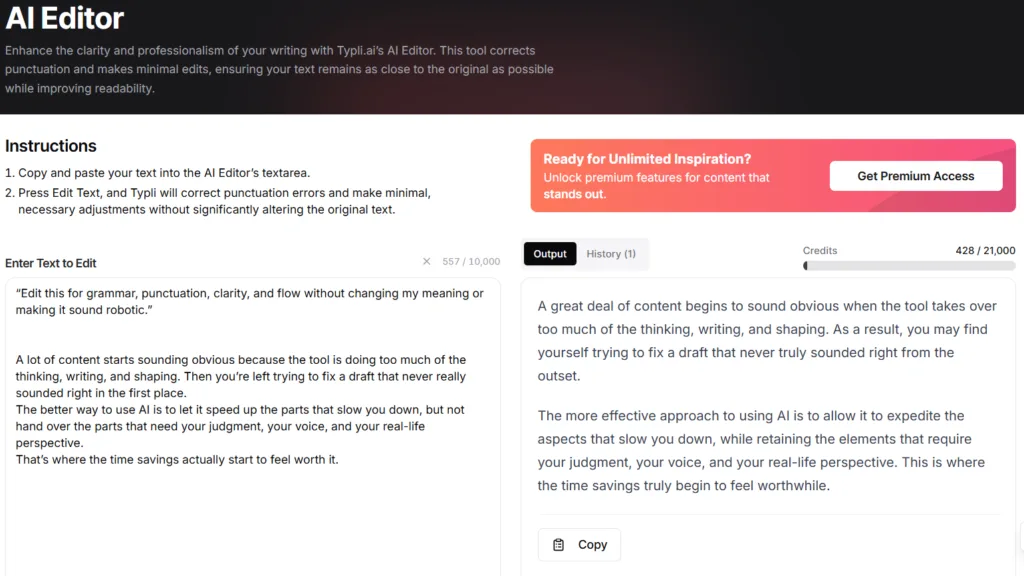
For my test, I asked it to edit a paragraph for grammar, punctuation, clarity, and flow without changing my meaning or making it sound robotic.
What Worked
The edited version was grammatically clean, it kept the basic meaning, and it was also fast and easy to use.
What Didn’t Work as Well
It changed the tone too much.
For example, it changed:
“never really sounded right in the first place” to “never truly sounded right from the outset.”
And it changed:
“speed up” to “expedite.”
That wording did not feel like something I would naturally say. The original was clearer and sounded more like me. The edited version was clean, but it felt too formal for the way I talk to my audience. I guess it all depends on what kind of tone you’re looking for.
My Verdict
I would use the AI Editor for basic grammar help, but I wouldn’t accept every change without checking it. If your writing already sounds like you, review the edits carefully.
Score: 3/5
Typli.ai AI Chat Workflow Test
For this test, I used AI Chat to see how Typli handled a small content workflow.
I asked it to take one topic and create:
- A short email intro
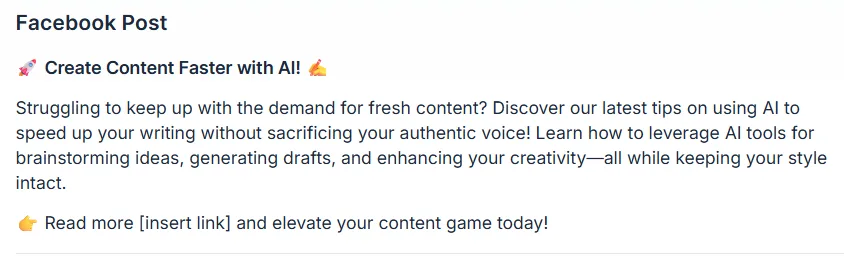
- A Facebook post
- A Pinterest pin description
The topic was:
“How to Use AI to Create Content Faster Without It Sounding Like AI“



What Worked
It created all three pieces quickly. That’s helpful when you want to turn one idea into different types of content. The Pinterest description was probably the strongest because it included keyword-friendly terms like AI tools, content creation, bloggers, marketers, and content creators.
What Didn’t Work as Well
The pieces sounded too similar. The email was too formal, the Facebook post was clear, but not strong enough. The Pinterest description had the best direction, but still needed work.
The main issue was that Typli created different formats, but didn’t fully adjust the tone for each platform. The email should feel more personal, the Facebook post should catch attention faster, and the Pinterest description should be searchable and click-focused.
My Verdict
AI Chat is useful for rough repurposing. I would use it to get ideas started, but I would still rewrite the final versions.
Score: 3.5/5
Typli.ai Image Generator Test
The AI Image Generator ended up being one of the more interesting parts of this review. Typli’s image page says its AI Image Generator can create images from text prompts using different models.
I tested it by asking for a 1200×628 featured image for a blog post called:
“How to Use AI to Create Content Faster Without Sounding Like AI“
I wanted a professional small business feel, laptop, notes, content draft elements, subtle workflow visuals, no robots, and colors close to my brand.
What Worked
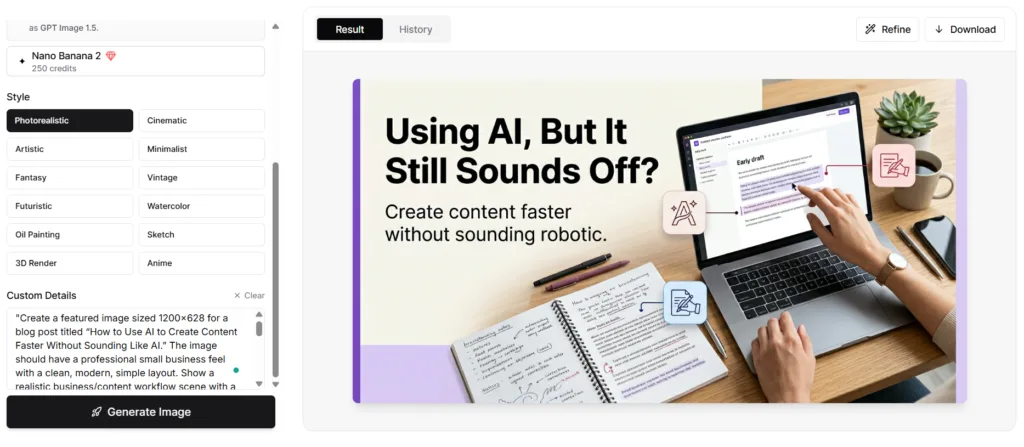
After upgrading my plan, the image was surprisingly usable. It matched my blog topic, the layout was clean, the text was readable, and the colors were close to my brand direction. I was really impressed with these results. would consider using it as a featured image or social graphic.
What Didn’t Work as Well
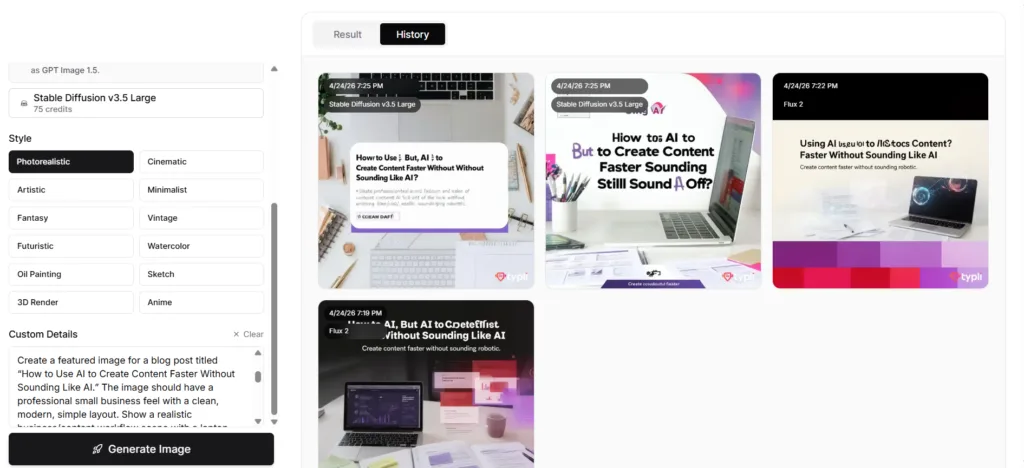
The free-credit images were not nearly as strong as the paid ones were. The earlier version with the free credits I had had more layout and text issues.
That matters because someone testing Typli with free credits may judge the image generator before seeing what it can do with better model access. So my recommendation is, if you want to use Typli for image generation, I suggest you upgrade your credits.
That was one of my biggest takeaways. The image generator looked much better after upgrading.
My Verdict
This was one of Typli’s stronger features after upgrading. I would not judge it only from the free-credit results.
Score: 4/5
Typli.ai Ease of Use
Overall, Typli was easy to use once I knew which tool I wanted. The individual tools were simple. You enter a prompt, click generate, and get an output.
The harder part is knowing where to start, because Typli has a lot of tools. A beginner may wonder whether to use AI Chat, Article Generator, AI Text Generator, Blog Outline Generator, or another specific tool.
The tool names are mostly clear, and Typli does a good job explaining what each one can do. The part that may be less obvious for beginners is knowing which tool to start with when you are trying to go from an idea to a finished piece of content.
My Verdict
Typli is beginner-friendly, but it works better when you go in with a plan and look around a bit to get familiar with how everything works before jumping in right away. If you open it and start clicking around randomly, it can feel like a lot. If you know the task you want help with, it is much easier.
Score: 4/5
Typli.ai Pricing and Credits for Content Creation
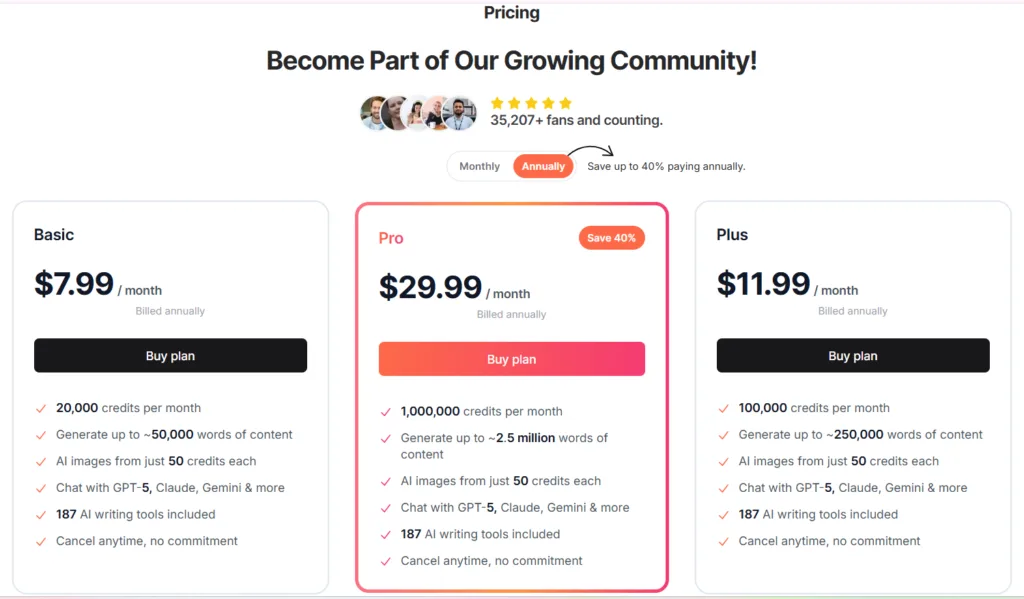
Typli uses a credit-based pricing system. It will first start you out with 1,000 free credits to try the platform out, but that can go pretty quickly depending on what you do on it.
At the time I checked, Typli’s pricing page listed:
- Basic: 20,000 credits per month
- Plus: 100,000 credits per month
- Pro: 1,000,000 credits per month
It also lists writing at about 2.5 words per credit and images starting at 50 credits each. I started with free credits first. After those ran out, I upgraded and paid for a month so I could keep using the platform.

What I Noticed
Writing tasks did not seem to burn through credits too fast. A 1,500-word article would likely use around 600 credits based on Typli’s words-per-credit estimate.
Images are different, though. Depending on the model, image generation can use credits faster. In my testing, the better image results came after upgrading, so the paid plan felt more useful for the image side.
Is The Pricing Fair?
For a solo business owner like myself, the Basic plan seems like the most realistic place to start after testing the free credits.
I would not suggest that most beginners jump straight to Plus or Pro unless they are creating a lot of content or using image generation heavily.
My Verdict
Typli can be worth paying for if you use several tools regularly. It’s less worth it if you only need one small feature.
Score: 4/5
What Worked Best and What Felt Weak
One of the clearest takeaways from this Typli.ai review for content creation was that some tools were better for planning and starting content than creating finished content.
The features I liked most were the AI Content Planner, Blog Title Generator, Blog Outline Generator, AI Chat for rough repurposing, and the AI Image Generator after upgrading.
The AI Content Planner stood out because it gave useful topic and keyword ideas, and the Image Generator was much better once I upgraded.
The weaker parts were the tools that changed the tone too much. That showed up most with the Article Generator, AI Paraphrasing Tool, and AI Editor. The Article Generator gave me a complete draft, but it sounded generic in places.
The Paraphrasing Tool and AI Editor were easy to use, but they made my writing sound more formal than I wanted.
That matters because small business owners don’t just need cleaner writing. They need content that still sounds like them.
Pros and Cons From My Typli.ai Review
Pros
- Easy to use
- Helpful for getting content started
- Good keyword and topic ideas
- Useful for blog titles and outlines
- Can help repurpose one idea into different formats
- The image generator was strong after upgrading
- Beginner-friendly once you know where to start
Cons
- Writing can sound generic
- Some tools over-polish your voice
- SEO help is useful, but still basic
- Lots of tools can feel like a lot at first
- Free image results may not show the tool at its best
- You still need to add your examples, opinions, and final edits
Who Typli.ai Is Best For & Who Should Skip It
This Typli.ai review for content creation is best for beginner bloggers, small business owners, affiliate marketers, and content creators who want help deciding if Typli fits the way they work.
It is also a good fit if you want one place for blog drafts, outlines, titles, meta descriptions, social content, and images.
I would skip it if you already have a strong workflow with ChatGPT, Claude, or Gemini and do not need the extra tool structure.
I would also skip it if you want advanced SEO research, deep competitor analysis, or finished writing that needs very little cleanup.
If you are wondering whether a general AI assistant is enough, my ChatGPT Plus review 2026 may help you compare the difference.
My Best Advice: Is Typli.ai Worth It for Content Creation?
Typli.ai is worth testing if you want one tool that can help with several parts of your content workflow, but I would not use it like a one-click content machine.
It is strongest for brainstorming, keyword ideas, outlines, rough drafts, titles, meta descriptions, repurposing content, and image ideas, especially after upgrading, but it’s not strong enough to replace your tone.
The best way to use Typli is to let it help you start, organize, and create the first version. Then you take over the parts that need you, like your opinion, examples, tone, final edits, and judgment.
This is also why I don’t think AI content is automatically good or bad. Google’s guidance on AI-generated content says the bigger issue is whether the final content is helpful, original, and made for people.
For me, that means I still check the output, add my own examples, and I make sure the final version is actually useful before I publish anything.
For beginners, I would start with the free credits first. If the workflow feels helpful, then the Basic plan is the one I would try before anything higher.
Final verdict
My final takeaway from this Typli.ai review for content creation is that Typli.ai is not perfect, but it is useful when you use it the right way.
The best features helped me plan, organize, brainstorm, and create starting points faster. The weaker features needed more cleanup, especially when they changed the tone of my writing.
For small business owners and beginner content creators, I would look at Typli as a support tool. Let it help you start, organize, and create first drafts and ideas, but don’t hand over your voice. That is still the part that makes your content worth reading.
If Typli sounds like it fits the way you create content, I would start with the free credits first and then see how it feels in your own workflow.
Related Posts That May Help
If you are still comparing AI tools or trying to build a better content workflow, these posts may help next.
Content Creation System for Beginners
How to Use AI to Create Content Faster Without Sounding Like AI
Canva AI Review or Is Canva AI Worth It
ChatGPT vs Gemini for Small Business
FAQ About Typli.ai
Yes, most of the tools are easy to use. The only tricky part is knowing which tool to start with because there are a lot of options.
Yes, Typli.ai can help create blog drafts, outlines, titles, and meta descriptions. I would use it for starting a blog post, but I would still edit the final version before publishing.
Typli.ai can help with SEO-related pieces like keyword ideas, meta descriptions, article structure, and titles. I would not use it as a full SEO research tool by itself.
Yes, Typli.ai includes an AI Image Generator. In my testing, the image results were much better after upgrading.
It depends on how often you create content. If you use several tools regularly, it can be worth paying for. If you only need one small feature, the value may not be as strong.
Want Better Results From AI Tools?
If there’s one thing this Typli.ai review made very clear, it’s that the tool can only do so much. When the prompt is too vague, it’s harder to get the kind of output you actually want. That’s why my free AI Prompt Toolkit can help you give AI better direction from the start.
It gives you simple prompts for blog ideas, outlines, captions, rewrites, and content planning, so you’re not starting from scratch every time or typing vague prompts that give you weak results.
You’ll also get my weekly AI tool reviews, comparisons, and online business tips to help you choose tools smarter and save time in your business.
Just fill out the form below.
We respect your privacy. You can unsubscribe at any time.
Thanks for reading. I hope this review helped you get a clearer idea of where Typli.ai may fit into your content workflow and where you still need to stay in control.

If this post helped you decide whether Typli.ai is worth testing, please share it with another business owner or content creator who is trying to figure out which AI tools are really worth their time.




Hi Meredith – I really enjoyed reading this review. Honestly, before this, I had not heard a whole lot about Typli.ai, so I appreciated that you actually rolled up your sleeves and tested it instead of just giving us the usual “this platform will change your life by Tuesday” type of review. That alone made this feel real and helpful. I also liked that you pointed out both the good and the not so good because sometimes AI reviews read like the software company wrote them while sitting in a room full of motivational posters and energy drinks.
What really stood out to me was your point about AI helping with the heavy lifting but still needing the person behind the keyboard to make the content sound human. I think a lot of people are chasing faster content while accidentally removing themselves from it completely. I also got a kick out of some of your examples where the AI tried just a little too hard to sound fancy. Nothing says “natural conversation” quite like words nobody has used since a college thesis in 1997. Seriously though, this was extremely helpful, practical, and easy to follow. I received a lot of value from it, especially since this platform was pretty new to me. Very nicely done and have a great week!
Hey Ernie!
I love how you said this. That’s exactly why I wanted to test it myself, rather than just repeating what the tool claims it can do.
Some AI tools look great on the surface, but once you use them in a real workflow, that’s when you start seeing what helps and what still needs a lot of cleanup.
And yes, the fancy wording made me laugh too. Sometimes AI tries so hard to sound professional that it forgets regular people don’t talk like that. LOL.
I’m really glad my review helped you, especially since Typli.ai was new to you. That’s always my goal with these posts. I like to make the tool easier to understand before someone invests a lot of time and money in it.
Thanks for stopping by and I hope you have a great week too!
Hi Meredith,
Like Ernie, I hadn’t really heard anything about that AI but I really liked the read.
One thing is for sure, we’re surrounded by all these tools to help us better manage the work we have to do but if we don’t take the time to review them and see if they are a good “fit” in our everyday life-work, we may be using them wrong and spending more time correcting instead of less time working.
You definitely bring the best out when you do these reviews, (avoids me doing the heavy lifting 🙂 ). All kidding aside, with the advent of AI, every facet of work is changing and we need to keep up with the program; if only for our sanity…
That being said, it’s a great disservice to our daily workload if we don’t look towards these tools to help us out. With your help, it makes it a lot easier!
Thanks!
Hi Marc,
Thank you so much! I really appreciate that, and yes, that’s exactly how I feel about AI tools too. They can be helpful, but only if they truly fit into the way we work. Otherwise, we can end up spending more time fixing what they give us than we would have spent doing it ourselves.
That is why I like testing them in real situations instead of just going by what the tool says it can do. AI is changing so much so quickly, and it can feel like a lot to keep up with. So if my reviews can make that a little easier and save you some of the heavy lifting, then I am happy to do it.
Thanks again for your kind words! 😊