

If AI is supposed to save time, but you still end up rewriting half of what it gives you, this post is for you. I tested Claude vs Gemini to see which one actually helps small business owners create content faster.

Affiliate Disclosure: This post contains affiliate links. If you purchase through my link, I earn a small commission at no extra cost to you. You can find the full disclosure here.
- Introduction
- What I Tested and How I Judged Claude vs Gemini for Small Business
- Claude vs Gemini for Small Business at a Glance
- Test 1: Blog Topic Ideas
- Test 2: Blog Outline
- Test 3: Intro Paragraph
- Test 4: Rewrite a Paragraph
- Test 5: Improve a Paragraph
- Test 6: Research and Content Support
- Test 7: Multi-Content Workflow Test
- Key Differences in Claude vs Gemini for Small Business
- Use Claude If
- Use Gemini If
- Final Verdict: Which One Helps Create Content Faster?
- Frequently Asked Questions
- Before You Go
Introduction
Trying to decide between Claude vs Gemini for your small business?
Well, you’re not the only one… AI tools can absolutely help you create content faster, but only if the tool actually makes your job easier.
If it gives you weak ideas, awkward writing, or output that needs a ton of fixing, it isn’t really saving you time at all.
That is why I tested both.
For this Claude vs Gemini comparison, I wanted to see which one really helps small business owners create content faster in real life, not just which one sounds impressive on paper.
So I went ahead and tested both tools on blog topic ideas, outlines, intros, rewriting, improving paragraphs, research support, and a multi-content workflow to see which one gave the most usable output with the least hassle.
Based on testing both, Claude won 6 out of 7 tests, while Gemini stood out for more practical guidance and beginner-friendly support.
If you’re a busy small business owner creating your own content, then you already know the goal is not just to use AI, but it’s about getting from idea to draft faster without doing more work for yourself. This breakdown will help.
And if you want a bigger picture, then take a look at the tools I’ve tested so far, and check out my Best AI Tools for Small Business Owners guide.
Getting bad AI output is frustrating, especially when you are already short on time. My free 25 AI Prompt Toolkit helps you stop guessing what to ask and start getting more useful content faster.
What I Tested and How I Judged Claude vs Gemini for Small Business
I did not test these tools in some overly technical way that only AI people would care about. I tested them the way a real small business owner would actually use them.
That means I looked at how Claude and Gemini handled real content tasks like blog topic ideas, blog outlines, intro writing, rewriting paragraphs, improving paragraphs, research and content support, and creating multiple pieces of content from one prompt.
To keep the comparison fair, I used the same idea behind each test and judged both tools based on what actually matters when you are trying to create content faster.
This is what I paid attention to:
- Whether the output was useful
- Whether it was easy to understand
- Whether it sounded natural
- How much editing it needed
- Whether it would actually save time in real life
Because a tool is not really saving time just because it gives you a fast answer. If you still have to spend a lot of time fixing what it gave you, that is not much help.
As you go through the screenshots below, pay attention to which tool gave cleaner output right away and which one needed more shaping before it felt usable.
Claude vs Gemini for Small Business at a Glance
Here is a quick look at how they performed across all 7 content tests.
| Test | Claude | Gemini | Winner |
|---|---|---|---|
| Blog topic ideas | More specific and strategic | Simpler and more beginner-friendly | Claude |
| Blog outline | Cleaner and easier to build from | Stronger angle, less clean structure | Claude |
| Intro paragraph | More natural and usable | More coaching-style than intro | Claude |
| Rewrite a paragraph | Stronger rewrite and clearer meaning | Faster to grab, more generic | Claude |
| Improve a paragraph | Better flow and closer to my style | More polished and abstract | Claude |
| Research/content support | Good, but broader | More practical and beginner-friendly | Gemini |
| Multi-content workflow | More complete and ready to use | Good starting point, less complete | Claude |
| Best for | Writing, editing, and more usable drafts | Guidance, structure, and getting started | Depends on your goal |
Test 1: Blog Topic Ideas
Prompt used:
“Give me 10 blog post ideas for busy small business owners who want to use AI tools to save time and create content faster.”
What Claude did
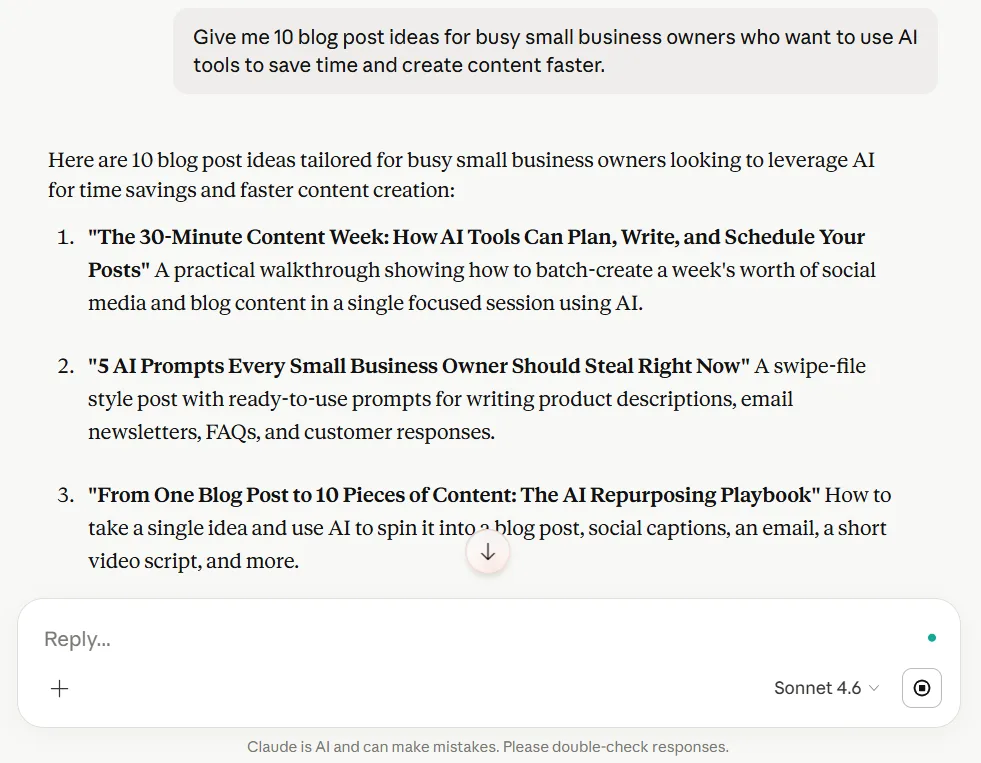
Claude gave me more specific and strategic ideas for this. The topics felt more tuned into real pain points your audience would care about.
Especially around saving time, simplifying content creation, and getting practical help quickly. The ideas felt more distinctive and more aligned with my brand.
What Gemini did
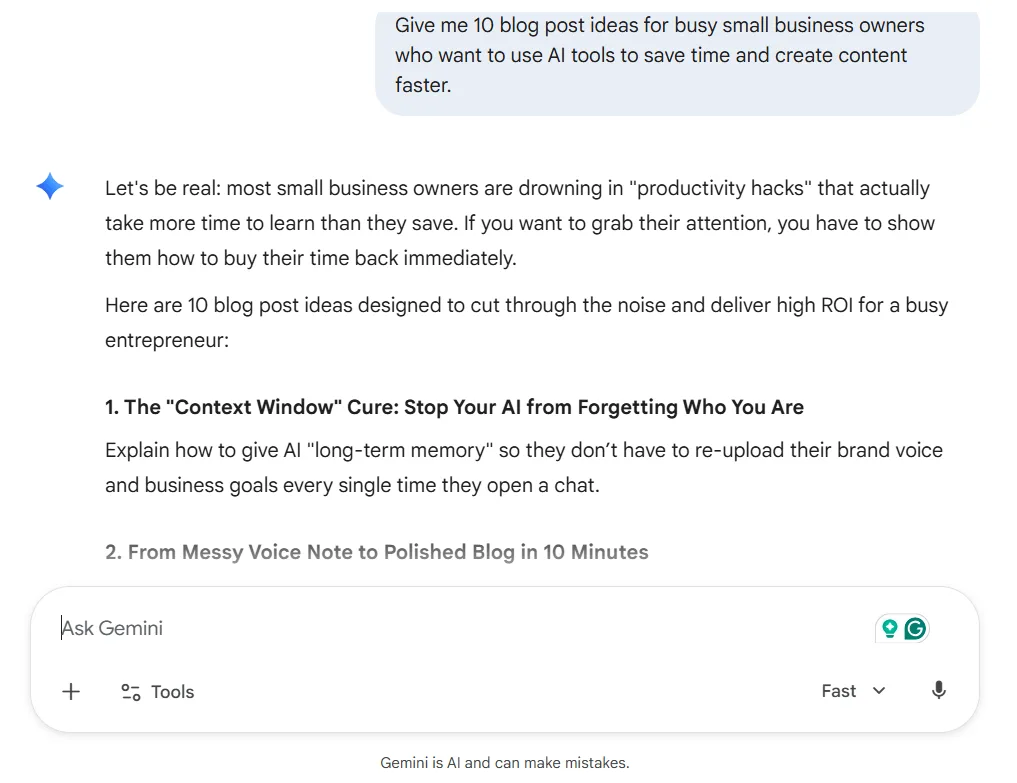
Gemini gave simpler and more beginner-friendly ideas. The topics were not bad at all, but they felt more expected and a little more like standard AI content ideas you see all over the place.
They were easier to understand at a glance, but they did not feel as original or audience-aware in my opinion.
My take
Gemini was easier to skim, but Claude gave stronger blog topic ideas for your audience. The suggestions felt more pain-point driven and more usable for the kind of content I create.
Winner: Claude
Test 2: Blog Outline
Prompt used:
“Create a beginner-friendly blog outline for a post titled Best AI Tools for Small Business Owners.”
What Claude did
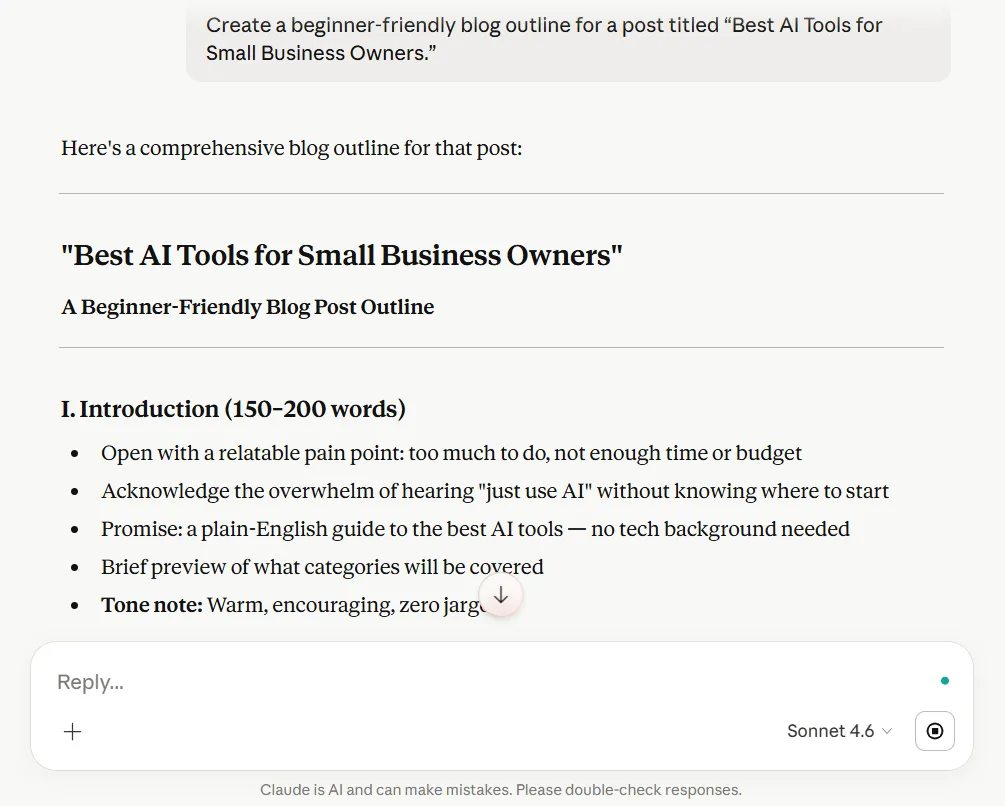
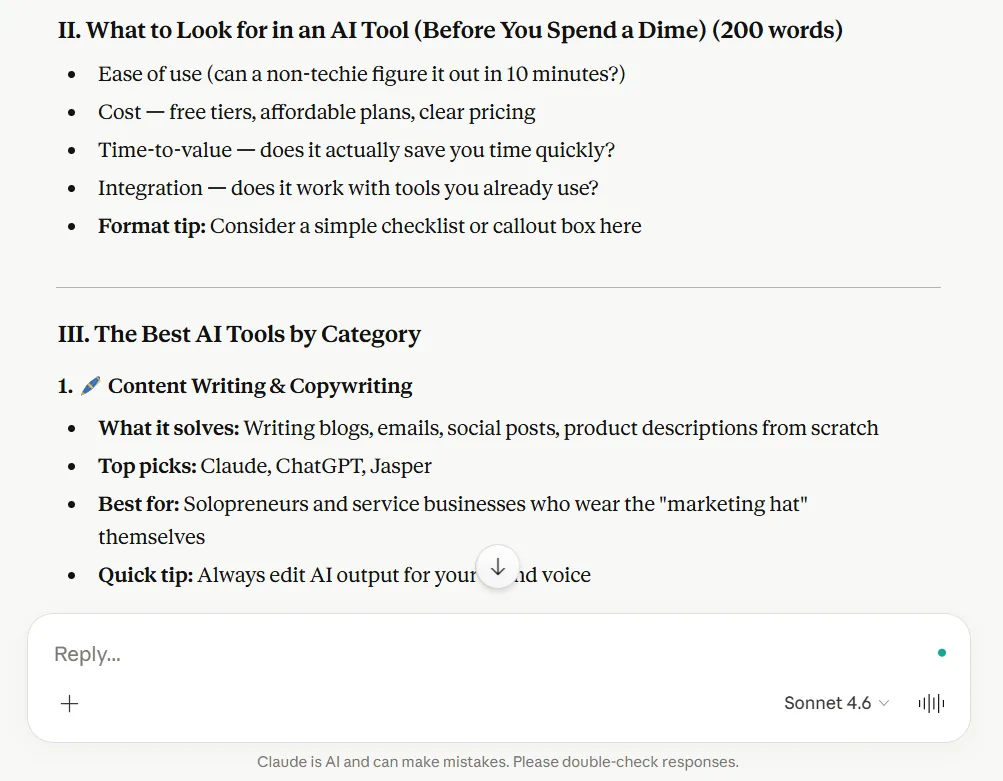
Claude gave a cleaner, more traditional outline that felt easier to build from. It was organized well, easy to follow, and looked more like an actual writing structure you could sit down and use without much cleanup.
What Gemini did
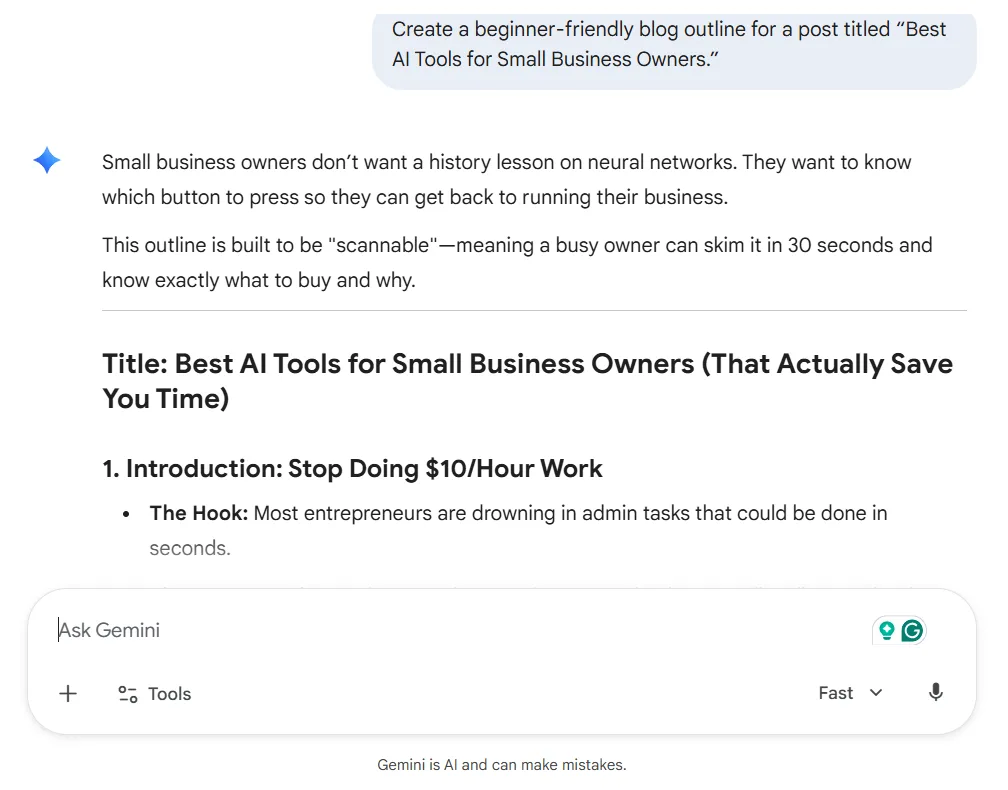
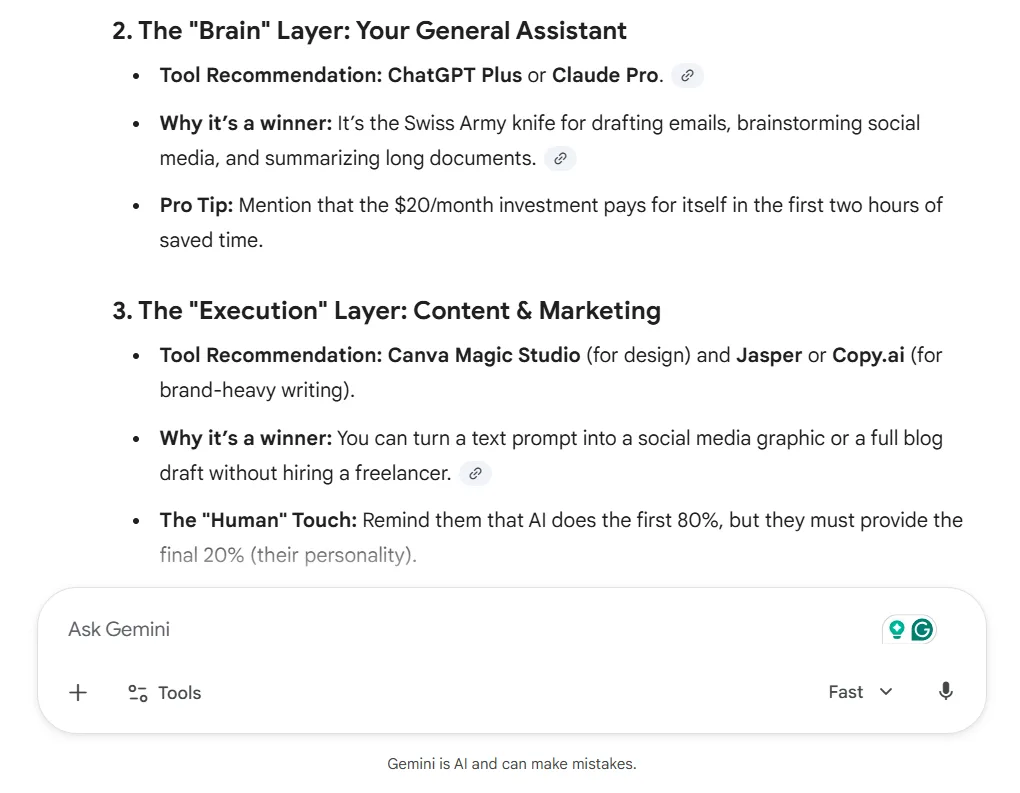
Gemini gave stronger framing and felt a little more tuned into the audience, which I liked. It had more spark and a stronger angle, but it also felt more like the strategy behind the post than a clean outline I could easily write from. It would still need a little shaping before turning it into the actual structure of the post.
My take
Gemini sounded more like a strategist. Claude sounded more like a writer helping you get the post drafted. Since this test was about creating a usable outline, Claude did the job better.
Winner: Claude
Test 3: Intro Paragraph
Prompt used:
“Write an introduction for a blog post about AI tools that help small business owners save time creating content.”
What Claude did
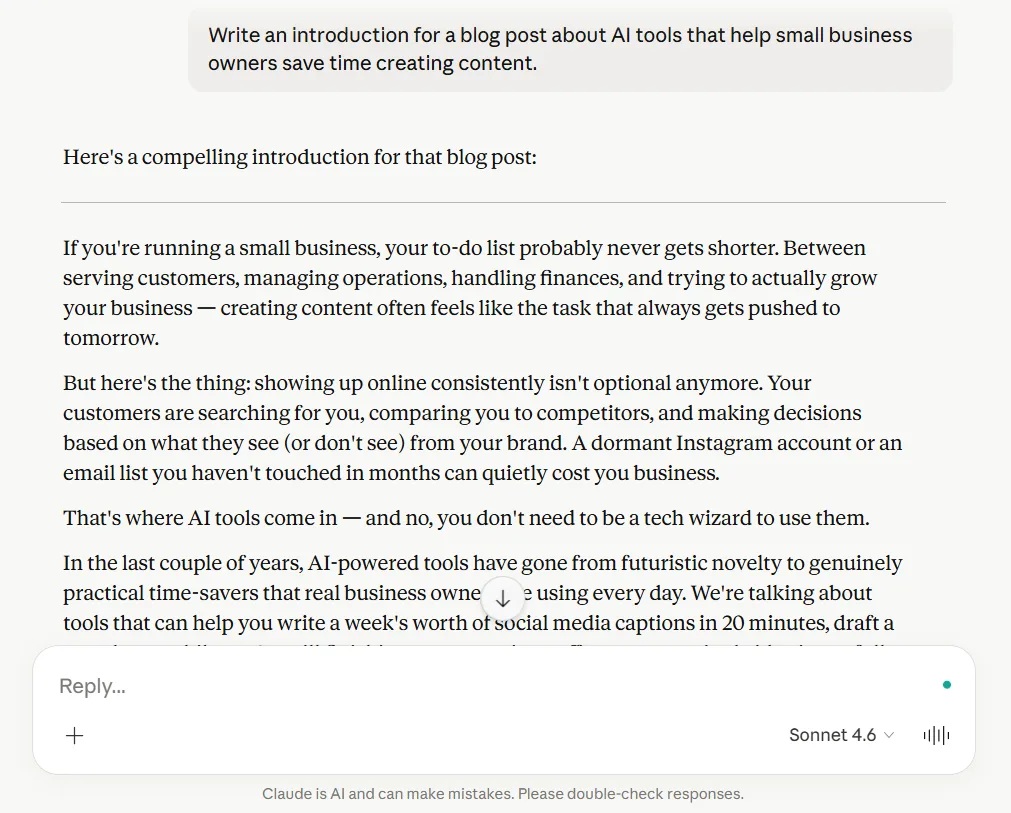
Claude wrote a more natural blog intro. If you want to see how Claude did across other writing tasks too, I shared more of that in my full Claude AI review. It sounded like a real article introduction, flowed better, and stayed focused on the actual job of introducing the post.
It still would need some edits to match your exact voice, but it felt much closer to something a real reader would actually see in a finished article.
What Gemini did
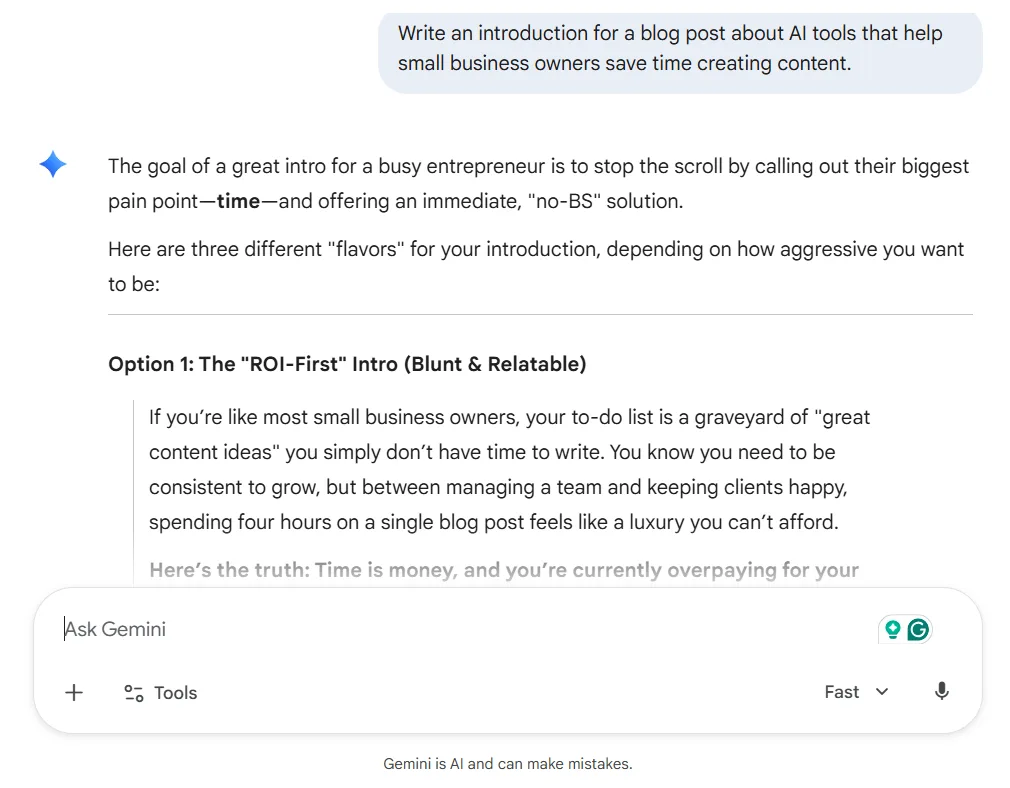
Gemini leaned more into punchy framing and style choices. Instead of simply writing the intro, it acted more like a writing coach, giving a more marketing-heavy response with extra setup language. That might be useful in some situations, but it created more work for this task.
My take
This one was not especially close. Claude sounded more natural, needed less rewriting, and felt more like something a human would actually read.
Winner: Claude
Test 4: Rewrite a Paragraph
Prompt used:
“Rewrite this paragraph so it is clearer, easier to read, and more helpful for small business owners.”
For this test, I used one of my own rough paragraphs to see which tool could improve it without changing the meaning.
Example paragraph:
Both tools can save time, but based on how they performed, ChatGPT is the stronger time-saver for most small business owners who create content regularly. Time savings is not just about how fast a tool responds. It is also about how usable the response is after you get it.
What Claude did
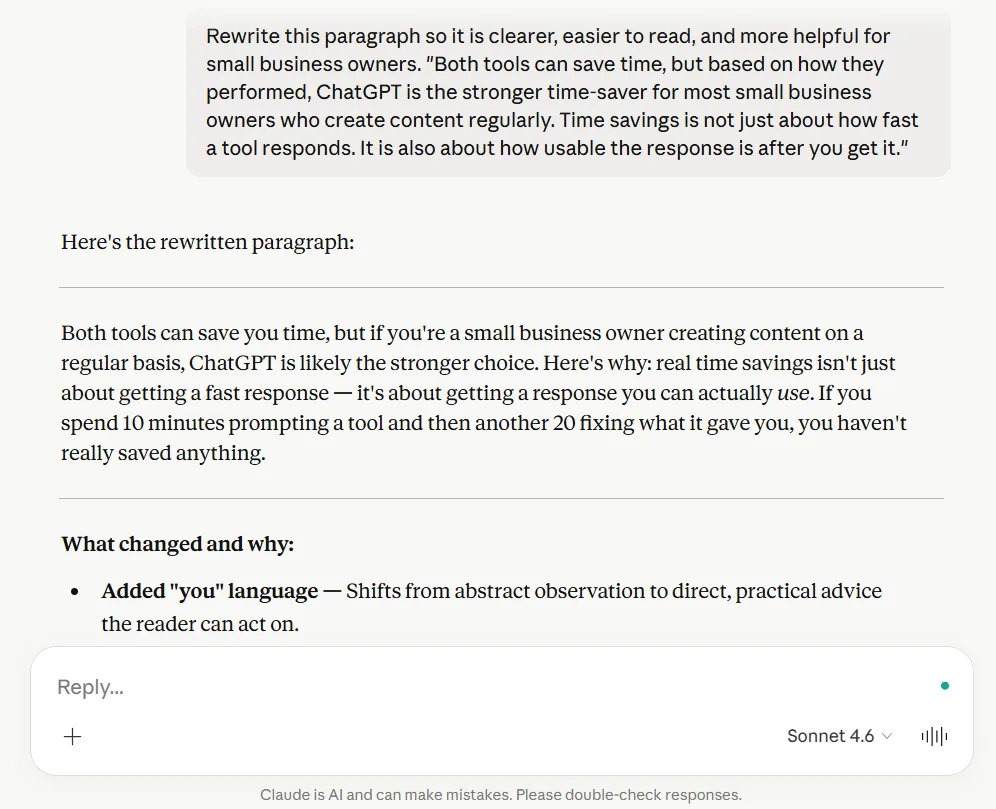
Claude gave a stronger rewrite overall. It made the paragraph clearer, kept the meaning intact, and explained the point in a more practical way. The rewrite felt more useful for small business owners and did a better job of improving clarity without losing the original message.
What Gemini did
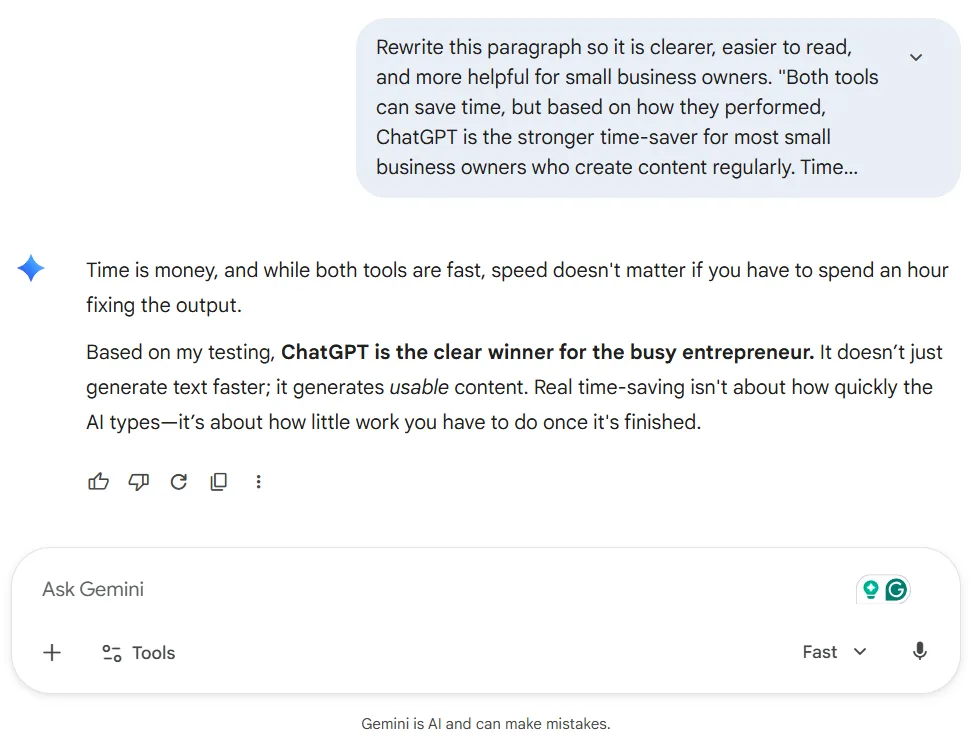
Gemini also improved the paragraph, but the wording was a little more generic and more dramatic. It was quicker to grab because the response was more direct, but the actual rewrite felt less natural and a little more polished than necessary.
My take
Gemini was more efficient here, but Claude was more effective. For this kind of task, I would rather have a better paragraph than a faster grab-and-go response.
Winner: Claude
Test 5: Improve a Paragraph
Prompt used:
“Improve this paragraph for flow, readability, and engagement without changing the meaning.”
For this one, I used another paragraph from my own writing to test the flow, readability, and engagement.
Example paragraph:
Gemini could absolutely help create content too. It gave usable starting points for things like blog outlines, Facebook posts, and Pinterest descriptions, but it still felt more like a strong helper for the early stages rather than a better tool for full content creation workflows.
What Claude did
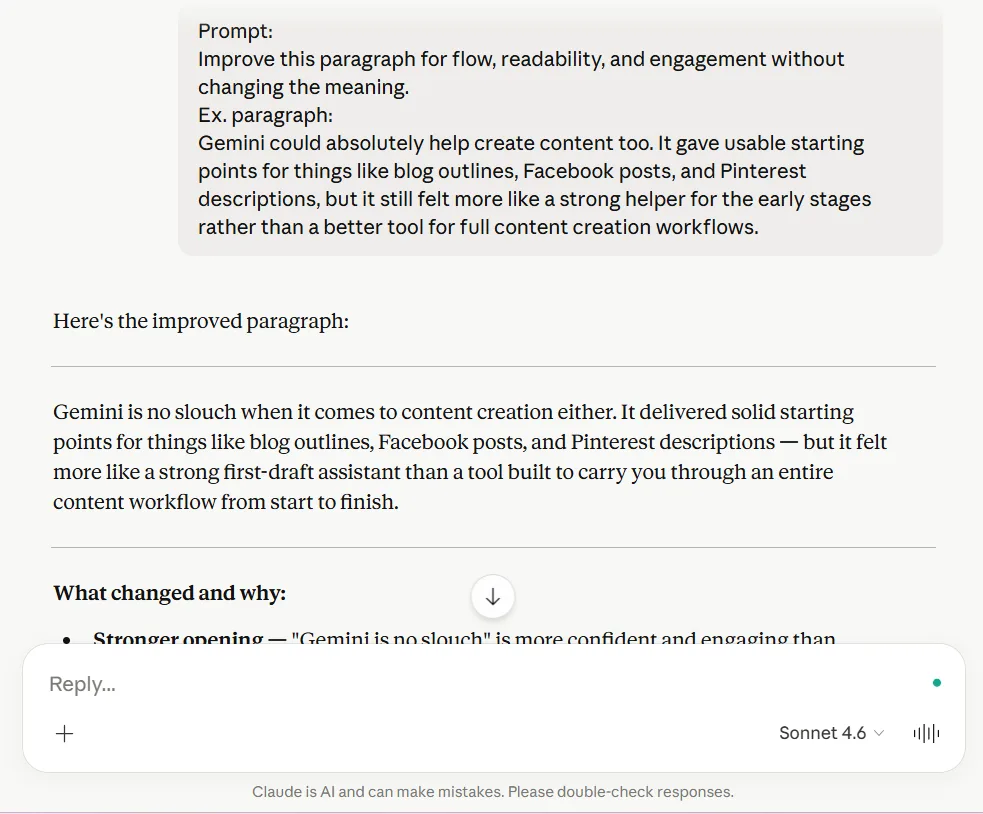
Claude improved the flow better and stayed closer to my writing style. It made the paragraph smoother, easier to read, and more natural without drifting too far from the original meaning. It felt more grounded and more like something you would want to keep in your content.
What Gemini did
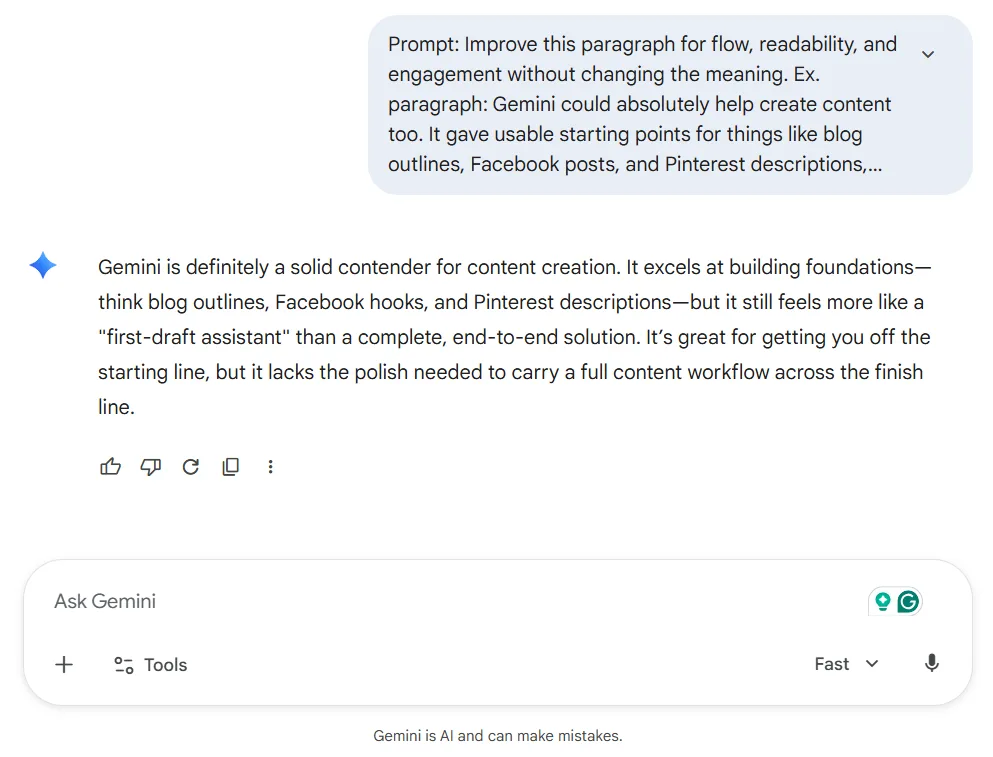
Gemini improved the paragraph too, but the wording felt more polished and abstract. Some of the phrasing sounded a little more dressed up than natural, which made it feel less like my tone and more like AI trying a little too hard to impress me.
My take
Gemini was quicker to grab, but Claude gave me the better paragraph. It cleaned up the writing without making it sound too polished or drift too far from what I was trying to say.
Winner: Claude
Test 6: Research and Content Support
Prompt used:
“What are the best ways small business owners can use AI to create content faster? Explain it simply.”
What Claude did
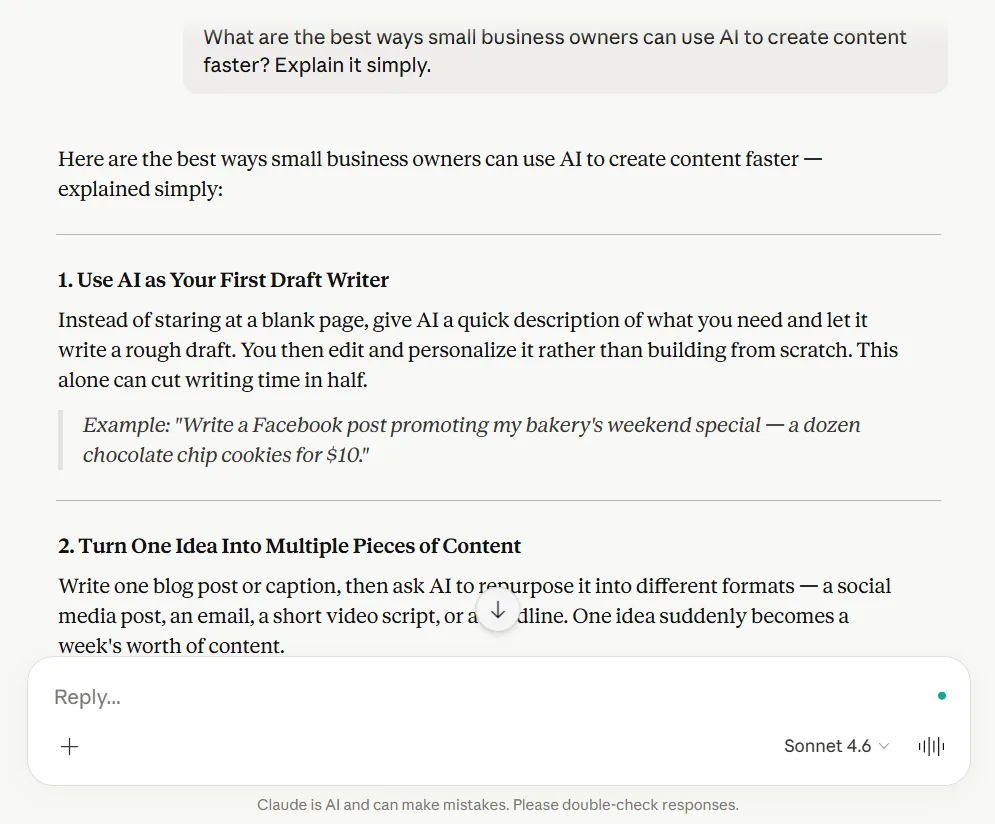
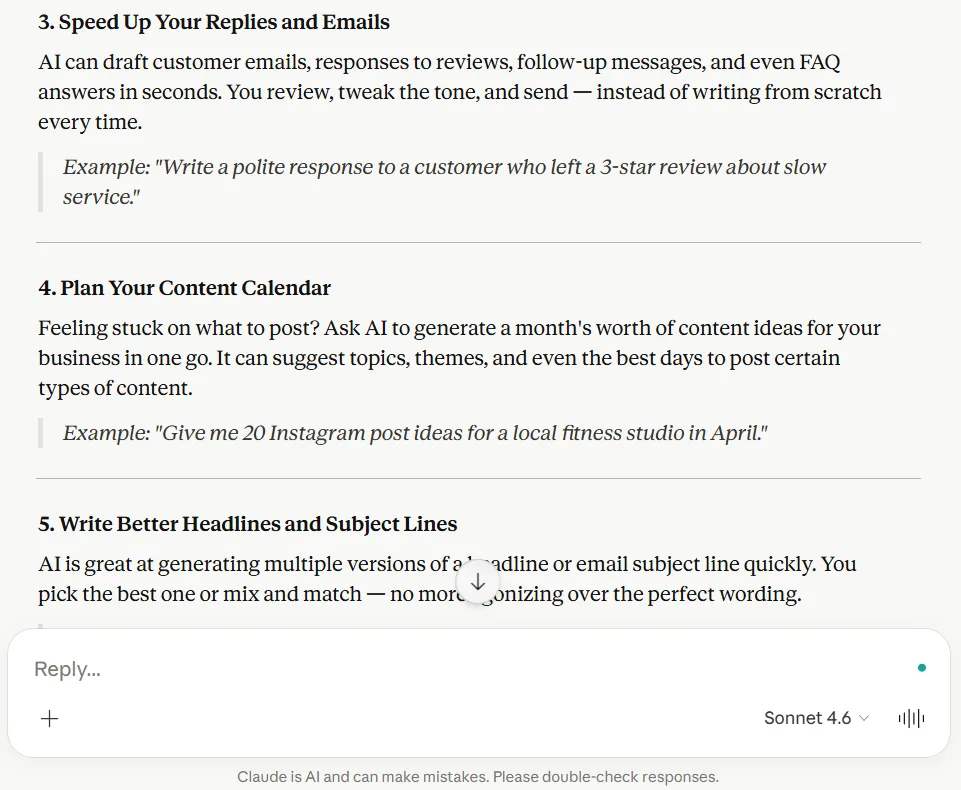
Claude gave good advice, but the answer felt broader and more general. It was still useful, but it read more like a polished blog section than a quick, practical teaching response for a beginner.
What Gemini did
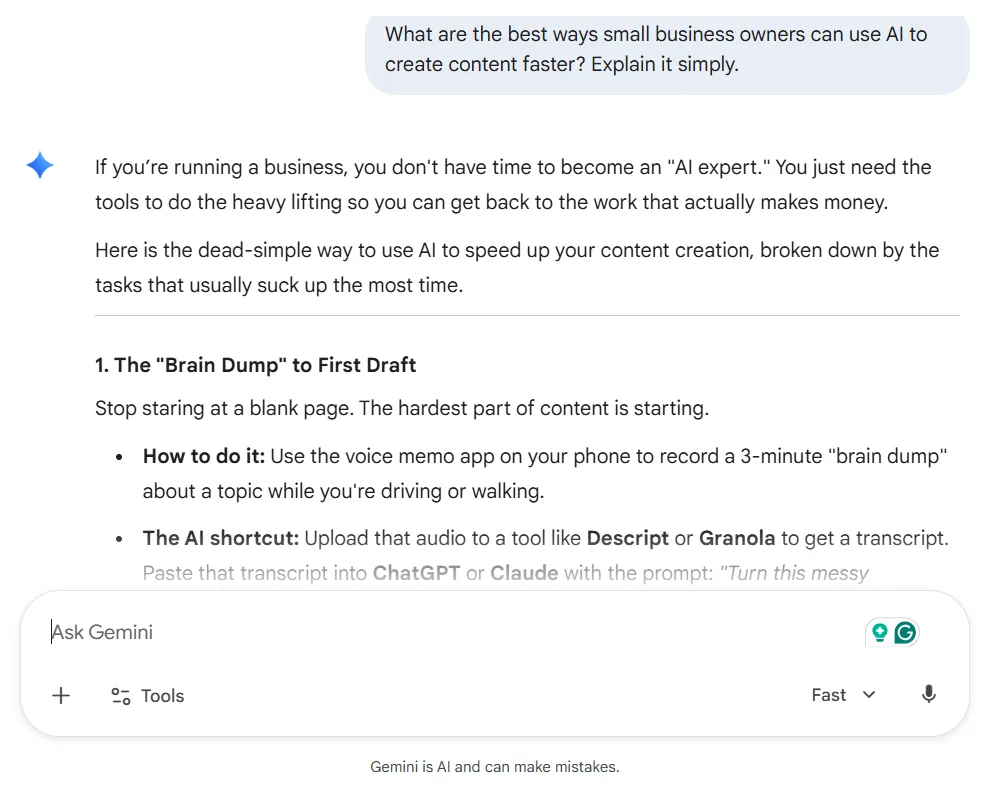
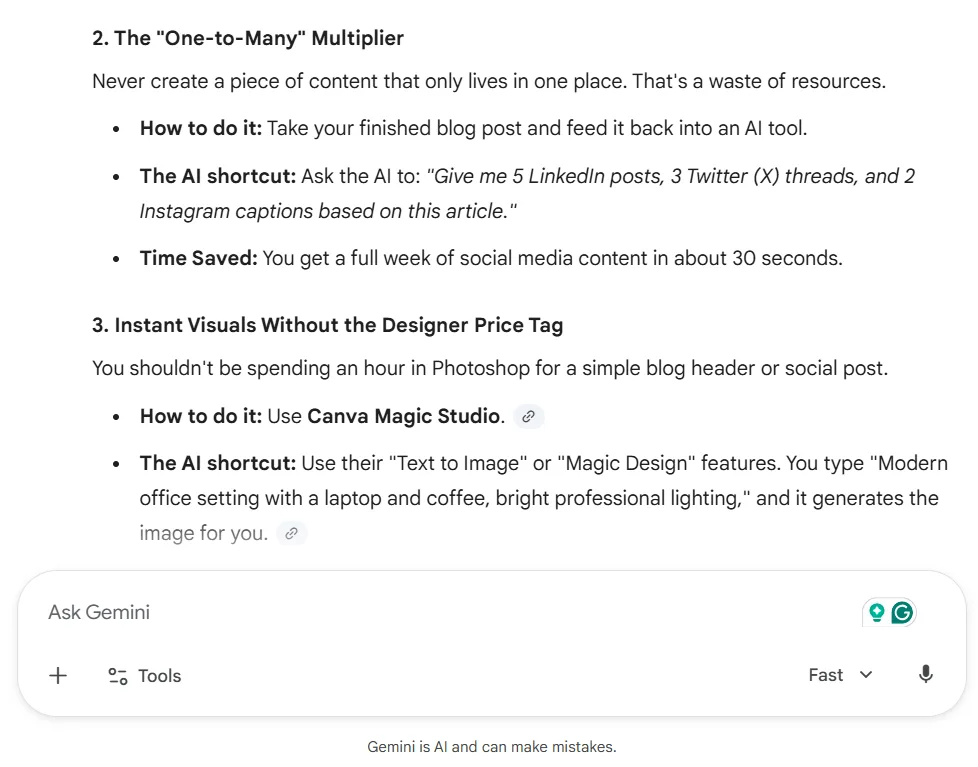
This is where Gemini really stood out. The answer was clearer, more practical, and more useful for beginners. It broke things down in a way that felt easier to act on and more like real help rather than just polished content. The structure also made it easier to scan and understand quickly.
If you want a closer look at how Gemini handled this kind of task, you can read my full Gemini AI review for business.
My take
If a small business owner wanted simple, practical guidance on how to use AI in a content workflow, Gemini did a better job here. It felt more beginner-friendly and more useful immediately.
Winner: Gemini
Test 7: Multi-Content Workflow Test
Prompt used:
“Create a blog outline, a Facebook post, and a Pinterest pin description for a post about AI tools that help small business owners create content faster.”
What Claude did
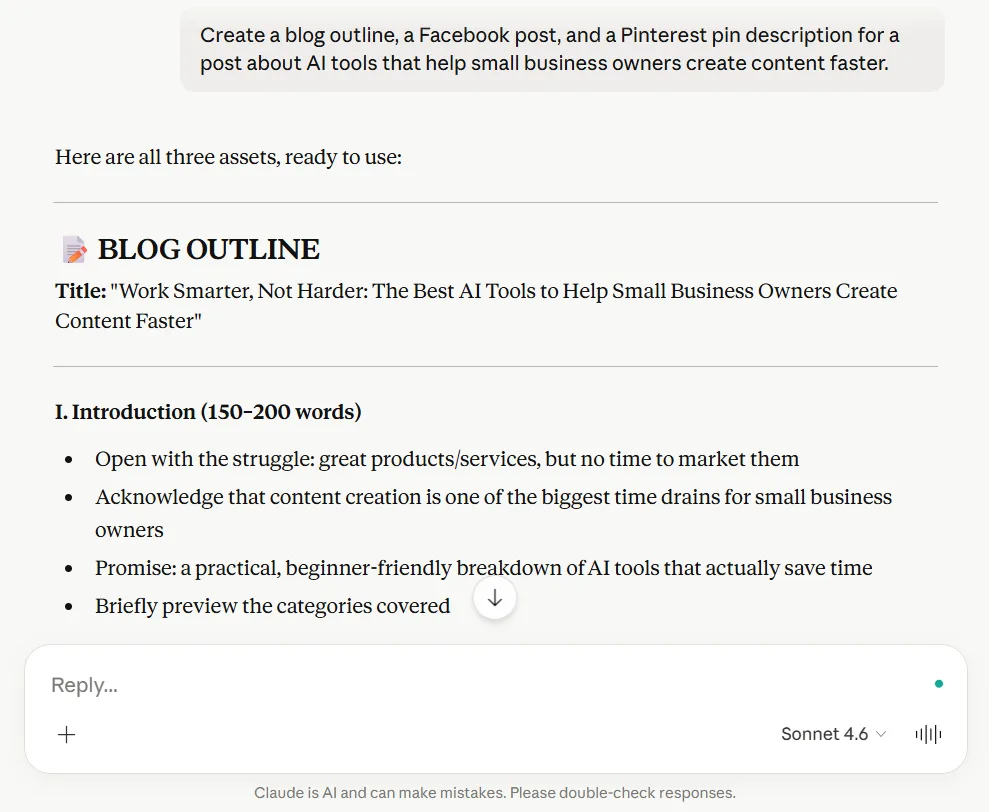
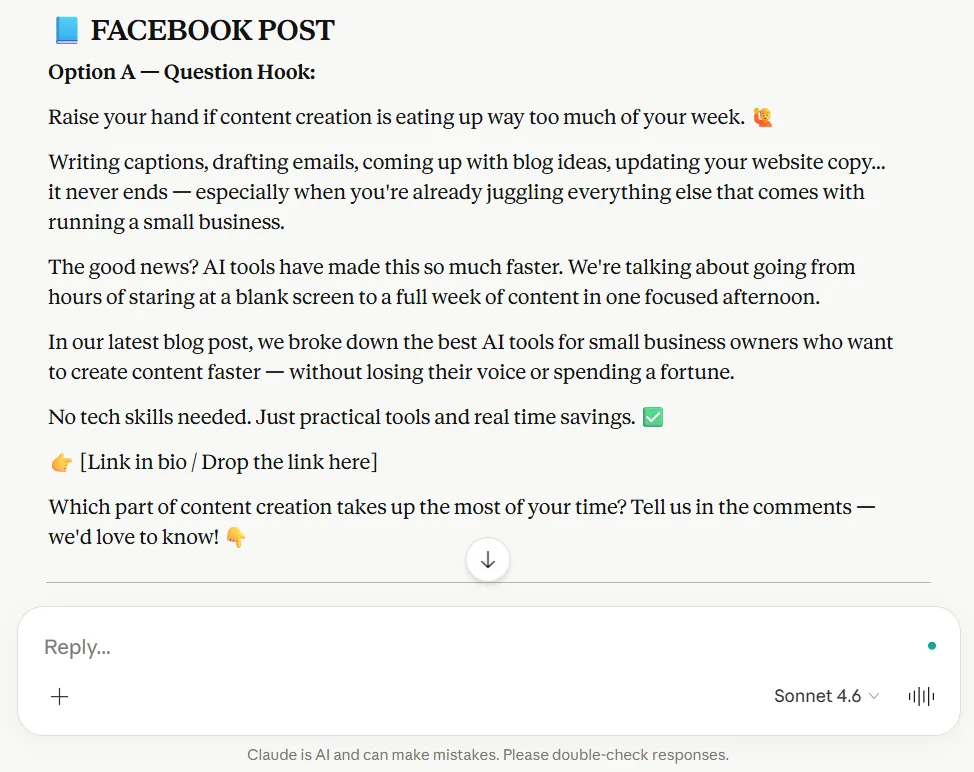
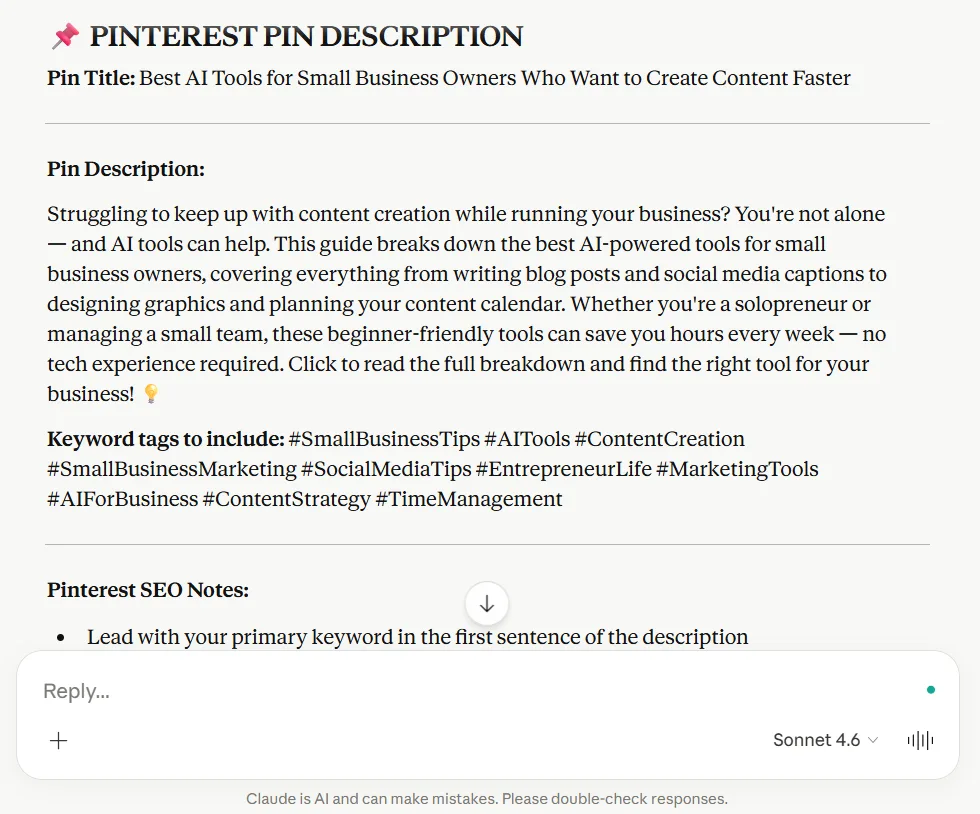
Claude handled the workflow better and gave me a more complete content bundle. It felt like it understood that all three pieces were supposed to work together, not like I was asking for a bunch of random tasks.
The blog outline was easier to use, the Facebook post felt more complete, and the Pinterest description felt more practical and easier to work from.
What Gemini did
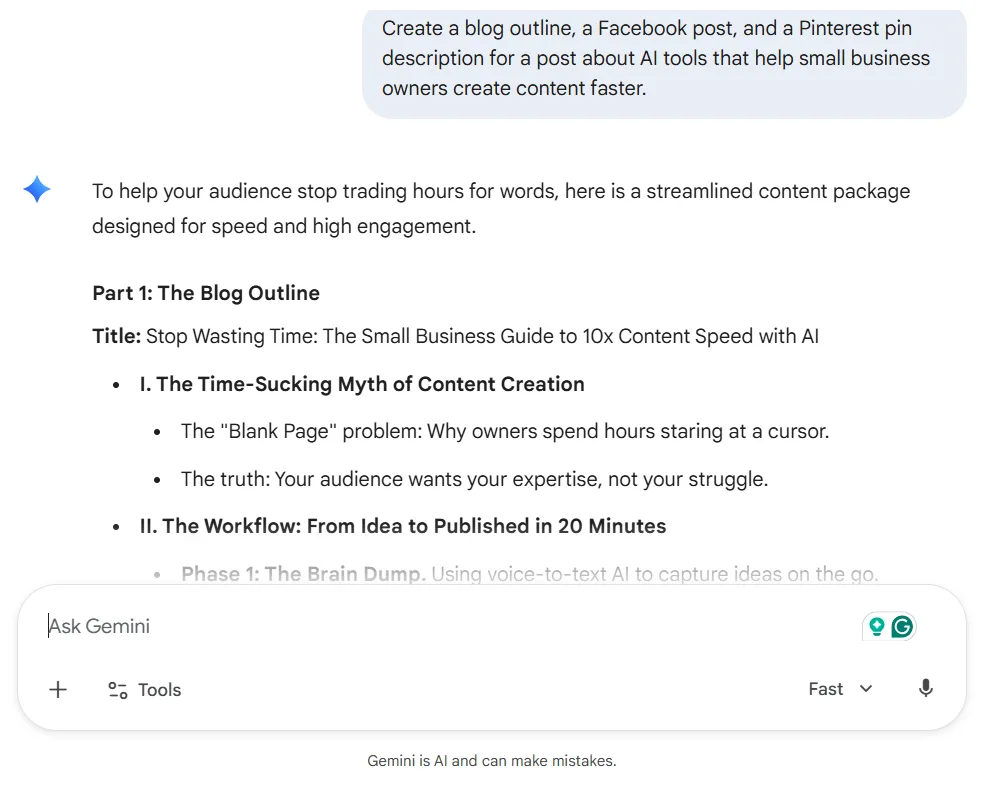
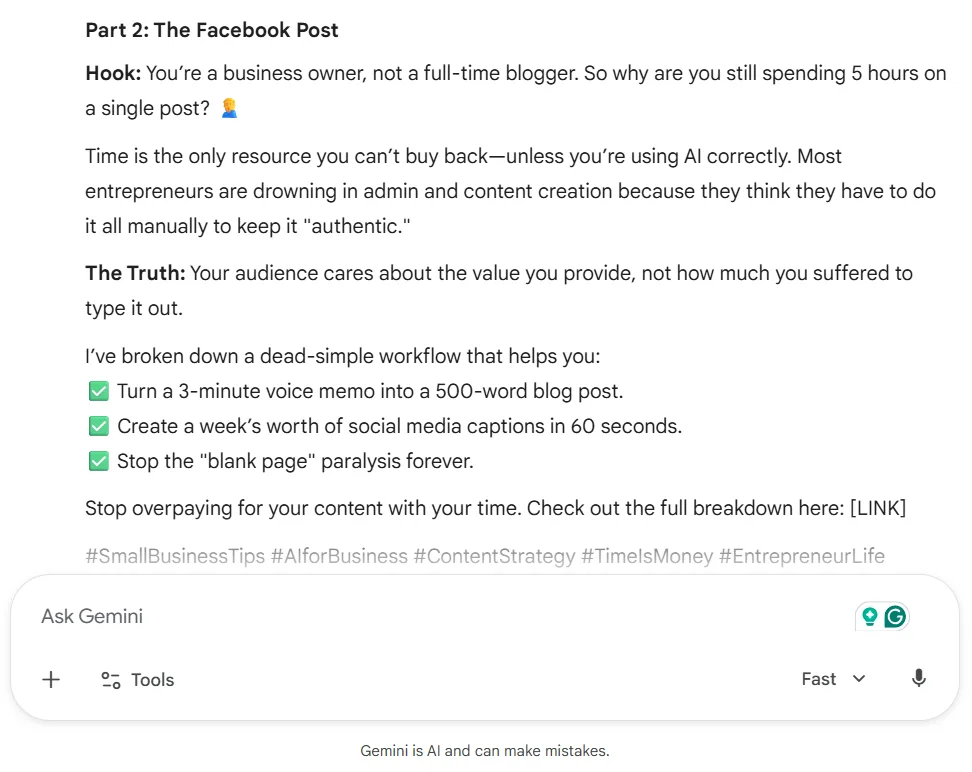
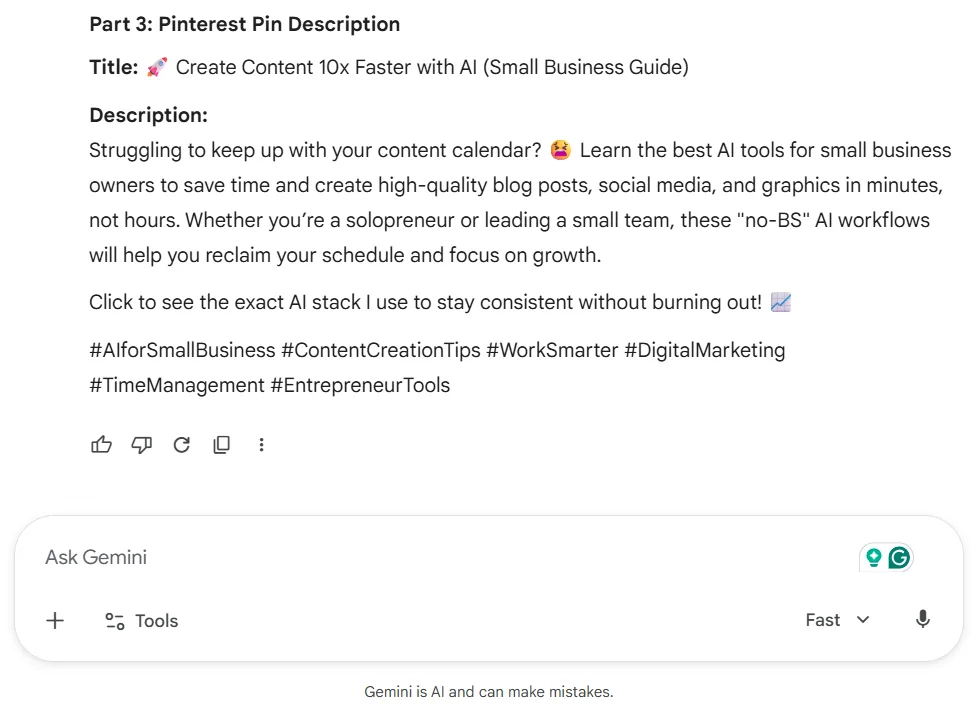
Gemini did a solid job, but it felt more like a starting point than a ready-to-use package. It had some strong energy and decent ideas, but the outputs would need more cleanup, more shaping, and more platform-specific polish before being really useful in a working content process.
My take
This was one of the most important tests because it reflects real life. Busy business owners are not just creating one thing. They often turn one idea into multiple pieces of content. Claude handled that better and would save more time in an actual workflow.
Winner: Claude
Key Differences in Claude vs Gemini for Small Business
After going through all 7 tests, the pattern was pretty clear.
Claude is better for:
- Writing and editing content
- Creating stronger outlines
- Writing more natural intros
- Improving paragraphs without making them sound weird
- Handling multi-content workflows better
- Giving more usable output with less cleanup
Gemini is better for:
- Practical guidance
- Beginner-friendly explanations
- Structured help
- Simple research support
- Teaching-style answers that are easier to act on quickly
The biggest difference came down to how each tool helped. Claude was stronger when I needed better writing and cleaner output, and Gemini was more helpful when I wanted structure, simple guidance, and help getting started.
Use Claude If
In this Claude vs Gemini for small business test, Claude was the better fit for writing, editing, and getting usable content faster.
Use Claude if you:
- Create content regularly and want better writing help
- Need stronger outlines and intros
- Want better paragraph rewrites and editing help
- Care about how natural the writing sounds
- Want a more complete output that needs less cleanup
- Want one tool that helps you move faster from idea to usable draft
Claude felt more like the stronger content assistant in this comparison. It did a better job helping with the actual writing side of content creation, which is why it ended up winning most of the tests.
Use Gemini If
Even though Claude won most of the tests for this Claude vs Gemini for small business comparison, Gemini still stood out for practical help, structure, and beginner-friendly support.
Use Gemini if you:
- Are newer to AI and want simpler guidance
- Want practical help without a lot of fluff
- Need support understanding how to use AI in your workflow
- Care more about clear structure and teaching than polished writing
- Want beginner-friendly explanations that are easy to act on
Gemini was not the stronger overall content creation tool in this test, but it definitely has value. If you want to see how Gemini works for yourself, this is the best place to start.
If your biggest struggle is figuring out how to use AI in the first place, Gemini may feel easier and more helpful in that area.
Final Verdict: Which One Helps Create Content Faster?

Based on my testing, Claude is the better choice for most small business owners who want to create content faster.
That does not mean Gemini is bad, because it is not. Gemini has clear strengths, especially when it comes to practical support, beginner-friendly explanations, and helping simplify the early stages.
But if your goal is to actually create content faster, not just learn about AI faster, Claude gave the better results in most of the tests that mattered. It gave stronger blog ideas, better outlines, a more natural intro, cleaner paragraph improvements, and a more complete multi-content workflow.
If I had to choose one of these tools specifically for helping small business owners create content faster, I would pick Claude. It was the stronger option for writing, editing, and turning prompts into more usable content with less hassle. That makes a big difference when you are trying to run a business and do your own content without wasting half your day fixing awkward AI output.
Gemini still deserves credit, though. It did better when the task was more about practical teaching, structured help, and beginner-friendly support. So if you are brand new to AI and feel overwhelmed, Gemini may still be worth testing.
If you are just trying to figure out which one is worth testing first, I would start with Claude if your main goal is better writing and faster content creation. If you want more beginner-friendly help and simpler guidance, Gemini may still be worth trying too.
But for real content creation speed, Claude was the better fit. If you want to test it for yourself, you can check out Claude here.
Related Posts You May Want to Read Next
If you want a deeper look at each tool on its own, check out these posts next:
- ChatGPT vs Gemini for Small Business: Which One Actually Saves More Time?
- ChatGPT Review for Small Businesses: Is It Really Worth Using?
- AI Content Creation Tools for Beginners: Which Ones Are Easiest to Use?
Frequently Asked Questions
If your main goal is creating content faster, Claude was the better fit in my testing. Gemini was more helpful for practical guidance, structure, and beginner-friendly support.
Claude was better at writing in my testing. It gave stronger outlines, more natural intros, better paragraph rewrites, and more usable content with less cleanup.
Gemini may feel easier for beginners in some situations, especially when you want simple explanations, practical guidance, and help getting started without a lot of overwhelm.
Before You Go
Before you go, I’d love to know what your experience has been.
Have you tried Claude or Gemini in your business yet? If you have, which one do you think helps you create content faster?
Are you using one more for writing and editing, or do you find one better for research, ideas, and getting started?
One of the biggest challenges small business owners face right now is not finding AI tools. It is figuring out which ones are worth using in your business. That’s why I always like hearing how other people are using them.
Drop a comment and let me know which one you like better and why. Your insight could help another business owner save time and choose the right tool faster.
And if creating content with AI still feels more confusing than helpful, grab my 25 AI Prompt Toolkit. It gives you beginner-friendly prompts for blog ideas, outlines, social posts, and more, so you can spend less time guessing and more time actually getting content done.
We respect your privacy. You can unsubscribe at any time.
I hope this post helped make the choice a little clearer. There’s no shortage of AI tools right now, but finding the one that fits your workflow can make a huge difference. Here’s to saving time, creating content faster, and making AI feel a whole lot less overwhelming.
Recommended AI Tools I Have Tested & You Might Want to Try
If you’re looking for a few other AI tools that can help with content creation, these are also worth a look:
Typli.ai — helpful if you want a more writing-focused tool for drafts, blog content, and content planning. Try Typli.ai here
Predis.ai — worth checking out if you want extra help creating and scheduling social content faster. Try it out here
Simplified – A good option if you want an all-in-one tool for content creation and marketing tasks. Let Simplified do it
P.S. If this post helped you decide which tool fits your workflow best, share it with another entrepreneur who might be stuck trying to create content faster.




Hi Meredith – This was a really practical breakdown, and what stood out to me most was your focus on usable output versus fast output. That is such an important distinction for small business owners. Saving time is not about how quickly something is generated, it is about how quickly it gets you to something you can actually publish or use. That takeaway alone is worth its weight in gold.
I also appreciated how clearly you separated the roles of each tool. One helps you produce, the other helps you learn and structure, and that gives a simple way to think about it in real life. For me, the real win is not choosing one over the other, it is knowing when to use each so you are not stuck overthinking the tool instead of creating. The practical takeaway I am walking away with is to start with a tool that gets a solid draft quickly, then refine the thinking with one that brings clarity, which likely saves more time than trying to force one tool to do everything. Thank you for sharing and have a great week!
Hey Ernie,
You really pointed out the biggest takeaway from my post.
The difference between fast output and usable output matters a lot, especially when you are running a business and don’t have time to keep fixing everything every time. An AI tool can give you something quickly, but if it needs a lot of cleanup, then it’s not really saving you much time.
I also agree with what you said about knowing when to use each tool. Sometimes the best approach is using them together instead of expecting one to do it all.
I really appreciate you taking the time to leave such a thoughtful comment. Hope you have a great week too.
Hi Meredith,
As always, it’s a great breakdown of AI tools. I’m a “sold” user of Claude AI but its great to be able to see alternatives and how they stack up against Claude, thanks!
The one thing that is definitely starting to become apparent is that whatever AI software is being used, more and more of them are sounding “less” AI than before…
Have a fantastic week 🙂
Hey Marc!
Thank you so much. I really appreciate that.
Claude is definitely a strong one, so I can see why you are sold on it. I usually go back and fourth between Claude and ChatGPT simply because they both have strong points in different ways. I agree, it is really helpful to look at other options too, just to see where they differ and what they may do better depending on the task.
I also think you are right about AI sounding less like AI now than it used to. That is becoming much more noticeable, and it makes the differences between tools a little more interesting to test.
Hope you have a fantastic week too 🙂