

This Simplified vs FlexClip comparison is for small business owners who want to choose the right video tool without wasting time or money. I tested both tools side by side to see how they perform in real-world content creation, rather than just relying on feature lists or marketing claims.
Choosing between two popular tools that seem to do the same thing can feel like a waste of time and money. I know, because I’ve been there.
Simplified and FlexClip both promise easy video creation without complicated software. On the surface, they look interchangeable. However, after testing both tools hands-on, I realized they’re built for very different types of entrepreneurs.
I used Simplified and FlexClip side by side to create real content like videos, graphics, and social assets, so you don’t have to guess which one fits your workflow. In this post, I’ll break down what each tool does well, where each falls short, and who should choose which.
This post is all about Simplified vs FlexClip comparison. Which one actually saves time?
Affiliate Disclosure: This post contains affiliate links for both tools. I’ve personally tested both and will give you my honest comparison. If you purchase through my links, I earn a small commission at no extra cost to you.
- Simplified vs FlexClip Comparison: Quick Overview
- How I Tested Simplified and FlexClip (Side by Side)
- Simplified: My Honest Review
- FlexClip: My Honest Review
- Simplified vs FlexClip Comparison: Feature Breakdown
- Simplified vs FlexClip: Which One Should You Pick?
- Final Verdict: Simplified or FlexClip?
- Helpful Tools & Resources to Help Grow Your Business
Quick note on how I test AI tools:
I use AI to handle the heavy lifting. That means for outlines, first drafts, structure, and ideas. Then I step into edit, refine, and make everything sound like me. Every tool I share is something I’ve personally used and measured for real-time savings in a working business.
Simplified vs FlexClip Comparison: Quick Overview
- Simplified is designed as an all-in-one content suite that combines writing, graphics, video, and social publishing all in one single dashboard.
- FlexClip is focused specifically on video creation, offering templates, stock media, and straightforward editing tools.
It’s also worth setting expectations around the free plans. Simplified offers a free plan, but it works best as a starter option with limits on credits, storage, and some features compared to paid plans.
FlexClip also offers a free plan, but it may include watermarks, lower export resolution, and other export limits unless you upgrade. Both tools are built to be beginner-friendly, but FlexClip’s simplicity is most noticeable when you’re only working on video editing tasks.
I spent several weeks using both tools and tested them to create short videos, social visuals, and marketing content for real projects—not just demos. If you want to dig deeper into each one, you can check out my full reviews here:
Simplified Review >> Simplified Review for Beginners: Save Hours Creating Content
FlexClip Review >> FlexClip Review: Does It Really Save Time for Beginners?
| Feature | Simplified | FlexClip |
|---|---|---|
| Best For | All-in-one marketing & content workflows | Video creation & editing |
| Pricing | Paid plans start around ~$19/month (annual) + Free tier | Paid plans include options around ~$11.99–$19.99/month; free tier with limitations |
| Free Plan | Yes (limited credits/features) | Yes (may include watermark + export limits) |
| Ease of Use | Beginner-friendly but broader feature set | Easy, intuitive, focused on video tasks |
| Key Strength | AI design + writing + video + social scheduling | Fast video creation and editing tools |
How I Tested Simplified and FlexClip (Side by Side)
To keep this fair, I used both tools for the same tasks:
- Created short social videos
- Built simple promo graphics
- Tested templates, exports, and customization
- Measured time spent vs output quality
I focused on:
- Ease of use (especially for non-techy users)
- Time saved compared to manual creation
- Value for money
I’ve tested 15+ AI and content tools over the past two years, so I know when a platform genuinely saves time, and when it just adds complexity.
Simplified: My Honest Review
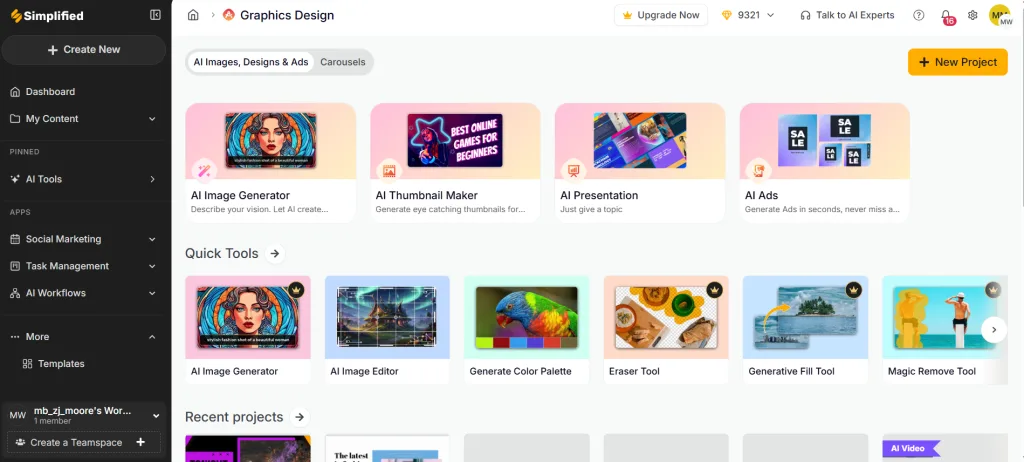
Pros
- All-in-one workflow: Video, graphics, AI writing, and social scheduling all in one place
- AI copy tools: Helpful for captions, headlines, and quick drafts
- Large template library: Plenty of templates that work well for social content.
- Good for teams: Easy collaboration tools built right in.
Cons
- Can feel overwhelming at first due to feature depth
- Video editor is solid, but not as focused as dedicated video tools
Bottom line:
I used Simplified when I needed multiple content types quickly, for example, creating a graphic, caption, and short video in one sitting.
Real result:
Tasks that usually took 1–2 hours across multiple tools were done in 30–40 minutes.
FlexClip: My Honest Review
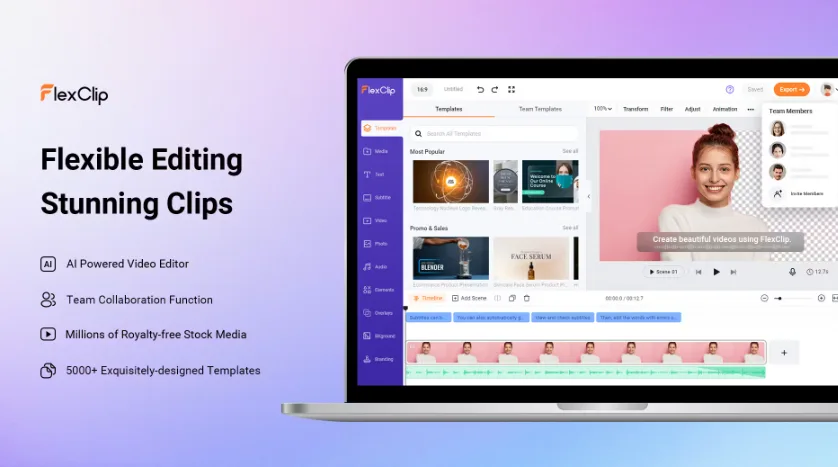
Pros
- Video-first design: Everything is built around video creation
- Clean output: Videos look polished and professional
- Stock assets included: Music, clips, and transitions are easy to access
- Budget-friendly: Lower cost if video is your only need
Cons
- No built-in AI copywriting suite
- The editor takes some time to learn for true beginners
Bottom line:
I used FlexClip when I wanted to crank out a video fast and still make a clean graphic to go with it.
Real result:
Creating simple explainer or slideshow-style videos was fast once I understood the interface.
Simplified vs FlexClip Comparison: Feature Breakdown
Ease of Use: Simplified vs FlexClip Tool Comparison
- Simplified: There’s more to learn, but everything is clearly labeled and easy to navigate.
- FlexClip: Fewer features, but not instantly intuitive
Winner: There’s a tie. It all depends on how much you want to do.
Simplified vs FlexClip Pricing Comparison & Value
- Simplified: Costs more, but replaces several tools
- FlexClip: Cheaper if video is your only goal
Winner: FlexClip has better value if you’re on a budget
Time Savings When Comparing Simplified and FlexClip
- Simplified: Faster when you’re creating multiple types of content at once
- FlexClip: Faster when you’re focused mainly on video
Winner: Depends on your workflow
Simplified vs FlexClip Output Quality Comparison
- Simplified: Works especially well for social-first content
- FlexClip: Has a slight edge when it comes to polished videos
Winner: FlexClip has stronger video quality
Simplified vs FlexClip: Which One Should You Pick?
Choose Simplified if:
- You want AI to help with writing and visuals
- You manage social media content regularly
- You prefer one platform instead of juggling different tools
Choose FlexClip if:
- You only need video creation
- You’re on a tight budget
- You want simple, clean video output
My personal choice:
I would lean toward Simplified for day-to-day content creation, but I still use FlexClip when I want fast, focused video work. Honestly, neither tool is bad. It comes down to how you work.
Final Verdict: Simplified or FlexClip?
There’s no universal winner in this Simplified vs FlexClip comparison.
- Simplified wins for all-in-one content workflows
- FlexClip wins for video-only simplicity and pricing
The best choice is the one that saves you the most time and money, not the one with the longest feature list.
Want more AI prompts that actually save you time?
Download my free “25 AI Prompts I’ve Personally Tested (So You Don’t Waste Your Time)” below. When you sign up, you’ll get instant access to the full 25 AI Prompt Toolkit, delivered straight to your inbox. You’ll also receive weekly emails with practical AI tips, honest tool reviews, side-by-side comparisons, and real strategies to help online entrepreneurs save time and grow income.
Just fill out the form below.
We respect your privacy. You can unsubscribe at any time.
Related Articles
>> ChatGPT Review 2026: Is It Worth It for Small Business Owners?
>> Batch Content Creation with AI: Save 8+ Hours Weekly
>> 7 AI Content Repurposing Tools That Save 10 Hours a Week
>> Conversion Rate Optimization: Increase Sales with Proven Tactics
Have you tried either tool? Let me know in the comments… I would love to hear which one worked best for you and your business!

Helpful Tools & Resources to Help Grow Your Business
The Iceberg Effect – Free copy (just cover shipping)! Unravel affiliate marketing secrets that’ll flip your game. Grab it now
Affiliate Marketing Free Guide – Free, no-fluff guide to ignite your affiliate success in a snap. Get it here
Free Report by Dean Holland – Discover why marketers fail online from a million-dollar mentor. Free must-read… Snag it here
Amazon Office Equipment & Supplies – Scoop up epic deals on office supplies to fuel your hustle. Shop now
As an Amazon Associate, I earn from qualifying purchases—at no extra cost to you!
Recommended AI Tools I Have Tested
Predis.ai – AI-powered social media content creation & scheduler. Try it out here
InVideo AI – Text-to-video with AI voiceovers.Get it n ow
Simplified – All-in-one content creation suite. Let Simplified do it
FlexClip – AI video maker + editor for quick, professional videos. Try it out
Website Essentials
ConvertKit – Skyrocket engagement with email funnels that convert like wildfire. Try it now
Bluehost – Turbocharge your site with fast, secure hosting to dominate the web. Power up here
If this comparison review helped you decide on which platform to use and was very helpful for you, please share it with another entrepreneur who might be struggling and needs to see this.



Hi Meredith – I really appreciated this comparison. I have been actively testing and considering different content and video tools lately and your breakdown helped me see not only what each platform does, but when it actually makes sense to use one over the other. It gave me clarity while I am deciding what belongs in my regular workflow instead of just chasing features.
What helped most was the real-world testing and time savings perspective. It confirmed that the best tool is not always the one with the most options but the one that fits the task at the right moment. This was very helpful as I narrow down my choices and build a practical system I will actually stick with. Thank You!
Hey Ernie,
I’m so glad it helped!
That’s exactly why I test things the way I do. It’s easy to get distracted by features, but what really matters and what you need to ask yourself is, does this fit the task and really save you time?
More options doesn’t always mean better. The best tool is the one that makes your workflow smoother, not heavier.
I love that you’re building a system you’ll actually stick with. That’s where real progress happens. Keep narrowing it down, simple and practical wins every time.