

I used to spend 15 hours every week when I started creating content and all from scratch. Blog posts, social media posts, emails, and Pinterest pins. However, once I discovered AI content repurposing tools, I managed to cut that time to just 5 hours.
What you don’t realize when you are starting out is that you don’t need to create everything from zero. Instead, one blog post can become 20+ posts across different platforms, and AI makes this process ridiculously easy and fast.
In this tutorial, you’ll learn to repurpose your content using AI content repurposing tools, how to use them step-by-step, and how to repurpose one blog post into a week’s worth of content in under an hour.
If you’re new to AI tools, start with my beginner’s guide to content creation AI tools ->7 Simple Content Creation AI Tools to Help Beginners Start Quickly
This post is all about AI content repurposing tools.

Affiliate Disclosure: This post contains affiliate links. If you purchase through these links, I may earn a commission at no extra cost to you. You can find the full disclosure here.
- Why AI Content Repurposing Tools Save Time
- What You Need: AI Content Repurposing Tools
- How to Repurpose Content with AI: Step-by-Step Tutorial
- Common Mistakes with AI Content Repurposing Tools
- Tips for AI Content Repurposing Tools
- Start Using AI Content Repurposing Tools Today
- I Want to Hear From You!
- Helpful Tools & Resources to Grow Your Business
Why AI Content Repurposing Tools Save Time
Before I started repurposing content with AI, I was stuck on a content hamster wheel. Every platform needed fresh content, and as a result, I was burning out fast.
Instead of constantly creating new content like I was doing, I now create a few solid pieces and let AI help me repurpose them across all my platforms, which dramatically reduces my creation time.
The biggest win was that content felt manageable again, which made it easier to stay consistent.
What You Need: AI Content Repurposing Tools
Here’s what you need:
– One piece of existing content (blog post, video script, or podcast transcript)
– 15-30 minutes to work through this tutorial
– No design skills required
– Free versions of AI tools work
Time estimate: 30 minutes your first time, then 15 minutes after that.
How to Repurpose Content with AI: Step-by-Step Tutorial
Step 1: Choose Your Source Content to Repurpose
First, pick one long-form piece of content you’ve already created. It could be a blog post (800+ words), a YouTube video script, or a podcast transcript.
I recommend starting with your best-performing blog post. Therefore, go to Google Analytics and find your top post from the last 3 months.
Tip For You: Look for posts with 5+ main key points. These will break down easily into individual social posts.
And when you’re done, before repurposing anything, you’ll want to make sure your old posts are SEO-optimized with this guide -> How to Update Old Blog Posts For SEO: Rank Higher in Google
Step 2: Extract Key Points with AI Content Tools
In the two images below, I took this exact blog post and dropped it into ChatGPT, asking it to take the key points from this post and then create multiple social media post ideas from it. What you’re seeing is the output. The key points extracted from the blog post and then they were then turned into social-ready content ideas in just seconds.
Key Points Extracted From My Blog

Social Media Ideas Created From The Key Points

So next, copy your blog post and paste it into ChatGPT or Claude (the free version works).
Use this prompt:
“Extract the 7 main points from this blog post and rewrite each as a standalone social media post (150 characters max for each). Make them conversational and actionable.”
What you’ll get: 7 bite-sized posts for Twitter, LinkedIn, Instagram, Facebook, or whatever platform you use.
Tip For You: Save this prompt in a Google Doc. You will want to keep it because you’ll use it every time.
If you want to learn more about other AI platforms, then read my full Claude AI review to see how it compares to other AI platforms -> Claude AI Review: My Honest Take for Affiliate Marketing Beginners
Also, if you want a tool that will polish your AI-generated content faster? QuillBot can help with that. Check out my review on QuillBot -> QuillBot Review: Powerful Tool That Saves You 10+ Hours Weekly
Step 3: Repurpose Content for Pinterest with AI
Now, log in to Canva (there’s a free account, but it’s limited) and click “Create a Design” > “Pinterest Pin.”
Use Canva’s AI Image Generator:
1. Click “Apps” from the left sidebar
2. Search for “Text to Image” or “AI Image Generator.”
3. Type: “minimalist business tips graphic with purple and white.”
4. Click “Generate.”
Then, pick one design, add your text (use one of the 7 points from Step 2), and you’re done.
I just recently went back to Pinterest, so I did the same thing with repurposing my content for my Pinterest pins, and I got 5 different pins from one blog post. It was so time-consuming. I loved it!
Tip For You: Create one template with your brand colors, duplicate it 7 times, and swap the text. Therefore, you’ll get seven pins in 5 minutes.
Related Article >>AI Image Generators That Save Small Businesses Time
Step 4: Repurpose Videos with AI Content Tools
If you have video content, upload it to FlexClip. The AI-assisted editor lets you trim your videos, add captions, and resize them for different platforms like TikTok, Instagram, or YouTube. This makes it easy to turn one longer video into multiple shareable clips.
Learn more about my complete FlexClip review here -> FlexClip Review: Does It Really Save Time for Beginners?
Free plan: Lets you create and export videos up to 720p with basic editing tools and a small watermark. This is perfect for getting started. Note: This could change at any time.
Tip For You: Don’t have videos yet? Record yourself going over your blog post’s key points. Even a single 10-minute recording can be trimmed into several short clips in FlexCip for social media or emails.
Step 5: Use AI Content Repurposing for Emails
Next, go to Typli.ai. Use its AI Email Generator to paste in your blog content or key points.
You can also use ChatGPT or Claude to help turn your blog content into emails, but Typli.ai is simpler and faster for beginners since its built-in email generator automatically creates subject lines, body copy, and calls-to-action.
The AI helps you draft email subject lines, body copy, and calls‑to‑action quickly. Then, edit everything to match your voice and schedule it.
Time savings: Emails used to take me 45 minutes. Now it takes about 10-15 minutes as long as I don’t get picky about it, which I tend to do sometimes.
Step 6: Generate Social Content with AI Tools
Then, take one key point and expand it into a longer caption.
Use this prompt:
“Turn this tip into a 200-word Instagram caption with a hook, storytelling, and a call-to-action: [paste your tip].”
Tip For You: Ask for 3 variations at once. Then, pick the one that sounds most like you.
AI can also write product descriptions if you sell physical or digital products. Check out this post on -> AI Product Description Generator: Write Them Without The Stress
Step 7: Batch Schedule Your Repurposed Content
Finally, use a social media scheduling tool to plan all your repurposed content for the next 7 days.
Tools like Predis.ai, Simplified, or Zapier can help you schedule posts across multiple platforms automatically, so you stay consistent without spending hours every day.
Check out my Simplified vs Predis comparison to see which scheduling tool is right for you -> Simplified vs. Predis.ai Comparison: Stop Juggling 10 Tools
Every Monday, I repurpose my latest blog post and schedule content for the entire week. It’s great and stress-free!
Related Article >> Is Predis.ai Worth It? 7 Things I Learned in One Week
📌 TRY THIS NOW
Stop reading and do this right now:
1. Open ChatGPT (free version)
2. Paste your latest blog post
3. Use this prompt below.
Use this prompt:
“Extract 5 key points and rewrite as a Facebook post including a hook and a call-to-action, in a friendly and approachable tone.”
Social Media Key Ideas

The Output for The Facebook Posts
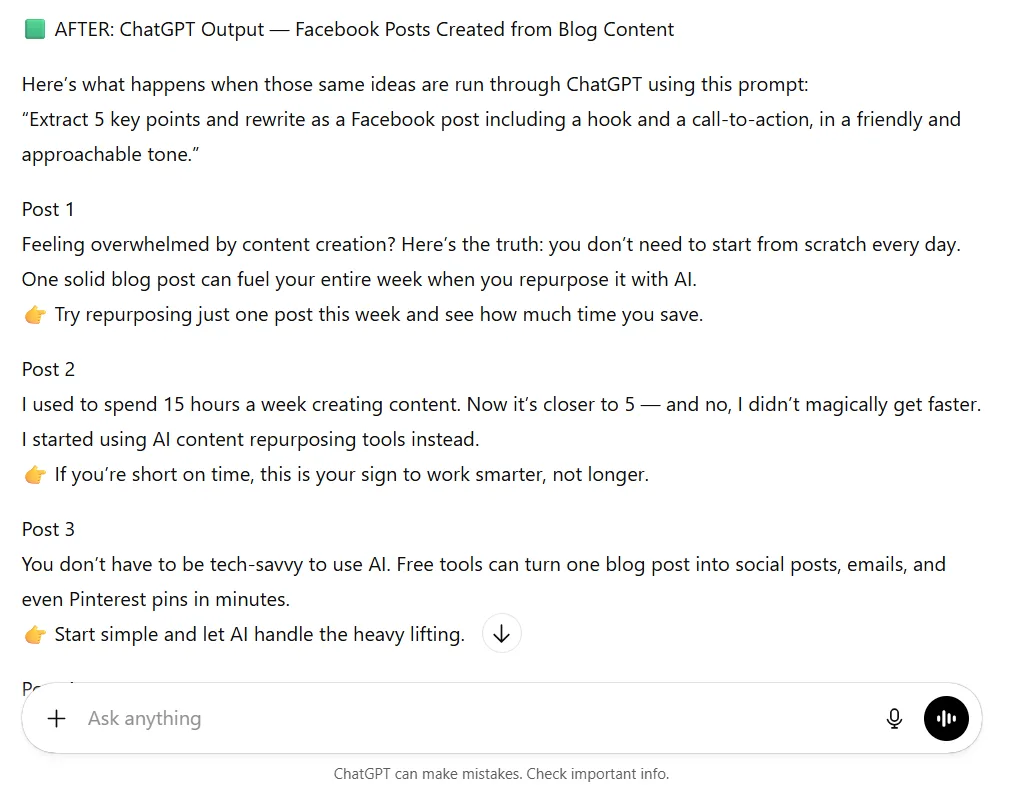
You should see 5 posts ready for Facebook in about 30 seconds. Then, you will want to pick a scheduling tool. You can either use Predis.ai, Simplified, or Zapier to batch schedule your posts across platforms. After trying this, come back and finish reading about the common mistakes you can make with AI content repurposing tools.
Common Mistakes with AI Content Repurposing Tools
Mistake #1: Using AI Content Output Without Editing
I used to copy/paste whatever the AI generated when I didn’t know how to use AI. As a result, the content was generic and didn’t sound like me. You want to be your authentic self, so people know you are real.
Do this instead: Edit every piece to add your personality and stories. Additionally, replace formal words with casual ones and make it sound like yourself.
Mistake #2: Repurposing Low-Performing Content
I wasted time repurposing blog posts nobody wanted to read.
Do this instead: Only repurpose content that’s already proven and that people want to read. Therefore, you want to check your analytics and repurpose what has gotten the most engagement.
Use AI market research tools to find out what your audience actually wants to read. Read up on this post to learn more about it. ->AI Market Research Tools: Use AI for Free Market Research
Mistake #3: Not Customizing for Repurposed Content
I posted the same caption everywhere on all platforms at first, not knowing that it wasn’t the best tactic to use. I learned that the hard way and got nowhere with it.
Do this instead: LinkedIn is professional. Instagram is personal. Twitter is punchy and so on. Ask AI to rewrite for each platform.
Tips for AI Content Repurposing Tools
Tip #1: Create an AI Content Repurposing System
Use a simple spreadsheet tracking: your original content, what you repurposed it into, the scheduled date, and the performance notes. This will help you in the long run.
Tip #2: Batch Your Content Repurposing
Instead of one post at a time, set aside 2 hours once a week and repurpose 4-5 blog posts at once. As a result, you’ll finish way faster.
Tip #3: Save Your Best AI Content Prompts
Every time an AI prompt gives you a great output, save it in a Google Doc, as I do, or a Word document works fine too. In fact, I have 20+ prompts I reuse constantly. You can check them out here if you need some good prompts.
Tip #4: Repurpose Your Repurposed Content
That Instagram caption you created? Turn it into a LinkedIn post. That Pinterest pin? You can use the same text for Facebook. Milk every piece of good content you have.
Start Using AI Content Repurposing Tools Today
You just learned how to use 7 AI content repurposing tools to turn one blog post into a week’s worth of content. Additionally, this process should take you 30 minutes your first time, then 15 minutes once you get the hang of it.
Your action plan:
1. First, pick your best-performing blog post
2. Then, follow steps 1-7 above
3. Finally, schedule everything for the next week
Get Your 25 AI Prompt Toolkit & Stop Struggling Using AI
Want smarter, faster ways to use AI for your business? Snag my free 25+ AI Prompt Toolkit and get it delivered straight to your inbox. Every week, my blog shares AI hacks, reviews, comparisons, and tips to boost your online income.
Enter your info below and start getting the best AI and money-making insights sent directly to you.
We respect your privacy. You can unsubscribe at any time.
I Want to Hear From You!
Which AI content repurposing tool from this post are you most excited to try first? And what’s the biggest challenge you face when turning one piece of content into multiple posts?
I know AI can be overwhelming to learn at first. I didn’t know a thing about AI when I started. That’s why I try to create content here to try to help you, so drop your answers in the comments below… I would love to hear your thoughts and help you in any way I can!

Helpful Tools & Resources to Grow Your Business
The Iceberg Effect – Free copy (just cover shipping)! Unravel affiliate marketing secrets that’ll flip your game. Grab it now
Affiliate Marketing Free Guide – Free, no-fluff guide to ignite your affiliate success in a snap. Get it here
Free Report by Dean Holland – Discover why marketers fail online from a million-dollar mentor. Free must-read… Snag it here
Amazon Office Equipment & Supplies – Scoop up epic deals on office supplies to fuel your hustle. Shop now
As an Amazon Associate, I earn from qualifying purchases—at no extra cost to you!
Recommended AI Tools I Have Tested
Predis.ai – AI-powered social media content creation & scheduler. Try it out here
InVideo AI – Text-to-video with AI voiceovers. Get it now
Simplified – All-in-one content creation suite. Let Simplified do it
FlexClip – AI video maker + editor for quick, professional videos. Try it out
Website Essentials
ConvertKit – Skyrocket engagement with email funnels that convert like wildfire. Try it now
Bluehost – Turbocharge your site with fast, secure hosting to dominate the web. Power up here
If this tutorial saved you time, share it with another entrepreneur drowning in content creation!


Hi Meredith – This was incredibly helpful and practical. I love how you broke down the repurposing process step by step in a way that feels doable for beginners.
Your point about not needing to create everything from scratch is such an important mindset shift, and I know it will help a lot of people get off that content hamster wheel.
I also appreciate the reminder to edit AI output so it still sounds like you, because authenticity matters! This post is packed with value and the action plan at the end makes it easy to implement right away. Thank you for putting this together and have a great week!
Hey Ernie!
I’m so glad it felt doable, especially for beginners. That “create everything from scratch” mindset is exhausting, and once you see another way, it’s such a relief. 😅
Yes… AI is amazing, but it still needs your voice in it. I’m happy that part came through because sounding like you really does matter.
Thanks for taking the time to leave such a thoughtful comment. I appreciate you, and I hope you have a great week too! 😊
This is such a great post, Meredith! I especially loved your point about how repurposing isn’t just about saving time, but about ‘meeting your audience where they are’ across different platforms. The way you broke down using tools like ChatGPT to turn one long-form blog post into a week’s worth of social media content makes the whole process feel so much less overwhelming. I had quite the learning experience working through the AI Image Generator exercise. Thanks for providing such a clear roadmap to saving time and maintaining quality content with AI!
Hey Denny,
Thank you, I really appreciate that!
I love that you picked up on the “meeting your audience where they are” part, because that’s honestly the whole point of repurposing. It’s not about pushing more content. It’s about showing up in the right places without burning yourself out.
And yep… that AI image exercise can be a bit of a brain stretch at first 😄 but once you get the hang of it, it opens up so many possibilities. I’m glad you stuck with it.
Thanks for taking the time to leave such a thoughtful comment.
Hi Meredith,
Apologies for my delayed response. You gotta stop bringing all these great tips! LOL! Seriously though, this is definitely a great way to repurpose a blog that was written in the past but has still great potential for expansion on the subject.
I really appreciate how in depth you go and (honestly) how easy this could be done.
Thanks for this – it’s another blog entry that has me bookmarked for the future! Cheers!
Hey Marc!
Haha, I love that 😄 Thank you!
You’re absolutely right, older blog posts are such an underrated goldmine. A little expansion and repurposing can breathe new life into them without starting from zero, and I’m glad that came through for you.
I really appreciate you noticing the depth and how doable it is. That balance is exactly what I aim for. Thanks for bookmarking it too. That honestly made my day.
Cheers to you, and thanks again for the kind words!