

Writing blog posts takes time, and when you’re running a business, content creation is often the task that gets pushed to the bottom of the list.
That’s why many bloggers are comparing ChatGPT vs Claude for blog writing to see which AI tool can help them create content faster.
That’s one reason AI tools like ChatGPT and Claude have exploded in popularity as businesses experiment with AI to speed up writing and content creation.
They promise to help generate ideas, draft content, and speed up writing so you’re not staring at a blank page for hours.
But the real question is: which one actually saves you time when you’re writing blog posts?
Want a quick overview of all the tools I’ve tested? Check out my Best AI Tools for Small Business Owners guide.
Quick tip before we get into the comparison:
If you’re experimenting with AI tools for content creation, having a few solid prompts ready makes a huge difference.
I put together a free toolkit with 25 simple AI prompts that help generate blog ideas, outlines, and posts much faster.
If writing content takes longer than you’d like, these can save you a lot of time.
Get the 25 AI Prompts That Save Hours Every Week
So instead of guessing, I ran both tools through the same prompts to see how they handled common blogging tasks. I looked at things like generating blog ideas, creating outlines, writing introductions, and improving existing content.
Some results were exactly what I expected, A couple of them really surprised me.
If you’re trying to decide whether ChatGPT or Claude is the better AI assistant for writing blog posts, here’s what I found.
This post is all about ChatGPT vs Claude for blog writing, and it will tell you which one saves you the most time.

Affiliate Disclosure: This post contains affiliate links. If you purchase through these links, I may earn a commission at no extra cost to you. You can find the full disclosure here.
- ChatGPT vs Claude: Quick Comparison
- Who This Comparison Is For
- How I Tested ChatGPT and Claude
- Test 1: Blog Topic Ideas
- Test 2: Blog Outline
- Test 3: Writing a Blog Introduction
- Test 4: Rewriting a Paragraph
- Test 5: Improving Blog Content
- Which AI Tool Is Easier for Bloggers?
- When ChatGPT Is the Better Choice
- When Claude Is the Better Choice
- Final Verdict
- Frequently Asked Questions
- Final Thoughts
Quick note on how I test AI tools:
I use AI to handle the heavy lifting. That means for outlines, first drafts, structure, and ideas. Then I step in to edit, refine, and make everything sound like me. If your AI drafts ever feel a little robotic, here’s my guide on how to humanize AI content. Every tool I share is something I’ve personally used and measured for real time savings in a working business.
ChatGPT vs Claude: Quick Comparison
| Feature | ChatGPT | Claude |
|---|---|---|
| Best For | Fast drafts and outlines | Editing and refining writing |
| Writing Style | Clear and practical | Natural and polished |
| Idea Generation | Quick and actionable | Strategic and thoughtful |
| Editing Ability | Good | Strong |
| Learning Curve | Beginner friendly | Beginner friendly |
Both tools can help with blog writing, but they’re better at different parts of the process. If you’re getting impressions but not clicks, this may help too: how to update old blog posts for SEO.
Who This Comparison Is For
This comparison will be helpful if you:
- Write blog posts for your business
- Create content regularly
- Want to save time using AI tools
- Or if you are deciding between ChatGPT and Claude
If you’re a busy entrepreneur or blogger who wants AI to help with content creation without adding complexity to your workflow, this test should give you a clearer idea of how each tool performs.
How I Tested ChatGPT and Claude
To keep things fair, in this ChatGPT vs Claude for blog writing test, I gave both tools the exact same prompts and tested them on the same blogging tasks.
I tested five common blogging tasks:
- Generating blog topic ideas
- Creating a blog outline
- Writing a blog introduction
- Rewriting a paragraph
- Improving an existing paragraph
For each prompt, I evaluated:
- clarity
- tone
- structure
- how much editing was needed
I also saved screenshots of the prompts and outputs so you can see the actual results. Here’s how the two tools compare.
Test 1: Blog Topic Ideas
The first test was simple. The ideas felt easy to turn into actual blog content quickly. Once the writing is done, tools like Canva AI can also help speed up the visual side of content creation for blog graphics and social posts.
If you want a closer look at how it works, you can read my full Canva AI review here.
The prompt I used:
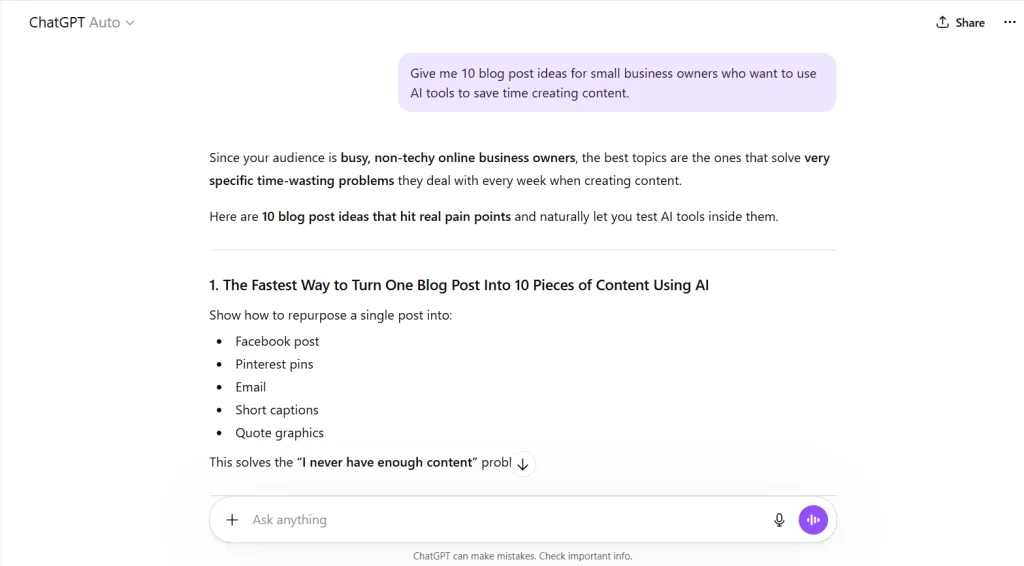
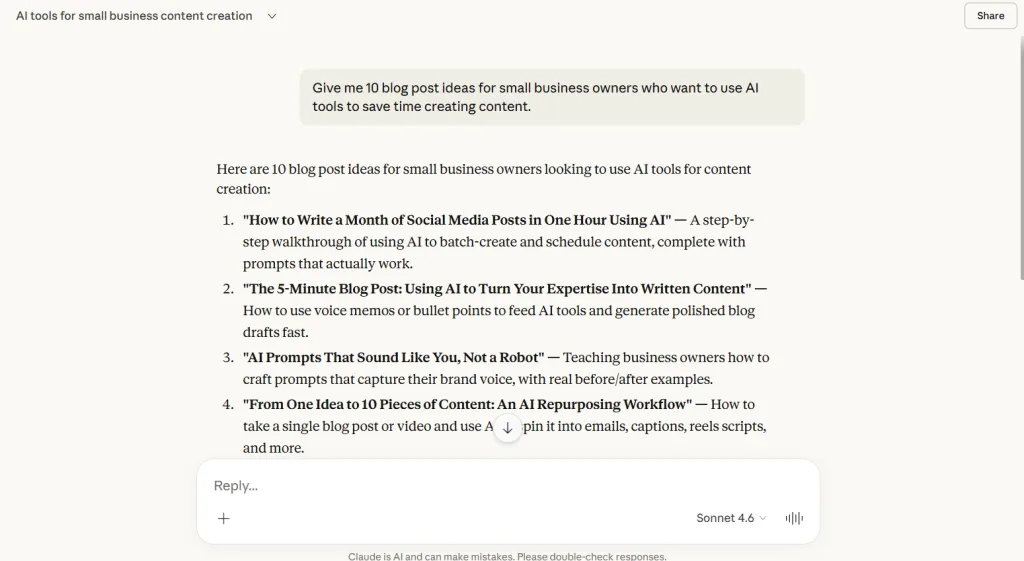
“Give me 10 blog post ideas for small business owners who want to use AI tools to save time creating content.”
ChatGPT
ChatGPT produced ideas that were very practical and action-focused. Many of the suggestions revolved around real workflows such as testing AI tools, speeding up content creation, or building repeatable systems for writing posts.
The ideas felt easy to turn into actual blog content quickly.
Claude
Claude generated ideas that were also highly relevant but often took a more strategic angle. Some suggestions explored deeper topics, such as what AI should write versus what humans should handle.
The ideas were thoughtful and sometimes more nuanced.
Takeaway
- ChatGPT: better for fast, practical blog topic ideas
- Claude: better for deeper strategic content angles
Test 2: Blog Outline
Next I asked both tools to generate a blog outline.
The Prompt I used:
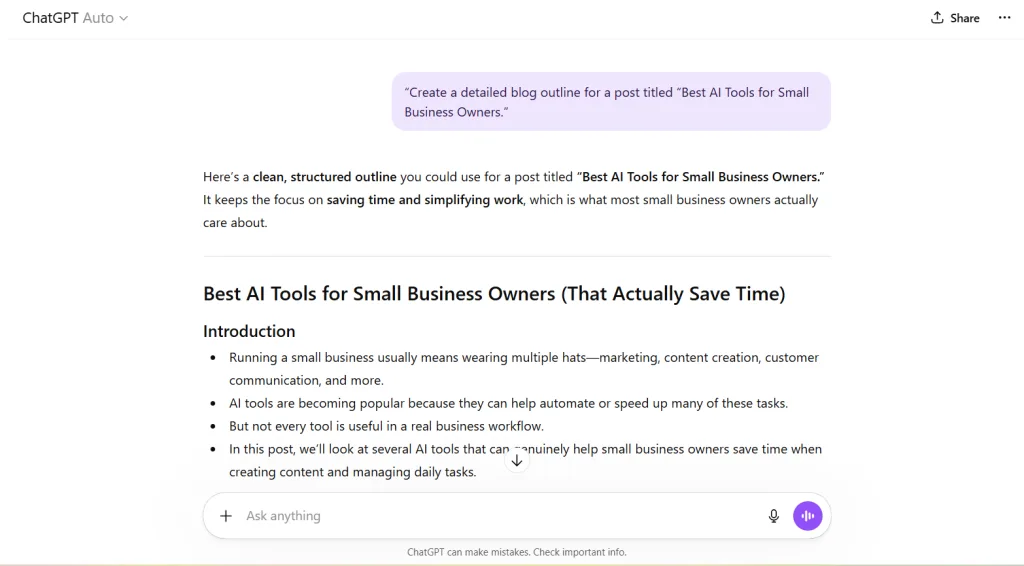
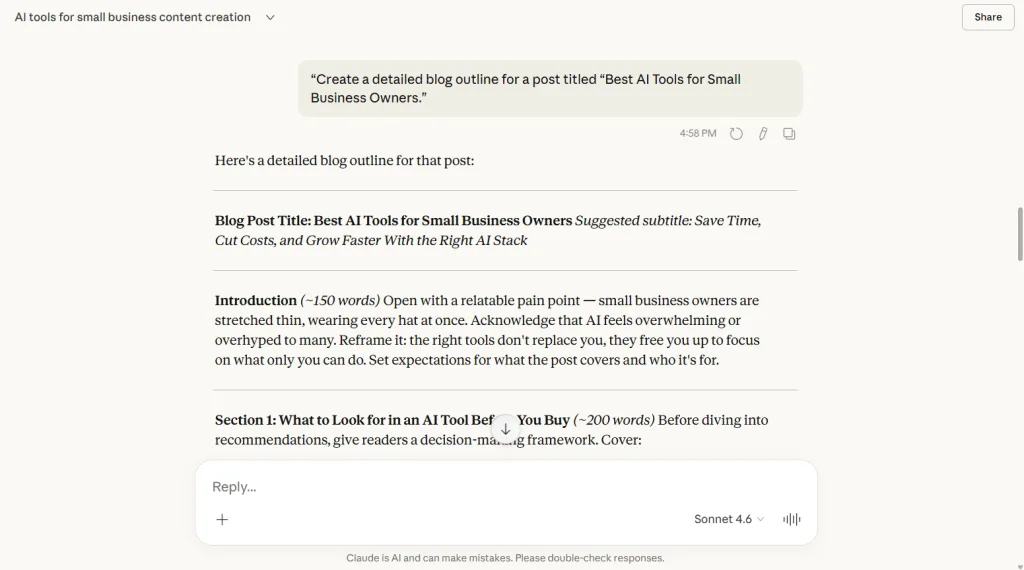
“Create a detailed blog outline for a post titled “Best AI Tools for Small Business Owners.”
ChatGPT
ChatGPT produced a clear and easy-to-follow outline. The structure felt beginner friendly and followed a natural flow from problem to solution.
It was very straightforward and easy to expand into a full post.
Claude
Claude created a more detailed and structured outline. It included decision-making sections before recommending tools, which helped guide readers through the topic.
The outline felt more like a strategic content brief.
Takeaway
- ChatGPT: simple and reader-friendly
- Claude: more structured and strategic
Test 3: Writing a Blog Introduction
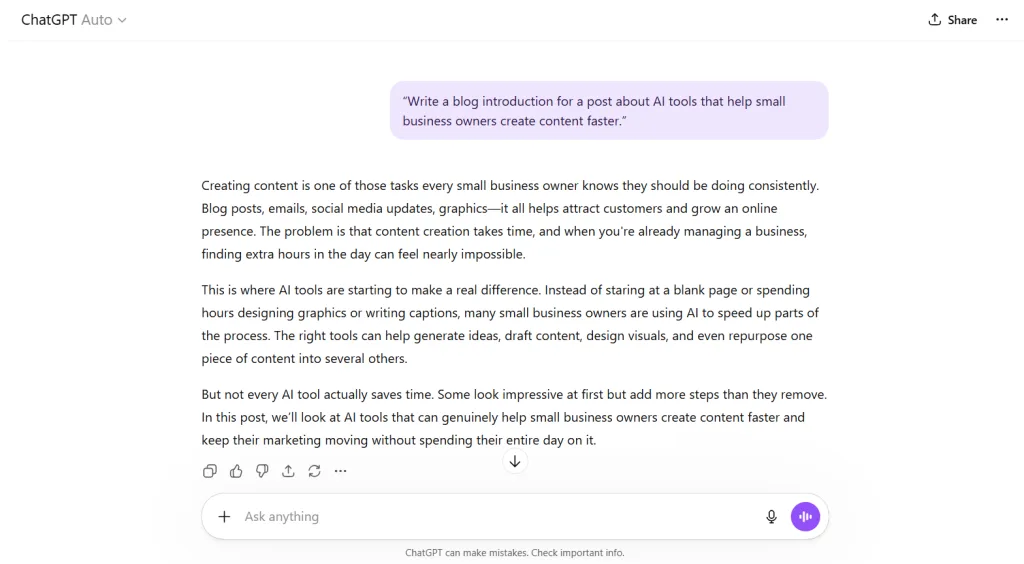
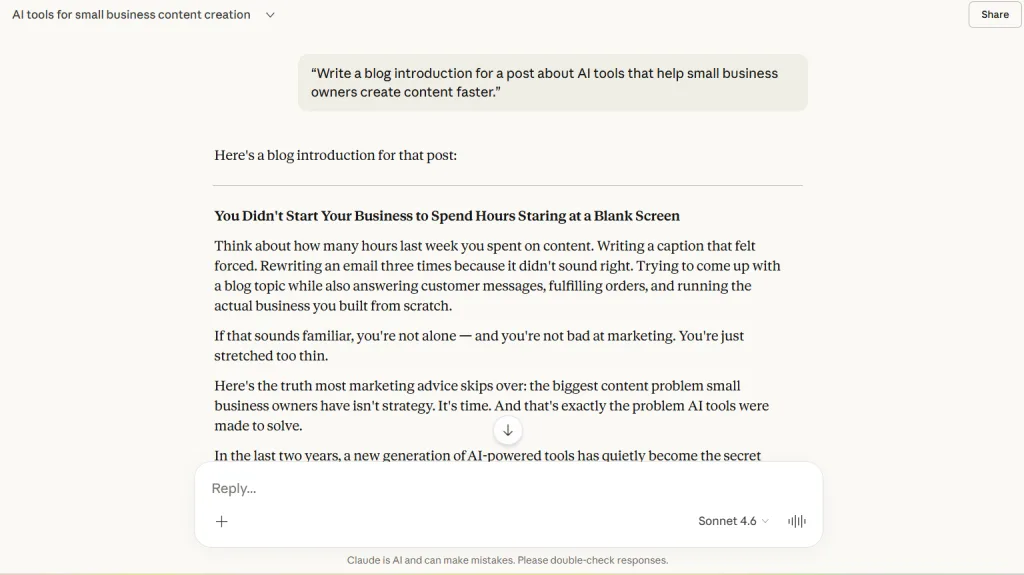
For the next test, both tools wrote an introduction for a post about AI tools that help small business owners create content faster.
The Prompt I used:
“Write a blog introduction for a post about AI tools that help small business owners create content faster.”
ChatGPT
ChatGPT’s introduction was clear and direct. It quickly explained the problem and introduced AI as the solution.
It worked well but felt slightly more informational.
Claude
Claude’s introduction felt more conversational and engaging. It leaned into storytelling and empathy for the reader’s situation.
The tone felt slightly more human.
Takeaway
- ChatGPT: clear and practical
- Claude: more engaging and conversational
Test 4: Rewriting a Paragraph
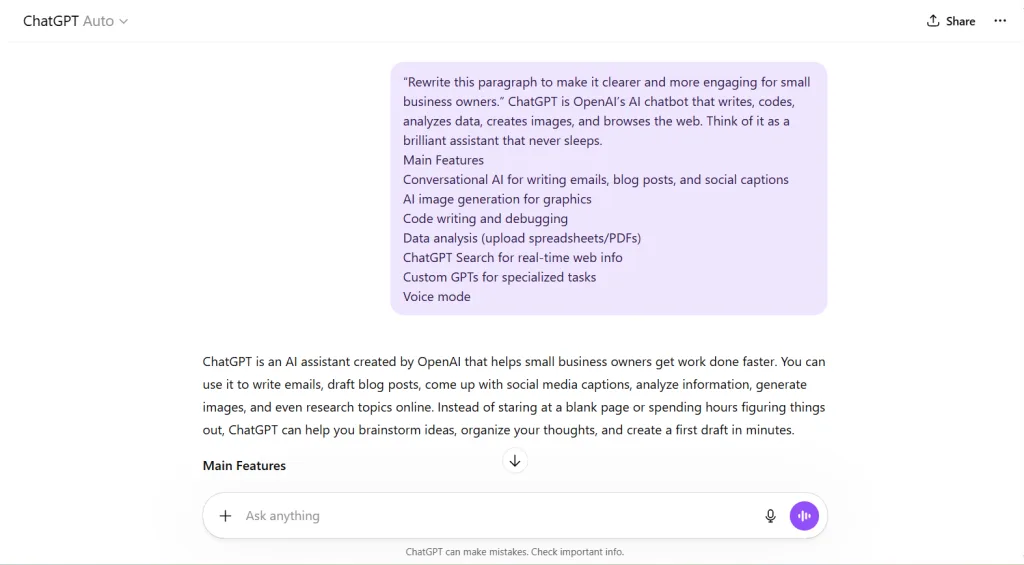
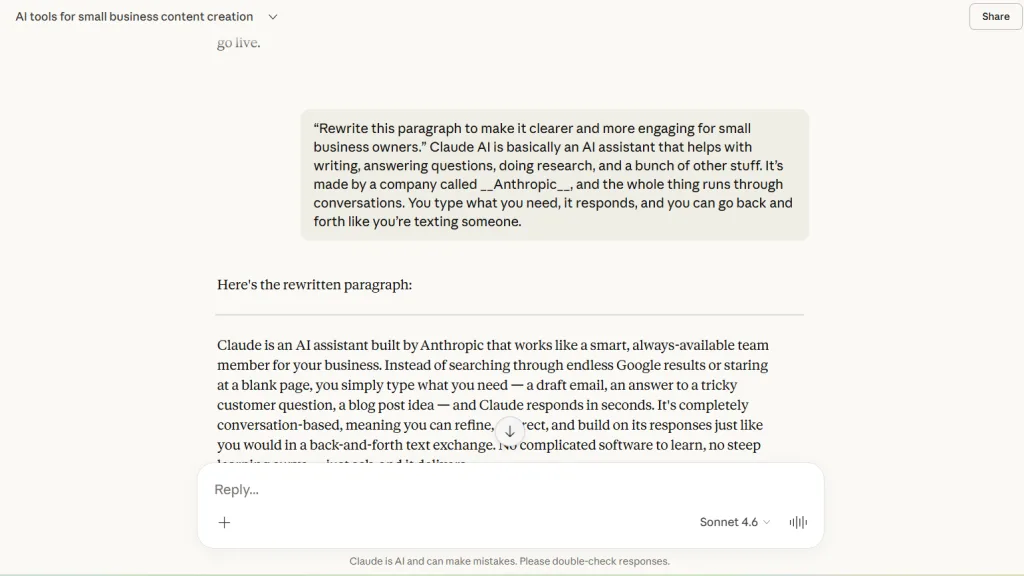
In this test I gave each tool a paragraph and asked it to rewrite the content to make it clearer and more engaging.
The prompt I used:
“Rewrite this paragraph to make it clearer and more engaging for small business owners.”
ChatGPT
ChatGPT simplified the paragraph and made the explanation easier to understand. It also organized information in a way that made the content easier to scan.
Claude
Claude’s rewrite improved the tone and writing quality more dramatically. It replaced vague phrases with stronger examples and made the paragraph sound more polished.
Takeaway
- ChatGPT: improves clarity
- Claude: improves writing quality and tone
Test 5: Improving Blog Content
For the final test, I asked each tool to improve an existing paragraph while keeping the meaning the same.
The prompt I used:
“Improve this paragraph to make it more engaging and easier to read while keeping the meaning the same.”
For this test, I used a short paragraph from my ChatGPT review post and another from my Claude review post to see how each tool handled improving existing content.
The paragraphs I used for each:
Original ChatGPT Paragraph
ChatGPT won’t run your business for you, but when you use it intentionally, it can save a surprising amount of time. During my 30-day test, it helped me speed up content creation and reclaim hours I would have otherwise spent starting from scratch.
Original Claude Paragraph
Just Talk to Claude AI. No complicated commands or prompts to memorize. You literally just type what you need like you’re texting someone. Prompts do help drastically to get the output you want, and not some generic response. Any AI you use is prone to doing that unless you give it detailed prompts of what you want.
Here’s how each AI improved the paragraph:
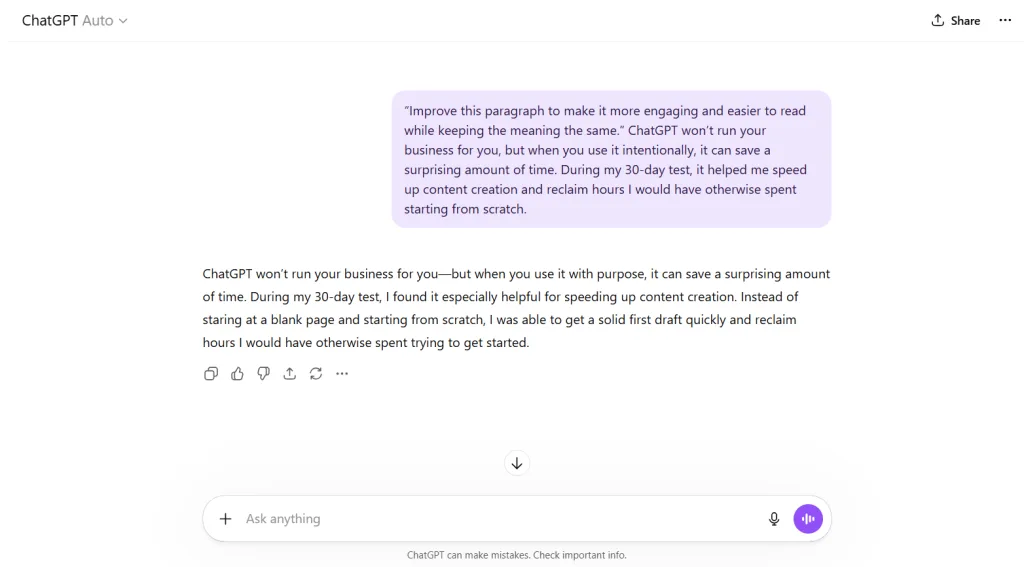
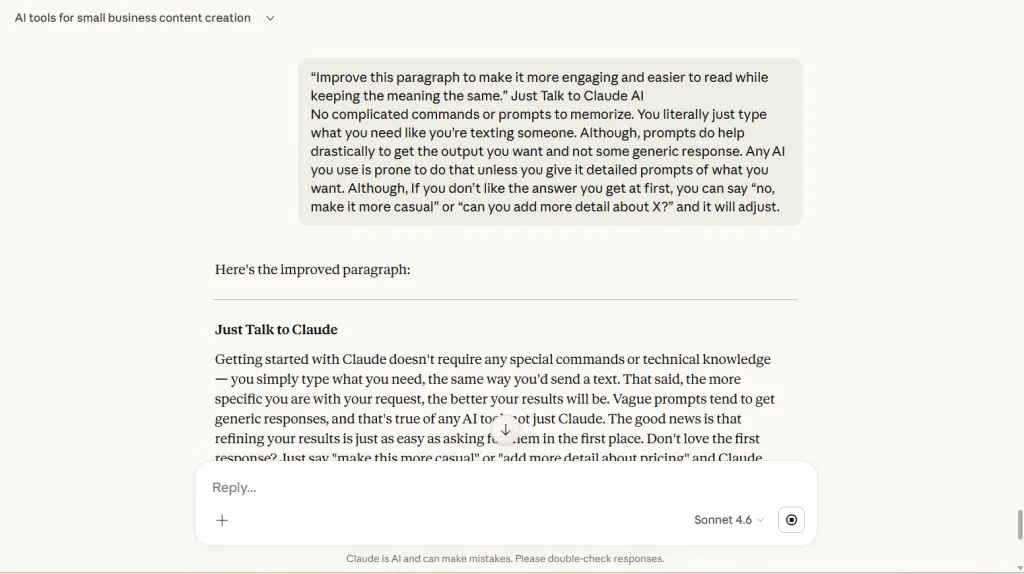
ChatGPT
ChatGPT made the paragraph smoother and more conversational. It focused on helping the reader understand how the tool saves time.
Claude
Claude improved the structure, flow, and grammar more significantly. The paragraph felt more refined and professional after editing.
Takeaway
- ChatGPT: conversational and easy to read
- Claude: stronger editing and polished
Which AI Tool Is Easier for Bloggers?
Both tools are beginner friendly, but they tend to help in different ways.
ChatGPT works well when you need to:
- Generate ideas quickly
- Draft outlines
- Create first drafts of blog posts
Claude tends to work well when you need to:
- Refine writing
- Improve tone
- Polish existing content
In simple terms, one helps you create faster, while the other handles the heavy lifting of editing.
When ChatGPT Is the Better Choice
ChatGPT is a strong option when you want to:
- Generate blog ideas quickly
- Create outlines
- Draft content fast
- Overcome writer’s block
If your biggest challenge is getting started, ChatGPT often feels faster.
When Claude Is the Better Choice
Claude tends to perform better when you want to:
- Improve tone
- Rewrite paragraphs
- Refine content
- Polish writing
If your biggest challenge is editing and improving drafts, Claude can be extremely helpful.
Final Verdict
After testing ChatGPT vs Claude for blog writing, it’s clear that both tools can save time, but they tend to serve different roles.
ChatGPT is excellent for generating ideas and creating drafts quickly.
Claude stands out when it comes to improving writing quality and refining content.
For many bloggers, the best workflow may be using both tools together. One to generate ideas and drafts, and the other to polish the final version.
The key is using AI intentionally so it helps you move faster without sacrificing the quality of your content.
Frequently Asked Questions
Is Claude better than ChatGPT for writing?
Claude, developed by Anthropic, often produces more natural-sounding writing and stronger editing. ChatGPT tends to be faster for generating drafts and outlines.
Which AI tool is better for bloggers?
Both can be useful. ChatGPT is great for generating ideas and drafting content quickly, while Claude excels at refining and improving writing.
Can AI write blog posts for you?
AI can help generate ideas, outlines, and drafts. However, most bloggers still edit and refine their content so it matches their voice and expertise. If you want quality content for your readers, I suggest you do the same.
Final Thoughts
At the end of the day, tools like ChatGPT and Claude aren’t meant to replace your voice. They’re meant to help you work faster and get past the blank page.
After running these tests, I found that ChatGPT is usually quicker for getting ideas and rough drafts started, while Claude tends to be better when it comes to refining and improving the writing.
For many bloggers and small business owners, using AI this way can turn content creation from something that takes hours into something much more manageable. That’s the whole purpose, isn’t it? Using AI the right way to save time.
Want the exact prompts I use to create content faster?
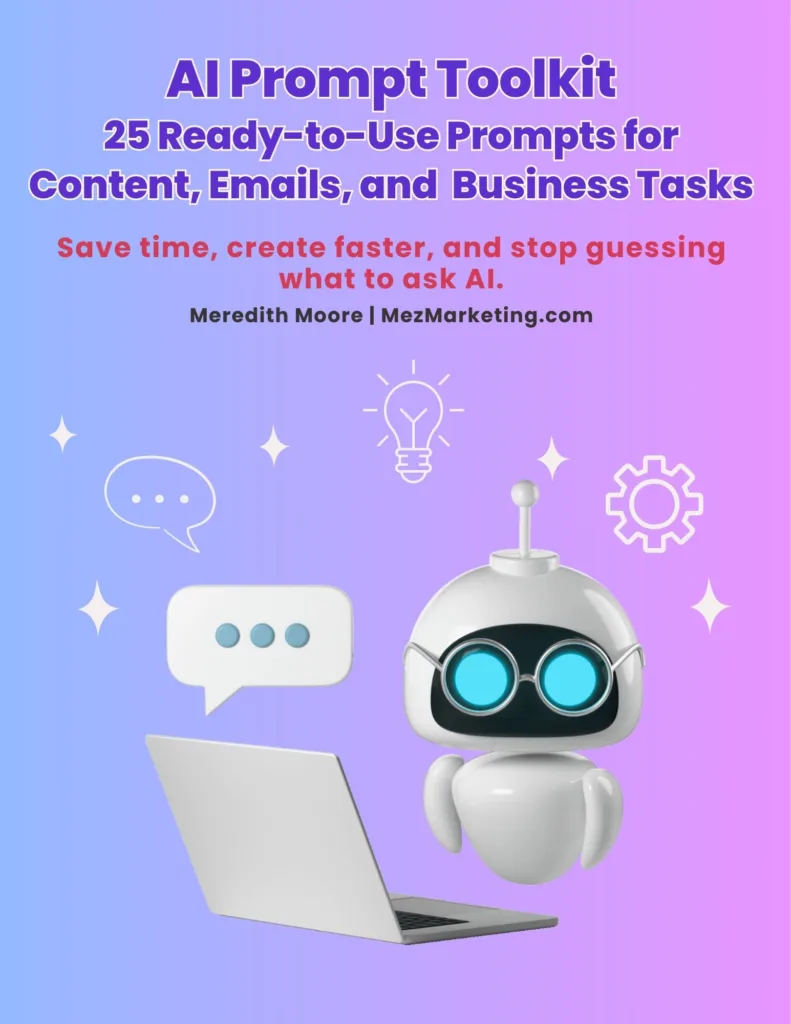
I put together a free toolkit with 25 AI prompts that help generate blog ideas, outlines, social posts, and more in minutes instead of hours.
If writing content takes longer than you’d like, these will help. Download the 25 AI Prompts That Save Hours Every Week
Grab the toolkit below.
Now I’m curious to know. Have you tried using ChatGPT or Claude for writing blog posts yet? Which one worked better for you? Leave a comment below and let me know what your experience was like.

Other Recommended AI Tools
Predis.ai – AI-powered social media content creation and scheduling tool. Try it out here
InVideo AI – Text-to-video with AI voiceovers.Get it n ow
Simplified – All-in-one content creation suite. Let Simplified do it
FlexClip – AI video maker + editor for quick, professional videos. Try it out
If this review saved you time, share it with another entrepreneur drowning in content creation!


Hi Meredith – This was a really helpful and thoughtful breakdown. I like how you tested both tools using the same prompts and focused on what most of us actually care about which is saving time without losing the quality of the writing. Your explanation of using one tool to get ideas and drafts started and the other to refine the writing really makes a lot of sense in a real-world workflow.
What stood out to me most was your reminder that AI should help with the heavy lifting, but it should never replace the voice and experience of the writer. Tools can make the process faster but the perspective and lessons we bring to the content are what make it meaningful for readers. This was a great comparison and a very practical guide for anyone trying to use these tools wisely. Thank you for taking the time to do the research and providing the results.
Hi Ernie,
Thank you, I really appreciate you taking the time to read it and share your thoughts. That’s exactly what I was hoping to show with this test. Both tools can be helpful, but they shine in different ways depending on where you are in the writing process.
I have found that using one to get ideas flowing and another to help polish things up can make the whole process a lot smoother, but as you said, the tools can’t replace the perspective and experience we bring to the content. They can help with the heavy lifting, but the real value still comes from the person behind the keyboard.
I’m glad the comparison was helpful for you. I always try to test these tools the way someone would actually use them in a real workflow, because that’s the only way to see what they’re truly good at. Thanks again for the thoughtful comment. 😊