

If you’re wondering whether the ChatGPT free plan is enough, or if paying for ChatGPT Plus will actually make running your business easier, this ChatGPT review 2026 will help you decide.
With different plans, changing features, and new models being added, it can be hard to know what you really need and what you would be paying extra for.
Before doing this test back in January, I used the ChatGPT free plan regularly before trying ChatGPT Plus for 30 days.
I originally planned to test it for this review and then cancel, but I found myself using the extra access often enough that I kept the subscription and have continued using Plus in my business.
Updated post: September 2026
ChatGPT has continued to change since my original January test. I’ve updated this review with current September 2026 information on account security, Voice, connected apps, pricing, and ads while keeping my original hands-on test results the same.
In this review, I’ll break down the current ChatGPT pros and cons, explain where the Free plan may be enough, show what Plus adds, and share what I still use Plus for in my business.
The goal is to help small business owners and content creators decide whether ChatGPT Plus is worth it or whether they can get what they need without paying.
Quick Answer
After using both ChatGPT Free and Plus in my business, here is the clearest summary of the strengths and weaknesses I have experienced:
| ChatGPT strengths | ChatGPT weaknesses |
|---|---|
| Helps me brainstorm, organize ideas, and create outlines and first drafts | Writing can sound generic sometimes and still needs editing to sound like me |
| Makes current research easier by providing links to sources | Important information still needs to be checked before publishing. ChatGPT can make mistakes. |
| Can analyze uploaded documents, spreadsheets, and other files | Free-plan tool limits can interrupt longer projects |
| Creates and edits images quickly | Images often need revisions before they fit my brand |
| Voice, Projects, and Memory help me work and stay organized | Plus costs $20 per month and may not be necessary for occasional users |
The Free plan includes useful tools such as Search, file uploads, data analysis, image creation, Voice, and access to eligible plugins, but with lower usage limits on some tools and features.
It may be enough for occasional writing, brainstorming, or research. I continue paying for Plus because I use ChatGPT regularly for longer projects, uploads, images, and revisions, and the higher limits help prevent interruptions.
Want a quick overview of some of the tools I’ve tested that will help you save time in your business? Check out my Best AI Tools for Small Business Owners guide.
Affiliate Disclosure: This post contains affiliate links. If you purchase through my link, I earn a small commission at no extra cost to you. You can find the full disclosure here.
- Quick Answer
- What Is ChatGPT and What Can It Do?
- What Changed Since My January Test
- My ChatGPT Review 2026: How I Tested It
- ChatGPT Free vs. Plus: What I Tested and How Much Time I Saved
- ChatGPT Strengths and Weaknesses in 2026
- ChatGPT Pricing 2026: Free, Go, Plus, and Pro
- Was ChatGPT Plus Worth It for Me?
- ChatGPT Features That Matter for Business
- Should You Use ChatGPT Plus?
- Final Thoughts for My ChatGPT Review 2026
- Ready to Get Better Results From ChatGPT or Any AI Tool You Use?
Quick note on how I test AI tools:
I use AI to handle the heavy lifting for things like, outlines, first drafts, structure, and ideas. Then I step into edit, refine, and make everything sound like me. Every tool I share is something I’ve personally used and either measured for real-time savings or carefully evaluated before recommending.
What Is ChatGPT and What Can It Do?
ChatGPT is an AI assistant from OpenAI that can help small business owners and content creators with writing, research, planning, images, and everyday business tasks.
You can give it a rough idea, question, document, or image, and it can help turn that into something useful, but you still need to review the result for accuracy and make it fit your business.
Main Features
- Brainstorm and create outlines, emails, blog content, and social media posts
- Search the web for current information and provide links to sources
- Upload and summarize PDFs, documents, spreadsheets, and images
- Analyze data and help explain what the numbers mean
- Create and edit images
- Talk with ChatGPT using Voice
- Organize related chats and files inside Projects
- Use plugins and connected apps for specific tasks and workflows
The features you can use and how often you can use them depend on whether you have the Free, Go, Plus, or Pro plan.
What Changed Since My January Test
Since my original test in January 2026, ChatGPT’s models, plans, and everyday tools have continued to change. In August, OpenAI began rolling out GPT-5.6 Luna as the default model for Free and Go users, along with unlimited everyday text chats and a Think option for questions that need more reasoning. Limits still apply to file uploads, image creation, voice, data analysis, and other tools.
Plus users now have access to GPT-5.6 Sol with more advanced reasoning options for complex research, planning, and problem-solving. I have found the newer reasoning options helpful when I am working through more complicated tasks. (openai.com)
ChatGPT has also become more personalized. Its updated memory can keep track of your preferences, goals, and ongoing work, reducing how often you need to repeat yourself. I regularly use Memory and Projects, and they help me stay organized. Plus users also receive more memory capacity, while Custom Instructions can now contain up to 5,000 characters.
ChatGPT also added Security History, which lets you review recent security activity on your OpenAI account, including sign-ins, sign-outs, password changes, and changes to MFA, passkeys, and other security settings. On the web, you can find it under Settings → Security and login → Security history.
New Ways to Research, Create, and Work
Deep Research now offers more control over sources and research plans, and I have found it useful for detailed research. Scheduled Tasks can send reminders, repeat work, or monitor for changes, which is fairly new to me, and I have just started using it for keeping recurring work on track. So far, it seems like it will be very helpful.
ChatGPT Work can also use connected apps and files to complete longer projects, including documents, spreadsheets, presentations, and reports. I have only tried some of these newer capabilities, but they look promising for larger projects. Availability may vary by plan, device, and account.
ChatGPT Images 2.0 can create and edit images, which I often use and have found faster for creating visuals.
Voice is useful for brainstorming
I have also been using Live Voice, and I love it because it is much easier than typing. Voice lets me talk through ideas when I do not want to type. Live Voice is available across plans, but the usage limits differ. Free has limited GPT-Live-1 mini access, Go includes up to 3 hours with GPT-Live-1 mini, Plus includes up to 3 hours with GPT-Live-1, Pro 100 includes up to 15 hours with GPT-Live-1, and higher Pro tiers provide more Voice access.
Live Voice can now also use eligible plugins and connected apps available to your account on web, iOS, and Android. That means some tasks that once required switching back to text can now be handled while you are talking. Availability still depends on your plan, account, permissions, and the specific plugin or connected app you are using.
Uploaded and created files can now be saved in the File Library, while users on every plan can search across past chats, projects, images, and documents. I have started using these and like how much easier they make finding past work.
These features were added or expanded after my original 30-day test, so I am including them as current updates rather than features I measured during that test. You can check OpenAI’s official ChatGPT release notes for the newest changes and rollout information.
My ChatGPT Review 2026: How I Tested It
I first tried ChatGPT Plus through a 30-day promotion after regularly using the Free plan and tracked how much time it saved me. I ended up keeping Plus and have continued using it in my business. That longer experience has given me a clearer picture of what the Free plan can handle, where Plus makes a difference, and whether the upgrade is actually worth paying for.
Features and Tasks I Tested
Here’s what I tested during my original review and have continued using in my business:
- Blog outlines, content planning, and social media posts
- Email sequences, editing, and customer responses
- Blog, social media, and Pinterest graphics
- ChatGPT Search for current information and research
- Custom GPTs for specific business tasks during my original test
I paid attention to more than how quickly ChatGPT produced an answer. I also looked at how much editing it needed, whether the results were useful, and whether Plus made these tasks easier than the Free plan.
ChatGPT Free vs. Plus: What I Tested and How Much Time I Saved
To compare the plans, I included my measured Plus and manual times alongside conservative estimates based on my earlier Free-plan workflow.
This shows both the likely time difference between Free and Plus and how much time Plus saved compared with completing each task without AI.
On mobile, swipe left or right to view the full comparison.
| Task Tested | Estimated Free Time | Plus Time | Free vs. Plus Difference | Manual Time Without AI | Time Saved With Plus |
|---|---|---|---|---|---|
| 4 Blog Outlines | 20 min | 12 min | 8 min | 1 hr 20 min | 1 hr 8 min |
| 12 Social Posts | 1 hr | 40 min | 20 min | 3 hrs | 2 hrs 20 min |
| 3 Email Sequences | 1 hr 15 min | 45 min | 30 min | 6+ hrs | At least 5 hrs 15 min |
| 20 Graphics | 1 hr 30 min | 40 min | 50 min | 5+ hrs | At least 4 hrs 20 min |
| Total | 4 hrs 5 min | 2 hrs 17 min | 1 hr 48 min | 15 hrs 20+ min | At least 13 hrs 3 min |
Note: I used the Free plan regularly before upgrading, so the Free estimates reflect my real workflow and the limits I experienced. However, I did not time these exact Free-plan batches with a stopwatch. The Plus and manual times were measured during my original 30-day test.
What My Results Showed
Across the four tasks I tracked, ChatGPT Plus reduced my work from at least 15 hours and 20 minutes to 2 hours and 17 minutes. That saved me at least 13 hours during the month, or a little over three hours per week.
Compared with my estimated Free-plan workflow, Plus also saved approximately 1 hour and 48 minutes across these tasks.
The biggest time savings came from drafting email sequences and creating graphics. However, faster did not always mean finished. I still needed to check facts, rewrite anything that sounded generic, and revise images so they fit my brand.
That is still how I use ChatGPT Plus today. It helps with ideas, structure, research, and first drafts, but I make the final decisions and edits myself.
My Free vs. Plus Takeaway
The Free plan can handle many of the same everyday content tasks, and unlimited everyday text chats make it more capable than it was when I first tested it. The biggest differences now are the separate limits on tools such as uploads, images, voice, and data analysis, along with access to more advanced reasoning models and higher limits on paid plans.
For occasional writing, brainstorming, planning, or research, Free may be enough for more people than before. Plus still makes more sense for me because I use ChatGPT regularly and often work on larger projects that involve uploads, images, multiple revisions, and more advanced reasoning.
How ChatGPT Compares
Compared with Claude, which I often prefer for longer drafts, and Gemini, which can be useful if you work heavily in Google’s ecosystem, ChatGPT is the most flexible all-around option for me. It handles many different business tasks well, even though another tool may sometimes be better for one specific job.
For example, I often prefer Claude for emails because its writing usually feels more natural, personal, and less formulaic to me. ChatGPT is still useful for organizing the message or creating a first draft, but Claude often gets closer to the tone I want with less rewriting. I’ve recently started using Claude more again to rewrite anything from ChatGPT that sounds too generic or doesn’t quite match the tone I want.
ChatGPT Strengths and Weaknesses in 2026
ChatGPT Strengths: What I Like Most
After using both the Free and Plus plans, these are the benefits that have mattered most in my business, and the drawbacks beginners should know before upgrading.
It helps me get started faster
ChatGPT saves me the most time with ideas, outlines, structure, and first drafts. I still edit everything, but it is much easier than starting with a blank page. My free 25 AI Prompt Toolkit also gives me ready-to-use starting points when I’m not sure what to ask.
Search makes research easier
ChatGPT Search can find current information and provide links to the sources it uses. Search is available on both Free and Plus, but I still open the sources and verify important facts before publishing them.
It can create and edit images
I use ChatGPT for quick blog and social media graphics, visual ideas, and image edits. Free users can create images with stricter usage limits, while Plus provides higher limits for people who create images more often.
Plugins can simplify repetitive tasks
ChatGPT is moving toward plugins for reusable workflows and connected tools. Plugins can combine saved instructions, skills, and connected apps for specific jobs such as writing, planning, research, or working with outside services. Availability depends on your plan, account, and the plugin you want to use.
Voice is useful for brainstorming
Voice lets me talk through ideas when I do not want to type. It is available on both Free and Plus, although the features and usage limits can differ by plan.
ChatGPT Weaknesses: What Beginners Should Know
Free tool limits can interrupt longer tasks.
The Free plan can handle many of the same basic tasks as Plus, but uploads, images, voice, data analysis, and other tools still have separate usage limits.
Plus offers higher limits, though usage caps still apply.
The answers still need checking
ChatGPT can provide incorrect information or generic-sounding writing. I always verify important facts and edit the content so it sounds like me. I do this with any AI I use.
Images often need revisions
ChatGPT can create images quickly, but the first result is not always ready to publish. Maybe it’s just me, and I’m a little more picky with what I want, but sometimes I may need to correct text, move elements, or adjust the design to fit my brand.
If you want to save time creating images and learn more about other AI image generators, then read this article on saving time with AI image generators.
Plus is another monthly expense
ChatGPT Plus costs $20 per month. It can be worth it when you regularly use the higher limits and broader tools, but occasional users may get everything they need from Free. That’s if you don’t create a lot of content as I do.
It cannot replace your judgment
ChatGPT can help you develop ideas, organize a plan, and think through decisions, but it does not know your audience or business better than you do. You still need to provide context, review the results, and make the final decisions.
Privacy and Access Limits
Do not paste passwords, confidential client information, private financial records, or other sensitive details into ChatGPT. Personal-account conversations may be used to improve OpenAI’s models, depending on your Data Controls settings.
ChatGPT also cannot always access paid articles, private databases, membership content, or information behind a login. Even when it uses Search, it may miss context, so important information still needs to be checked.
ChatGPT Pricing 2026: Free, Go, Plus, and Pro
The screenshot below shows ChatGPT pricing when I last checked in August 2026. Current plans may have changed since this screenshot.
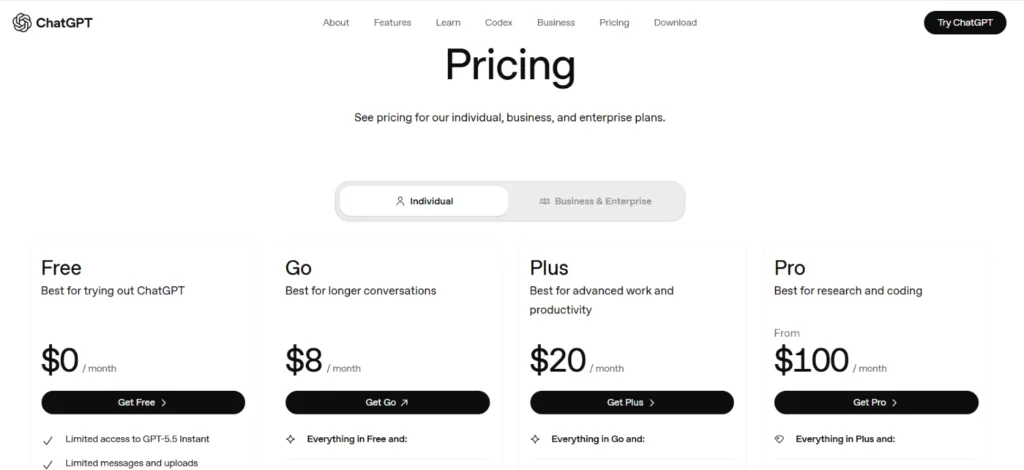
Source: OpenAI’s official ChatGPT pricing page.
Current ChatGPT Plans at a Glance
Free — $0 per month: Includes GPT-5.6 Luna for everyday chats, with unlimited everyday text chats and a Think option rolling out for harder questions. Free users can also use tools such as file uploads, image creation, voice, data analysis, and other features, but those tools have separate usage limits.
Go — $8 per month: Includes GPT-5.6 Luna, unlimited everyday text chats, the Think option, and higher limits than Free for eligible tools such as image creation, file uploads, and data analysis.
Plus — $20 per month: Includes GPT-5.6 Sol, more advanced reasoning options, higher tool limits, and broader access to features for longer or more demanding work.
Pro — $100 or $200 per month: OpenAI currently offers two Pro tiers. Pro 100 costs $100 per month, while Pro 200 costs $200 per month and includes more usage. Pro plans also include access to Pro models, Codex, deep research, image creation, memory, and file uploads.
One more difference to know: Ads may appear on the Free and Go plans. Plus and Pro are ad-free. OpenAI says ads are shown separately from ChatGPT’s responses and do not influence the answers you receive. Free users in eligible regions can also choose an ads-free Free experience, but that comes with lower usage limits and reduced access to some features.
Features and limits can change, so check the official ChatGPT pricing page for the latest plan details.
Was ChatGPT Plus Worth It for Me?
During the tasks I tracked, ChatGPT Plus saved me at least 13 hours over 30 days. The biggest difference for me was being able to work through longer content projects, make several revisions, and create more images without the lower Free-plan limits interrupting me as often.
I kept Plus after the promotion because I use ChatGPT regularly for content planning, research, some editing, images, and working through business ideas. It still doesn’t give me a perfect final result. I fact-check the information, rewrite generic sections, and make sure everything fits my audience before I use it.
For me, the $20 monthly cost is worth it because ChatGPT has become part of my regular workflow. Someone who only uses it occasionally may be fine with Free, while Go may be enough for someone who mainly wants higher limits at a lower price.
Before upgrading, check OpenAI’s official ChatGPT Plus page for the latest pricing, features, and usage limits, since these can change.
ChatGPT Features That Matter for Business
ChatGPT has many features, but these are the ones I use most for content, research, and everyday business tasks. Availability and usage limits vary by plan.
Content Creation
I use ChatGPT for blog outlines, some emails, social posts, product descriptions, and video scripts if I do any videos. It helps me get started faster, but I still add my own examples, opinions, and voice before publishing anything.
Related article >> How to Write Product Descriptions With AI
Research, File Analysis, and Repurposing
You can upload PDFs, documents, and spreadsheets and ask ChatGPT to summarize information, compare options, or explain the data.
I also use it to turn existing blog posts and guides into emails, social posts, and new content ideas. File uploads and data analysis are available on the Free plan with lower limits, while paid plans provide expanded access.
Related articles >>
Image Creation and Editing
I use ChatGPT to create and edit blog graphics, social media images, and visual ideas. It can produce a first version quickly, but I often need revisions before the image fits my brand.
ChatGPT Search
ChatGPT Search finds current information and provides links to its sources. I find it useful for checking product updates, statistics, and details that may have changed, but I still open the sources and verify important facts.
Deep Research
For questions that require more than a quick search, Deep Research can review multiple websites and uploaded files and create a structured report with citations.
This can be useful for detailed market, competitor, or product research, although access and usage limits depend on your plan.
I did not include Deep Research in my original timed test, so it’s not part of the 13 hours I measured and saved.
Learn more about how it works on OpenAI’s official Deep Research page.
GPTs, Projects, and Memory
OpenAI is moving away from custom GPTs and toward plugins, which can combine reusable instructions with connected apps and tools.
Existing GPTs may still be available during the transition, but plugins are the direction OpenAI is moving toward. Projects and Memory still help keep related work organized and reduce how often you need to repeat useful background information.
Projects help me keep related chats, files, and instructions together, while Memory can reduce how often I need to repeat useful background information. Projects are available on Free and paid plans, although memory features vary by plan.
Should You Use ChatGPT Plus?
Whether ChatGPT Plus is worth it depends on how often you use ChatGPT and whether the Free plan’s limits are getting in the way of your work.
The Plus Plan May Be Worth It If You:
- Create content, research information, or work on business tasks several times a week
- Regularly reach the Free-plan limits
- Need room for longer projects, uploads, image creation, and multiple revisions
- Value saving time more than the $20 monthly cost
The Free Plan or Go May Be Enough If You:
- Only use ChatGPT occasionally
- Are still learning what it can do
- Rarely reach the Free-plan limits
- Cannot comfortably add another monthly subscription
No plan will produce perfect work every time. You will still need to fact-check important information, edit generic writing, and make the final decisions yourself.
My ChatGPT Plus Rating: 8.5/10 ⭐⭐⭐⭐
I gave ChatGPT Plus an 8.5 out of 10 after my original 30-day test, and my rating has not changed after continuing to use it in my business.
What keeps it from earning a perfect score is that the results still need fact-checking, editing, and sometimes several prompts before they feel right. Images may also require revisions. However, the higher limits, flexibility, and range of business tasks it can handle make Plus worth the cost for how often I use it.

For me, ChatGPT Plus is worth the current $20 monthly price because I use it regularly, and the time savings outweigh the cost. It is not magic, though.
The quality of the result still depends on the instructions I provide and the editing I do afterward. OpenAI currently lists Plus at $20 per month, although features and limits can change.
Still deciding whether ChatGPT is the best choice for every writing task? Read Best AI for Writing: Is ChatGPT Enough or Should You Use Another Tool?.
Final Thoughts for My ChatGPT Review 2026
ChatGPT will not run your business for you, but it can save a significant amount of time when you use it for the right tasks.
During my original 30-day test, ChatGPT Plus helped me save at least 13 hours across content creation, emails, graphics, and planning.
I originally expected to cancel after the test, but I kept Plus because I continued using it for content planning, research, editing, images, and working through business ideas.
I still review the facts, rewrite anything that sounds generic, and make the final decisions myself.
My Recommendation
Try ChatGPT Plus if: You use ChatGPT regularly, work on longer or more complex projects, or frequently need uploads, images, multiple revisions, and access to more advanced reasoning without the lower Free-plan tool limits interrupting your work.
Stay with Free or consider Go if: You mainly use ChatGPT for everyday writing, brainstorming, planning, or research and the separate limits on uploads, images, voice, data analysis, and other tools are not getting in your way.
For me, ChatGPT Plus is worth the current $20 monthly price because the time it saves me outweighs the cost.
However, I still don’t rely on one AI tool for everything. Different platforms have different strengths, so I choose the tool that fits the task instead of forcing ChatGPT to handle every part of my business.
Ready to Get Better Results From ChatGPT or Any AI Tool You Use?
Knowing what ChatGPT can do is one thing. Knowing what to ask and how to ask it is where many beginners get stuck.
My free 25 AI Prompt Toolkit gives you ready-to-use prompts for planning content, writing emails, creating social posts, organizing business tasks, and getting past the blank page faster.
Enter your email below, and I’ll send the toolkit straight to your inbox. You’ll also receive practical tips, honest AI tool reviews, and beginner-friendly strategies to help you save time in your business.
Just fill out the form below to get instant access
We respect your privacy. You can unsubscribe at any time.
Thanks for reading my ChatGPT review for 2026. I hope it helped you decide whether the Free plan, Go, or Plus makes the most sense for how you plan to use ChatGPT in your business.

If this review helped you decide which tier to use and was very helpful for you, please share it with another entrepreneur who might be struggling with content creation.




Hi Meredith – This was a really helpful and honest breakdown. I have been using ChatGPT as part of my workflow for quite some time now, and your post really confirmed that I am on the right path with how I use it as a support tool and not a replacement for my own thinking. The way you explained time savings versus strategy hit home, especially the reminder that we still have to bring our voice and direction to the table. Great clarity for small business owners trying to decide how to use AI wisely. I truly appreciate all of your blog posts!
Hey Ernie!
Thank you so much for this, it really means a lot 💛
I love how you said support tool, not a replacement… that’s exactly how I use it too. AI can save us time, but the ideas, direction, and voice still have to come from us. I’m really glad my post helped confirm that you’re already on the right track.
I appreciate you taking the time to read and comment. It truly makes my day… Thanks for being here and for the encouragement! 😊
Hi Meredith,
Apologies for the delayed response. Like Ernie has said, your reviews are definitely a great way to take a look at the tools we require when working online.
The breakdown you bring has made me think twice about how I shouldn’t just use 1 AI app for my work. I’m looking at how each of them are a better tool for that specific area of my work. For example, I find that Claude is a big added asset for marketing, etc.
Truly appreciate your help! Cheers!
Hey Marc! 😊
Thank you so much for this! I really appreciate you taking the time to share that.
And yes, that’s exactly the point I try to get across. One AI tool usually isn’t the answer. Different tools shine in different areas, and once you start matching the tool to the task, everything gets easier (and honestly, less frustrating).
I’m glad the breakdown helped you look at things differently, and I agree, Claude can be a great asset for marketing when used the right way.
Thanks again for the kind words. Means a lot!