

When you have content ideas but don’t know where they should go, everything starts to feel harder than it needs to be. This post will show you how AI content planning can help you sort your ideas before you start writing, so you can decide whether it should start as a blog post, an email, a social post, or something smaller instead of turning one idea into a scattered mess and getting nowhere with it.
Affiliate Disclosure: This post contains affiliate links, which means I may earn a commission at no extra cost to you if you purchase through my links. I only recommend tools I’ve personally tested and believe will add value to your business. You can find the full disclosure here.
- Introduction
- Quick Answer: How to Use AI for Content Planning
- Why AI Content Planning Works Better Before You Write
- AI Content Planning for Beginners: Use This Start Here Filter
- How to Use AI to Decide If Your Idea Should Start as a Blog Post
- How to Use AI to Decide If Your Idea Should Start as an Email
- How to Use AI to Decide If Your Idea Should Start as a Social Post
- How to Use AI to Turn One Idea Into a Weekly Content Theme
- How to Use AI to Plan Content Before You Write
- Follow-Up Questions to Ask AI
- Content Planning With AI Example
- The Best Tools Are the Ones That Match the Job
- Final Takeaway
Introduction
Sometimes the hardest part of content creation is not coming up with the idea. It is figuring out what to do with the idea next, and that is where AI content planning can help you stop guessing before you start writing.
You might have a good topic sitting in your notes, but then the questions start.
Should this be a blog post or a social post? Would this work better as an email? Could this become a Pinterest pin? Is this big enough for a weekly content theme? Am I turning one simple idea into too much work?
That is where content planning starts to feel scattered.
A lot of business owners don’t struggle because they have no ideas. The real problem is usually this. You will hear them say something like. “I have content ideas, but I don’t know where to use them first.”
That is exactly where AI content planning can help you slow down for a minute and look at the idea before you turn it into content.
Instead of guessing where the idea should go, you can use AI to sort the idea, compare the options, and choose the strongest starting point.
Quick Answer: How to Use AI for Content Planning
Use AI to decide where a content idea should start by giving it your idea, your audience, your goal, and the platforms you use. Then ask whether the idea works best as a blog post, email, social post, Pinterest pin, or full weekly content theme.
The goal isn’t to lock the idea into one place. The goal is to choose the best starting point first, so repurposing the idea feels easier and more intentional.
After testing different AI tools for content creation, I’ve learned that the tool is rarely the first problem. The bigger issue is usually asking AI to create content before you know what job the idea is supposed to do.
Why AI Content Planning Works Better Before You Write
Content ideas usually feel scattered when you jump into writing before you know what the idea is supposed to do. You get an idea, open your AI tool, and ask it to help, but if you haven’t figured out what that idea should become yet, AI can send you in the wrong direction pretty quickly.
You might get a long draft for an idea that only needed a quick message. Or you might get something short when the topic really needed more explanation.
That’s why planning your content with AI first can help. It gives you a chance to slow down, look at the idea, and decide what the idea needs before you start writing.
If you need a more step-by-step way to organize your ideas, my simple content creation system can help you stop guessing before you post.
What This Usually Looks Like
This is when you start seeing things like:
- Half-finished drafts
- Random social posts
- Blog ideas that feel too thin
- Emails that should have been blog posts
- Content that sounds okay but has no clear purpose
- One simple idea is becoming a bigger project than it needed to be
That is why the planning step is worth doing first. It helps you avoid wasting time on the wrong format before you start writing, editing, designing, or scheduling anything.
How One Idea Becomes Many Content Pieces
A content idea doesn’t have to live in only one place. That’s one of the most useful parts of content planning with AI.
Once you know the strongest starting point, it becomes easier to turn that same idea into smaller pieces without making the whole thing feel scattered.
For example, a larger idea could become a main blog post first and then turn into an email, social post, Pinterest pin, or short tip later.
A smaller idea might only need a quick post, a short email, or one helpful section inside a bigger article. The point is not to use every idea everywhere. The point is to understand what the idea needs first.
AI Content Planning for Beginners: Use This Start Here Filter
If you’re new to AI content planning, keep this simple. Don’t start by asking AI to write the full piece. Start by asking AI to help you decide what the idea is supposed to become. This simple “Start Here” content decision filter can help you.
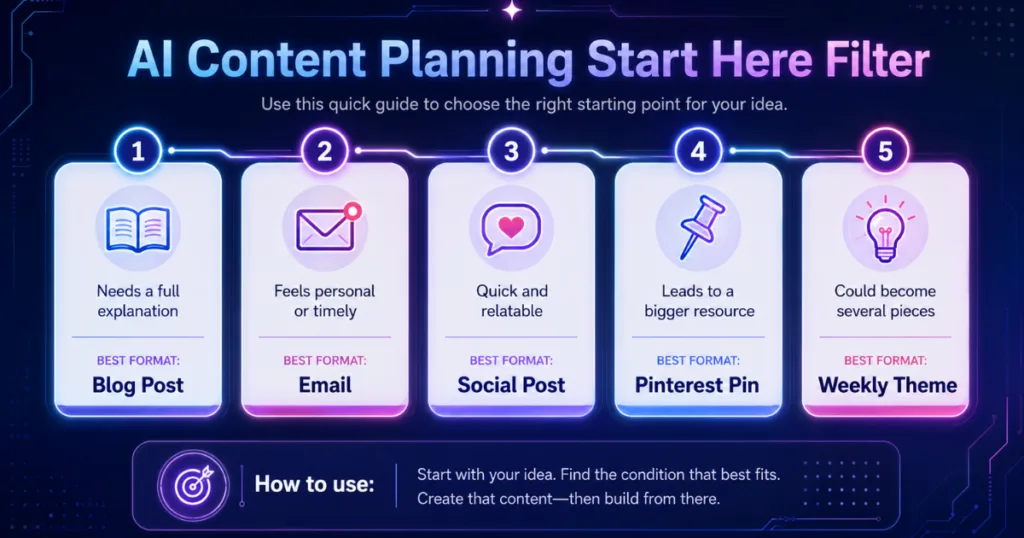
1. Is This Idea Big Enough to Solve a Full Problem?
If the answer is yes, it may work best as a blog post. A blog post is usually a good starting point when the idea needs explanation, examples, steps, comparisons, or search-friendly answers.
For example:
- How to use AI to plan a week of content
- Best AI tools for writing emails
- How to update an old blog post with AI
- How to decide what content to create when you have too many ideas
Those ideas are bigger than a quick caption. They need room.
That doesn’t mean that they can’t also become social posts or emails later. It simply means the blog post might be the best place to fully explain the idea first.
2. Is This Idea Personal, Timely, or Opinion-Based?
An idea might work better as an email or Facebook post if it feels personal, timely, or opinion-based. Some ideas don’t need to rank on Google. They need to connect with your audience.
An email can be a better starting point when the idea comes from a lesson you learned, a mistake you noticed, a quick tip, a behind-the-scenes thought, or a personal opinion.
For example, if you tested an AI tool and realized it made content planning harder instead of easier, that could become a great email. It doesn’t need to become a full blog post unless there’s a bigger lesson or search topic behind it.
3. Is This Idea Quick, Relatable, or Conversation-Starting?
A social post may be the better starting point when the idea is quick, relatable, or easy to respond to. Social posts are great for ideas that make people think, nod, laugh, or say, “Yep, that’s me.”
Here are a few examples:
- “Your email subject line may be too generic.”
- “Three signs your AI tool is making the job harder.”
- “Most small business owners do not need more apps. They need a simpler workflow.”
- “Posting every day will not help much if your message is still unclear.”
These ideas are strong because they are clear and easy to understand quickly. They may lead into a bigger blog post later, but they don’t always need to start there.
4. Is This Idea Helpful Enough to Lead Back to a Bigger Resource?
Some ideas work best as a Pinterest pin, Facebook post, or social promo because they point people back to something bigger.
For example, this idea could make a strong pin: “Simple follow-up email tips for small business owners.”
That pin could lead to a blog post about how to write better follow-up emails without sounding pushy. The pin doesn’t need to explain everything. Its job is to get the right person to think, “That is exactly what I need help with.”
If you’re turning an idea into graphics or pins, this is where it helps to understand when to use ChatGPT for planning and Canva for visuals.
5. Does This Idea Connect to Several Smaller Pieces?
Some ideas are too big for one piece of content. That’s not a problem. It might mean you found a weekly content theme.
For example, your main theme could be: “Following up without sounding pushy.”
That theme could become:
- Blog post: How to Use AI to Write Better Follow-Up Emails Without Sounding Pushy
- Email: The simple follow-up mistake that can cost you sales
- Facebook post: Most people don’t lose sales because they’re bad at selling. They lose them because they forget to follow up.
- Pinterest pin: Follow-up email tips for small business owners
- Short tip: Ask AI to write three follow-up email options: friendly, direct, and helpful.
Now your content feels connected instead of random. That’s the value of content planning with AI. It helps you see the bigger picture before you start creating.
How to Use AI to Decide If Your Idea Should Start as a Blog Post
A content idea should usually start as a blog post when it solves a bigger problem or answers a question people might search for.
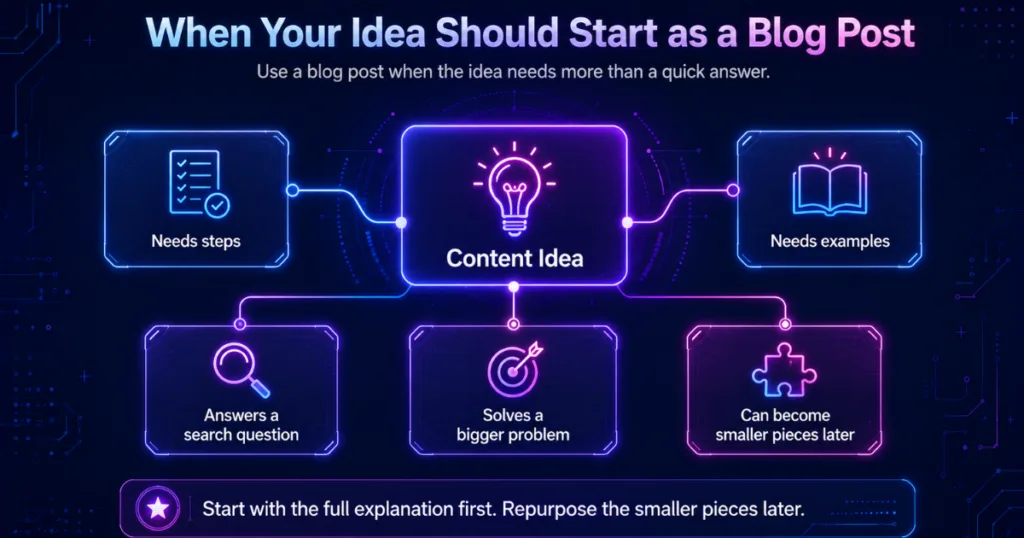
Blog posts work well for:
- tutorials
- beginner guides
- comparisons
- how-to questions
- step-by-step explanations
- mistakes to avoid
- tool breakdowns
- content that needs examples
For example, “how to write better follow-up emails without sounding pushy” is probably better as a blog post than a quick social caption. The reader needs more than one sentence. They need steps, examples, and a way to apply it.
When I Would Turn an Idea Into a Blog Post
From testing different AI tools for content planning and writing, I’ve learned that a blog post makes the most sense when the idea needs more than a quick answer. If the topic needs steps, examples, comparisons, or a full explanation, I would rather start with a blog post first and then break it down into smaller pieces later.
That keeps the bigger idea in one helpful place instead of trying to squeeze too much into a short email or social post.
If your idea turns into a writing project and you are not sure which tool fits best, I also break that down in my post on how to choose the best AI tool for the job.
How to Use AI to Decide If Your Idea Should Start as an Email
An idea should usually start as an email when it’s more personal, timely, story-based, or connected to a lesson you want to share with your audience.
Emails don’t always need to be long. Sometimes one small lesson is enough.
For example:
- “I forgot to follow up with someone who was interested, and it reminded me how easy it is to let warm leads slip through the cracks.”
- “I tested a new email subject line this week, and the simpler version worked better than the clever one.”
- “I noticed I was overcomplicating my weekly content again, so I went back to one clear message.”
- “A quick reminder: your audience does not need a perfect email. They need a helpful one.”
Those are email-friendly ideas because they feel personal, timely, or connected to a real lesson. They can also lead readers back to a blog post, free resource, or helpful tool.
Give the Email a Job First
Before you write the email, decide what the email is supposed to do.
- Is it meant to teach?
- Connect?
- Share a quick lesson?
- Send traffic to a blog post?
- Promote a free resource?
Once you know the purpose, the email becomes much easier to write.
If you use an email platform like Kit, this is where your content plan can become even more useful. After your idea is clear, you can send a short email that points readers to the blog post, a free lead magnet, or a resource that helps them take the next step.
How to Use AI to Decide If Your Idea Should Start as a Social Post
Some ideas work better as social posts because they are quick to understand, easy to relate to, visual, or likely to spark a reaction. Social posts are not always meant to explain everything. Sometimes their job is to get the reader to stop scrolling and think.
For example:
“Three signs your email subject line is too generic.”
That is a strong social post idea because it is simple, specific, and easy for someone to recognize in their own business.
Keep the Social Post Focused
A short explanation could look like this:
“If your subject line could fit almost any business, it is probably too generic. Try making it more specific to the problem your reader is actually dealing with, so they have a reason to open the email.”
That is enough for a social post. It teaches one clear thing without trying to turn the post into a full email marketing lesson.
If you already know the idea should become social content, a tool like Predis.ai can help you turn that clear idea into captions, carousels, or short-form content faster. I also shared more about this in my Predis.ai review.
However, I would not start with the tool first. Start with the idea. Decide what the post is supposed to do. Then use a tool like Predis.ai to help create the social version faster.
That order matters because if the idea is still messy, the tool is not going to magically fix it. It may just help you create more messy content faster, and that is the last thing you need.
How to Use AI to Turn One Idea Into a Weekly Content Theme
Some content ideas are big enough to carry your content for the whole week. This is where AI content planning can save a lot of time. Instead of coming up with a brand-new idea for every platform, you can use one main idea and break it into smaller pieces.
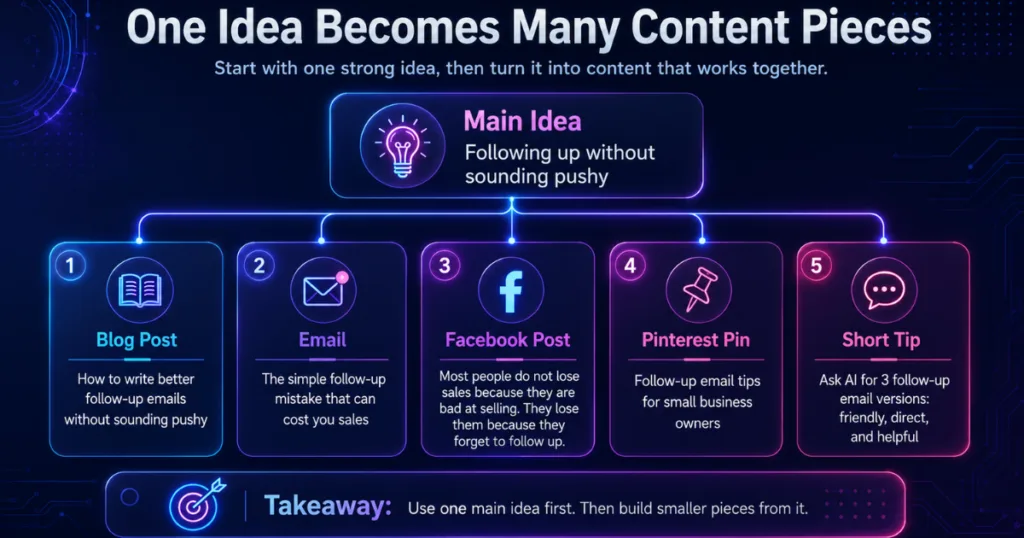
For example, let’s say your main idea is: “I keep forgetting to follow up with potential customers.”
That could become one piece of content that could become a full weekly theme.
Example Weekly Content Plan
Here’s how that one idea could break down:
- Blog Post – How to Use AI to Write Better Follow-Up Emails Without Sounding Pushy.
- Email – The simple follow-up mistake that can cost you sales.
- Facebook Post – Most people don’t lose sales because they’re bad at selling. They lose them because they forget to follow up.
- Pinterest Pin – Follow-up email tips for small business owners.
- Free Resource CTA – Grab my free [Lead Magnet] if you want help writing clearer emails, follow-ups, and content ideas faster.
How to Use AI to Plan Content Before You Write
You don’t need a complicated prompt to make this work. You just need to give AI enough context to help you make a better decision.
AI Content Planning Prompt
This is the part of AI content planning that keeps you from rushing into the wrong format too soon.
Try this simple prompt:
“I have this content idea: [insert idea]. My audience is [insert audience]. My goal is [insert goal]. I use [blog/email/Facebook/Pinterest/etc]. Should this idea start as a blog post, email, social post, Pinterest pin, or weekly content theme? Explain why, and give me a simple plan for how to use it across my content.”
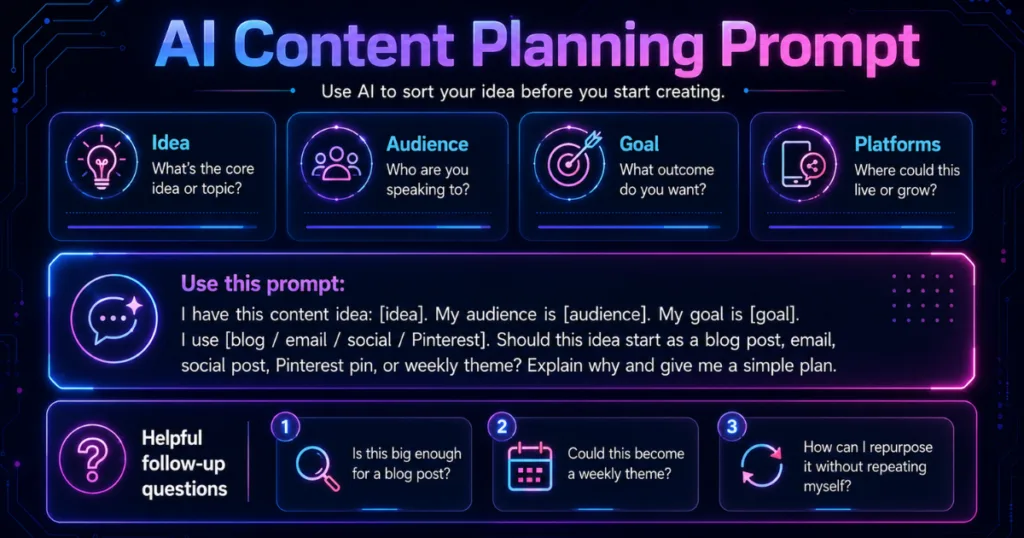
You can use this prompt in ChatGPT, Claude, Gemini, or whatever AI tool you like best. If you are comparing tools, my posts on ChatGPT vs Claude for blog writing and ChatGPT vs Gemini for small business can help you see where each one fits better.
The point is not to have AI write the whole thing right away. The point is to let it help you sort through the idea first, so you have a clearer direction before you start creating.
This also lines up with Google’s guidance on using generative AI content, which explains that AI can be useful for researching a topic and adding structure to original content when it still provides value for users.
Follow-Up Questions to Ask AI
After AI gives you the first answer, ask a few follow-up questions.
For example:
- Is this idea big enough for a full blog post?
- What would make this idea better as an email?
- Could this idea become a weekly content theme?
- What is the strongest angle for my audience?
- What would be the simplest version of this idea?
- How could I repurpose this idea without making it feel repetitive?
This is how to use AI to plan content without making everything more complicated.
AI can help you see your options, but you still need to make the final decision based on your audience, your business, and what the idea actually needs.
Content Planning With AI Example
Turning One Idea Into a Simple Plan
Let’s use this content idea for an example:
“My email subject lines sound too generic.”
If you gave that idea to AI and asked where it should start, it may not need to become a full blog post right away. This is a specific problem, but it’s also simple enough to explain in a short email, Facebook post, or quick tip.
That makes it a good example of a smaller idea.
How That Smaller Idea Could Break Down
The starting point could be a short email or social post.
- Email: One simple way to tell if your subject line is too generic.
- Facebook post: If your email subject line could fit almost any business, it probably needs to be more specific.
- Pinterest pin: Email subject line tips for small business owners.
- Quick tip: Ask AI to rewrite your subject line three ways: clearer, more specific, and more curiosity-driven.
If you wanted to expand the idea later, you could turn it into a blog section inside a larger post about email marketing mistakes. But it doesn’t need to start as a full article unless you have enough tips, examples, or strategy to make it worth the reader’s time.
Once the idea is clear, a writing tool like Typli.ai could help draft a short email or caption. I go into more detail in my Typli.ai review if you want to see where it fits best.
For social content, Predis.ai could help turn that idea into a few post options. When it is time to schedule those posts, Metricool could help you keep everything organized.
The important part is that the tool comes after the decision. First, decide what the idea needs to be. Then use the tool that fits the job.
The Best Tools Are the Ones That Match the Job
From testing AI tools for content planning, writing, and social content, I’ve found that the best tool depends on where the idea is in the process.
A lot of people think they need more tools, but that’s not the case. Most of the time, they need a clearer plan first. AI tools can help, but only when you know what you want the tool to do.
Here is a simple way to think about it:
- I would use ChatGPT, Claude, or Gemini to organize the idea and explore angles.
- Then use Typli.ai when you’re ready to turn that clear idea into a draft.
- I would use Predis.ai when the idea should become social content.
- And then use Metricool when you want to schedule and organize the content across platforms.
That is the order I would use. Plan first, create second, and schedule third. When you follow that order, AI becomes a helper instead of another thing, making your content feel scattered.
Final Takeaway
AI content planning doesn’t have to be complicated. It just needs to help you make a better decision before you create.
The goal isn’t to create more random content. The goal is to understand what each idea is supposed to do before you turn it into a blog post, email, social post, Pinterest pin, or weekly content theme.
That also connects to Google’s people-first content guidance, because your content should help real people first, not just fill space on your website.
That is why AI content planning is so helpful for beginners. It gives you a simple way to sort your ideas, choose the right starting point, and stop turning every content idea into more work than it needs to be.
Before you create your next piece of content, ask AI one simple question: “Where should this idea start?” That question can save you so much time, make your content feel less scattered, and help you use one idea in a smarter way.
Want Help Planning Your Content With AI?
If you want help asking AI better questions for content ideas, planning, rewrites, and clearer messaging, grab my free AI Prompt Toolkit below. It gives you ready-to-use prompts so you can stop staring at a blank screen and start using AI in a way that actually helps your business.
You’ll also get my weekly AI tool reviews, comparisons, and online business tips to help you choose tools smarter and save time in your business.
Just fill out the form below.
We respect your privacy. You can unsubscribe at any time.
Thanks for reading. I hope this post helped you see how AI content planning can make it easier to decide whether your idea should start as a blog post, email, social post, or something smaller before you start creating.

If this post helped you think differently about planning your content with AI, please share it with another small business owner or content creator who has ideas but doesn’t always know where to use them first.


Hi Meredith – This really hit home for me because I think a lot of us have notebooks, sticky notes, and random ideas floating around, but then we get stuck trying to figure out what to do with them. I liked how you showed that not every idea needs to become a giant project. Sometimes it just needs the right home.
The part about deciding what job the content is supposed to do before asking AI to create it was a great reminder. It is amazing how much easier things become when we slow down, make a plan, and then let the tools help us. Thanks for another practical and helpful post.
Hey Ernie!
Thank you for this. You said it perfectly, the ideas usually aren’t the problem. It’s the “now what do I do with all of this?” part that makes everything feel messy. That’s why I’ve had to stop treating every idea like it needs to become a big project.
And yes, AI works so much better when the content has a clear job first. I’m so glad that part stood out to you, and I really appreciate you sharing this.