

Everyone says ChatGPT will save you time, but if you’re running a small business, you may be spending more time rewriting generic answers than actually using them.
The problem usually isn’t ChatGPT. It’s that the prompt doesn’t give it enough to work with.
In this guide, I’ll give you 8 ChatGPT prompts for small business owners that you can copy, customize, and use to get clearer, more useful answers without wasting time trying to figure out what to type.
Updated: September 2026. I refreshed this post with new ChatGPT prompt examples for small business owners, clearer prompting tips, and more practical ways to get better results from AI.
Affiliate Disclosure: This post contains affiliate links. If you purchase through my links, I may earn a commission at no extra cost to you. I only recommend tools I personally use and trust. See full disclosure here.
You type a simple request into ChatGPT, hit enter, and expect something useful. Instead, you get a response that sounds generic, obvious, or nothing like what you actually needed.
I used to think that meant ChatGPT just wasn’t very good. I’d ask it to write a social media post and get advice that could have been written for almost any business.
What I eventually realized was that the problem usually wasn’t the tool. I simply wasn’t giving it enough information to understand what I wanted.
Once I started being more specific, the answers became much easier to use in my business.
You don’t need to learn complicated prompt engineering to get better results. You just need a clearer way to ask.
That’s what this guide is for. I’ll show you 8 ChatGPT prompts for small business owners that you can copy, customize, and use for everyday tasks like content, email, brainstorming, and marketing.
I’ll also show you how to adjust them so the answers fit your business instead of sounding like they were written for everyone.
Why ChatGPT Gives You Generic Answers
When ChatGPT gives you a bland or generic answer, it usually doesn’t have enough information about what you want.
I learned this by typing things like “write me a caption about productivity” and then wondering why the result sounded like it could belong to anyone.
Usually, one of these things was missing:
- Context: Who are you creating this for, and what do they need?
- A clear task: What exactly do you want ChatGPT to create or help you do?
- Format: Do you want a short post, a list, an email, an outline, or something else?
- Tone: Should it sound friendly, professional, casual, encouraging, or direct?
Think of ChatGPT less like a search box and more like someone helping you with a task. The clearer your instructions are, the easier it is for ChatGPT to give you something useful.
OpenAI’s own Prompting guide recommends giving clear instructions, helpful context, and guidance about the kind of response you want.
Next, I’ll show you the simple prompt formula I use to put those pieces together.
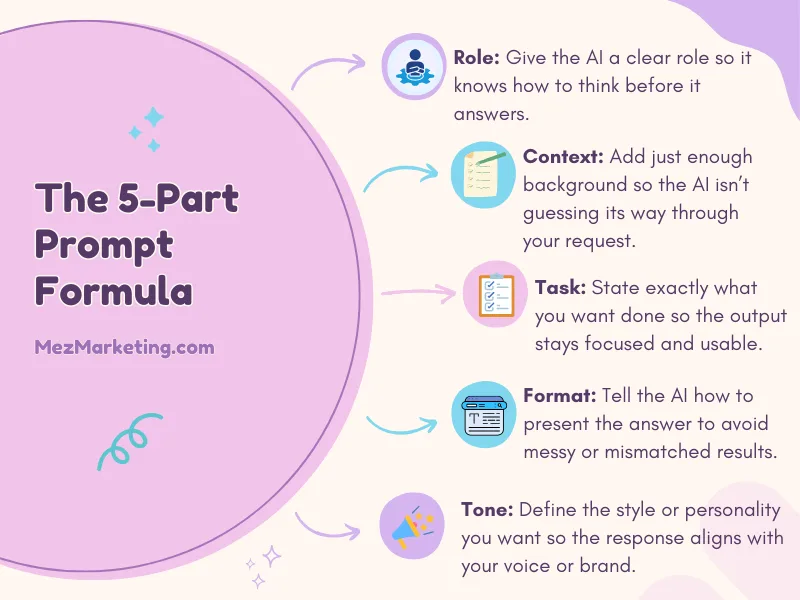
The 5-Part Prompt Formula That Works
You don’t need a complicated prompt to get a useful answer. I usually give ChatGPT five simple things.
1. Role
Tell ChatGPT what kind of help you want.
Example:
“Act as a social media strategist for small business owners.”
2. Context
Explain who you’re creating for or what situation you’re dealing with.
Example:
“My audience is busy, non-techy solopreneurs who want simple ways to use AI.”
3. Task
Be clear about exactly what you want it to do.
Example:
“Write 5 email subject lines about saving time with AI.”
4. Format
Tell ChatGPT how you want the answer delivered.
Example:
“Keep each subject line under 50 characters and number them 1–5.”
5. Tone
Describe how you want the response to sound.
Example:
“Make it conversational and helpful, not overly promotional.”
You won’t need every detail in every prompt, but the more clearly you explain what you need, the less ChatGPT has to guess.
And now let’s put that formula into practice with prompts you can actually use in your business.
Want 25 Ready-to-Use AI Prompts?
If you’d rather not create every prompt from scratch, I put together a Free 25 AI Prompt Toolkit with prompts for content, email, marketing, and everyday business tasks.
You can grab the free toolkit below, or keep reading for 8 ChatGPT prompts you can try right now.
We respect your privacy. Unsubscribe anytime.
8 ChatGPT Prompts for Small Business Owners
You don’t have to build every prompt from scratch. These examples cover common tasks small business owners handle every week, from creating content and writing emails to brainstorming ideas and planning marketing.
Copy the prompt you need, replace anything in brackets with your own information, and adjust it to fit your business.
Prompt 1: Write a Social Media Post
Use this when you know what you want to talk about but aren’t sure how to turn the idea into a post.
Copy & Paste Prompt:
“Act as a social media strategist for a small business. Write a Facebook post about [your topic]. My audience is [describe your audience], and they struggle with [specific problem]. Keep the post under 100 words. Start with a hook that speaks to that problem, keep the tone conversational and helpful, and end with a simple question or call to action. Avoid corporate language and do not use hashtags.”
Why it works:
Instead of asking ChatGPT to simply “write a Facebook post,” you’re giving it the audience, problem, format, and tone you want.
If social content is one of the areas taking too much time in your business, you can also see the 7 Simple Content Creation AI Tools I’ve looked at for creating content more efficiently.
Prompt 2: Write Email Subject Lines
Use this when you’ve written the email but get stuck trying to come up with a subject line people will actually want to open.
Copy & Paste Prompt:
“Act as an email copywriter for a small business. Write 5 subject lines for an email about [your topic]. My subscribers are [describe your audience], and this email will help them [main benefit or takeaway]. Keep each subject line under 50 characters. Use curiosity where it makes sense, but don’t make them misleading or overly clickbaity. Give me 5 different options and briefly explain the angle behind each one.”
Why it works:
ChatGPT knows who the email is for, what benefit the reader should care about, and what kind of subject lines you want. Asking for different angles also helps you avoid getting five versions of basically the same idea.
Prompt 3: Create a Blog Post Outline
Use this when you know what you want to write about but need help organizing the post before you start drafting.
Copy & Paste Prompt:
“Act as a content strategist for a small business blog. Create a clear blog post outline about [your topic]. My readers are [describe your audience], and they are struggling with [specific problem]. They want practical, beginner-friendly help. Include: A short introduction, 4–5 useful H2 sections, H3 subheadings only where they help explain the topic, and a conclusion with one clear next step. Make the headings specific and useful, not vague or overly clever. Keep the tone helpful, simple, and encouraging.”
Why it works:
This gives ChatGPT the topic, audience, problem, structure, and tone before it builds the outline, so you’re more likely to get something organized around what the reader actually needs.
Prompt 4: Brainstorm Content Ideas
Use this when you know your topic or niche but feel like you keep talking about the same things.
Copy & Paste Prompt:
“Act as a content strategist for a small business. Give me 10 content ideas about [your topic or niche]. My audience is [describe your audience], and they struggle with [specific problem]. Make the ideas beginner-friendly, useful, and different from each other. Include a mix of: Quick tips, Common mistakes, Questions, Personal-story angles, How-to ideas. For each idea, give me a short headline and one sentence explaining what the content should cover.”
Why it works:
Instead of just asking ChatGPT for ideas, you’re telling it who the content is for, what problem they have, and what kinds of angles you want. That makes it much less likely to give you ten versions of the same idea.
Prompt 5: Write an Email
Use this when you know what you want to tell your subscribers but need help turning the idea into a clear email.
Copy & Paste Prompt:
“Act as an email copywriter for a small business. Write an email about [your topic]. My subscribers are [describe your audience], and the main thing I want them to understand or do after reading is [main takeaway or action]. Start with a natural opening that connects to the problem or situation. Keep the email focused on one main idea, use short paragraphs, and end with one clear call to action. Make the tone conversational, helpful, and human. Avoid hype, corporate language, and unnecessary filler.”
Why it works:
This keeps ChatGPT focused on one message instead of trying to cram several ideas into the same email. It also tells it who the reader is, what the email needs to accomplish, and how you want it to sound.
Prompt 6: Repurpose One Piece of Content
Use this when you already created something useful and want to turn it into more content instead of starting over.
Copy & Paste Prompt:
“Act as a content repurposing strategist for a small business. Here is my original content: [paste your blog post, email, video transcript, or social post]. Turn this into: 3 Facebook post ideas, 3 short social captions, 2 email ideas, 5 Pinterest pin headline ideas. Keep the main message consistent, but give each piece a different angle so they don’t all sound the same. My audience is [describe your audience]. Keep the tone clear, conversational, and helpful.
Why it works:
This gives ChatGPT one strong piece of content to work from and tells it exactly what you want created from it. Asking for different angles also helps prevent repetitive output.
Prompt 7: Turn a Rough Idea Into a Clear Message
Use this when you know what you want to say, sell, or explain, but the idea still feels messy in your head.
Copy & Paste Prompt:
“Act as a messaging strategist for a small business. Here is my rough idea: [paste your notes, thoughts, or draft]. My audience is [describe your audience]. Help me turn this into one clear message that explains: What I’m offering or talking about, who it is for, what problem it helps solve, and why someone should care. Keep the wording simple and conversational. Do not make it sound overly polished, salesy, or full of marketing jargon. Then give me 3 shorter versions I could use for a website, email, or social post.”
Why it works:
This gives ChatGPT your raw thinking first, then asks it to organize the idea around the parts your audience actually needs to understand.
Prompt 8: Understand What Your Audience Is Struggling With
Use this when you need help figuring out what your audience may be worried about, confused by, or trying to solve.
Copy & Paste Prompt:
“Act as a customer research assistant for a small business. My audience is [describe your audience], and my business helps them with [topic, problem, or goal]. Give me 10 realistic problems, questions, or frustrations this audience may have about [specific topic]. For each one, include: The problem or question, why it matters to them, and one content idea I could create to help. Keep the ideas practical and specific. Do not make up statistics or pretend you have access to real customer data.”
Why it works:
This helps ChatGPT organize likely audience struggles without pretending those ideas came from actual research. You can then use the list as a starting point and compare it with real questions, comments, search data, or customer feedback.
✨ Try This Now:
Pick one of the prompts above that matches something you’re working on today. Replace the bracketed parts with your own details, paste it into ChatGPT, and see how the response changes.
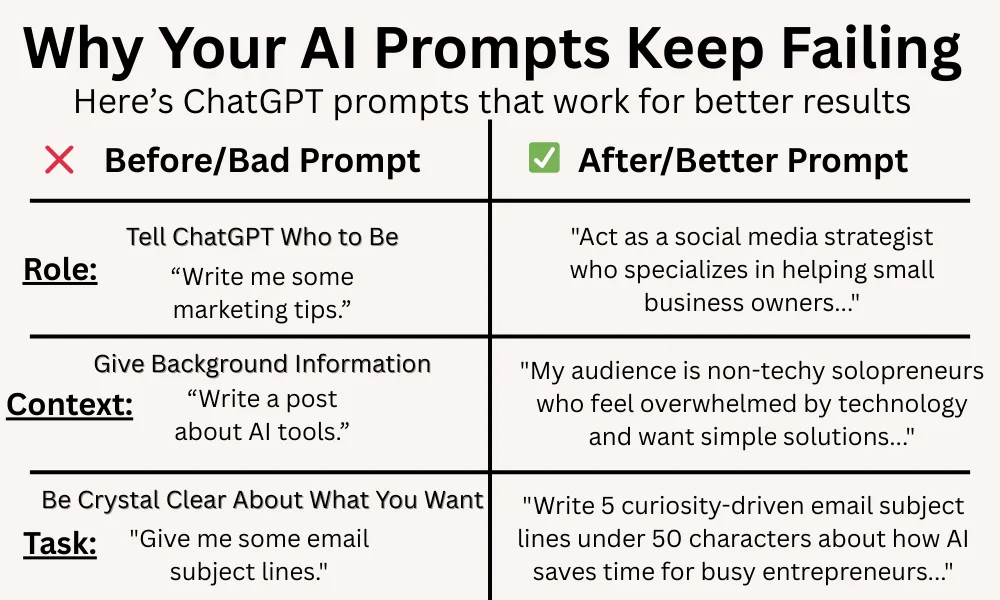
Common Prompt Mistakes to Avoid
Even a good prompt can give you disappointing results if a few important details are missing. Here are four mistakes I’d watch for:
1. Being Too Vague
❌ “Write something about productivity.”
✅ “Write a 150-word tip about one way a busy small business owner can save time using AI.”
A little more detail gives ChatGPT much more to work with.
2. Not Giving It Limits
If you want a quick answer, say so. Include things like a word count, number of ideas, or how long each section should be.
3. Forgetting Your Audience
Tell ChatGPT who the content is for. Advice for a complete beginner should sound very different from advice for someone with years of experience.
4. Publishing the First Draft Without Editing
AI can give you a strong starting point, but it still needs you. Check the facts, remove anything that doesn’t sound like you, and add your own experience or examples.
If this is something you struggle with, my guide on how to humanize AI content walks through simple ways to make AI-assisted writing sound more natural and personal.
The Follow-Up Trick Most People Miss
You don’t have to accept ChatGPT’s first answer.
One of the easiest ways to get better results is to keep the conversation going and tell it what needs to change.
Try follow-up prompts like:
- “Make this shorter.”
- “Make it sound more conversational.”
- “Give me 3 different versions.”
- “Rewrite this for [different audience].”
- “Make the opening stronger.”
- “Add a specific example.”
For example, if the first draft is close but still feels too formal, you can say:
“This is good, but make the tone warmer and more natural. Keep the main idea the same.”
That small follow-up can save you from starting over with a brand-new prompt.
If you want to save even more time by creating several pieces of content together, see my guide on Batch Content Creation with AI.
Related Questions
Why does ChatGPT sometimes give different answers to the same prompt?
ChatGPT can respond differently even when you ask the same thing more than once. If you want more consistent results, give it clearer instructions about the audience, format, tone, and details that matter.
Can ChatGPT write content that sounds like me?
It can get closer when you give it examples of how you naturally write. You can paste in a short sample and explain what you like about your tone, then ask ChatGPT to use that style as a guide. I’d still edit the final version so it sounds like something you would actually say.
Do I need a special AI tool to write better prompts?
No. The biggest improvement usually comes from giving the AI clearer instructions, not from finding another tool. Start with the AI assistant you already use and practice adding better context, a clear task, and the format you want.
How long should a good ChatGPT prompt be?
There isn’t one perfect length. A prompt should be long enough to explain what you need without adding details that don’t matter. Some tasks only need a sentence or two, while others need more context.
Start Getting Better Results From ChatGPT
You don’t need perfect prompts or complicated prompt-engineering tricks. A little more context, a clearer task, and a few simple instructions can make a big difference in the answers ChatGPT gives you.
If you haven’t already, pick one of the 8 prompts above and try it with something you’re working on today. The easiest way to get better at prompting is to start using it.
Want 25 More Ready-to-Use AI Prompts?
If these prompts helped, I put together a Free 25 AI Prompt Toolkit with ready-to-use prompts for content, email, marketing, and everyday business tasks.
They’re designed to give you a starting point when you know you want AI’s help but don’t want to waste time figuring out what to type.
Want 25 more ready-to-use prompts? Click the button below to get your free AI Prompt Toolkit.
If you try one of these prompts, I’d love to know how it worked for you. What’s the biggest thing you struggle with when using ChatGPT? Leave a comment below and let me know.

If this post helped you, share it with a friend who’s frustrated with AI giving them useless answers.



Meredith, Glad to see you working more with AI. This post is jam packed with ChatGPT tips. Personally I like jumping around from AI to AI to see what different results I get.
You make a real good point on following up. Instead of just going with that initial response we should really have a back and forth conversation with our AI. I did find that a good conversation starter is as follows:
“You’re my ruthless mentor. Don’t sugarcoat anything. If my idea is weak, call it trash and tell me why. Your job is to test everything until I say it’s bulletproof.”
Hey Robert,
Yes! I totally do that too, hopping from one AI to another to see what different results I get.
And I agree, the follow-up is everything. Having a real back-and-forth with your AI is where the magic happens. I do this all the time with a few of them. That prompt you shared? Love it! Nothing like a brutally honest “mentor” to call your ideas out and make sure they’re actually good.
I’ll definitely add that one to my own toolkit. Thanks for stopping by!
AI needn’t be mysterious. Let’s remember, AI gets to know you. That’s the best part for me. I recently gave it a writing sample, and now it knows what I sound like, who my customers are, and how I can address their problems, with viable solutions. I recently gave it a book I wrote and it created an update geared to the people I serve, now. It is a mind blower for someone like me who was born in the early 1950’s!!
Oh my gosh, Kate, I love this! And you’re so right, AI doesn’t have to feel mysterious at all. Once it gets a taste of your voice and understands who you’re talking to, it becomes this super helpful little sidekick that just gets you.
And wow… feeding it your book and having it update everything for your audience now? That’s incredible. I can only imagine how wild that must feel, especially after watching technology evolve from the ’50s to this. Honestly, it blows my mind too, and I wasn’t even around back then!
It’s amazing what we can do with it now, and I’m so glad you’re having fun with it. Thanks for your comment..
Hi Meredith,
For anyone looking to advance their ChatGPT – or any other AI software for that matter – this is gold! You have all the information you need to bring your writing (and anything else), to the next level.
Thanks for bringing this out in the open Meredith, too many people think that asking an AI is the same as asking Google and it sure doesn’t work that way. Cheers!
Hey Marc,
Thank you and yes, exactly! Asking an AI isn’t like Googling something. It’s a whole conversation, not just a search.
Once people understand that and they get the hang of working with it, the results can be amazing. I’m glad this made sense for you. Thanks for your comment!
I really enjoyed reading your post! I found it so practical and filled with concrete examples. I’ve been using AI to help me restructure and rebrand my online business over the last month and learned the difference in prompts and was able to accomplish so much. after reading your post it helped me to be more specific and use the follow up more. it does make a big difference. I was initially afraid of AI but also learned how useful it can be. thanks again for your post!
Hey Denny,
Thank you! I’m so glad you found it practical. That’s exactly what I’m aiming for.
I love hearing how you’ve been using AI to restructure and rebrand your business. And yes, getting specific with prompts and following up really does make a huge difference. It’s amazing how something that feels a little scary at first can turn out to be such a powerful tool once you get the hang of it. Thanks so much for your comment!
Hi Meredith – You really over delivered with his blog post. The prompts you suggest and how I now think about prompting has made me consider what to do next with my content and my time with AI. This is such a great breakdown! It’s amazing how much the quality of AI responses improves when we slow down and give clearer instructions. The 5-part formula is such a simple shift, but it really does turn generic into usable. Thanks for laying it out so clearly.
Hey Ernie!
Thanks so much! I’m really happy to hear the prompts are useful for you and that they got you thinking differently about how you work with AI. That’s exactly what I was going for. I wanted to make it practical, not just theory. I can’t wait to see what you do with it. Hope you have a great week!