

Since this post is long and packed with valuable info, here’s a short version of what you’ll find here. Save it for later and share with someone who could use it; you’ll want to come back to it!
You can set up a professional blog in under 1 hour with their latest offer. I’ll walk you through each step, point out the mistakes that often cost beginners weeks of frustration, and show you how to publish your first money-making post today.
This post contains affiliate links. I may earn a commission at no extra cost to you. I only recommend tools I’ve used or thoroughly researched for beginners. See full disclosure here.
- Introduction
- Why Choose Your Blog with Bluehost for Your Blog Setup?
- Step 1: Choose Your Bluehost Hosting Plan
- Step 2: Register Your Domain Name
- Step 3: Complete Your WordPress Blog Setup with Bluehost
- Step 4: Install Astra Theme for Fast Loading
- Step 5: Start Blogging with Your First Money-Making Post
- Common Setup Mistakes to Avoid
- Next Steps After Launch
- Frequently Asked Questions
- Start Your Affiliate Blog Today
- Let’s Hear From You!
- Your Quick Action Plan: (If You Skipped to the End)
- Must-Have Tools to Catapult Your Business!
Start Your Blog Today with Bluehost and take advantage of their latest offers – Click Here to Get Started!

Introduction
Have you been dreaming about starting a blog but keep putting it off because you think it’s too expensive or complicated? You’re not alone. I felt the same way when I first started. But here’s the good news: blogging doesn’t have to be pricey or overwhelming. In fact, Bluehost always has great deals for new bloggers. Check out the latest here.
With Bluehost’s beginner-friendly platform, you can have your blog live and ready for affiliate marketing in under an hour with this introductory pricing for your first 36-month term, less than your daily coffee.
This tutorial walks you through exactly how to start a blog with Bluehost step-by-step, from choosing your plan to publishing your first post. I’ll show you why Bluehost is perfect for beginners and the fastest path to start blogging for affiliate marketing.
Why Choose Your Blog with Bluehost for Your Blog Setup?
When I started blogging, I spent weeks researching different hosting options, overwhelmed by confusing technical terms and worried about making the wrong choice for my first blog.
Here’s what I discovered:
When you start your blog with Bluehost, you get the top choice for WordPress beginners because it removes all the technical complexity while providing everything you need to succeed.
Why Bluehost Works for Bloggers
WordPress Integration
When you start your blog with Bluehost, WordPress automatically installs and optimizes everything for beginners. No technical setup, no configuration headaches, just click and start blogging.
Affordable Starting Point
Bluehost makes it easy to launch your blog, and they offer ongoing offers for new customers. It removes the financial barrier that stops most beginners.
This promotional price includes: a free domain name for the first year (saving you $15/year) and a free SSL certificate (normally $50/year), making it an incredible value for new bloggers.
Built-in Growth Tools
With Bluehost’s Starter plan, you get essential features like free SSL, 24/7 support, a WordPress staging site, and a Pro Email trial.
These are things most budget hosts make you pay extra for. Marketing credits are included in higher-tier plans, but even the Starter plan gives you a head start without the extra cost
Step 1: Choose Your Bluehost Hosting Plan
The biggest mistake beginners make. Overthinking hosting plans.
Here’s exactly what you need:
Starter Plan – Perfect for Beginners
- 10 website (plenty of room to grow while staying simple). You really only need one when you start.
- 10GB storage (enough for 500+ blog posts)
- Free domain for first year (normally $15/year)
- Free SSL certificate (normally $50/year)
- 24/7 support
Important note:
When BlueHost offers special promotional pricing for new customers, with renewals billed at their standard rates. These promotions do change from time to time, so it’s best to take advantage of the latest offer while it’s available.
Bluehost also offers higher-tier plans with unlimited websites and storage, along with additional features like spam protection. These plans cost more than the Starter plan but give you room to grow if you’re planning multiple blogs or want extra features from the start.
My recommendation:
Start with the starter plan today. Even though you can host up to 10 websites, most successful affiliate bloggers focus on one profitable blog rather than spreading themselves thin across multiple sites. You can always upgrade later.
Step 2: Register Your Domain Name
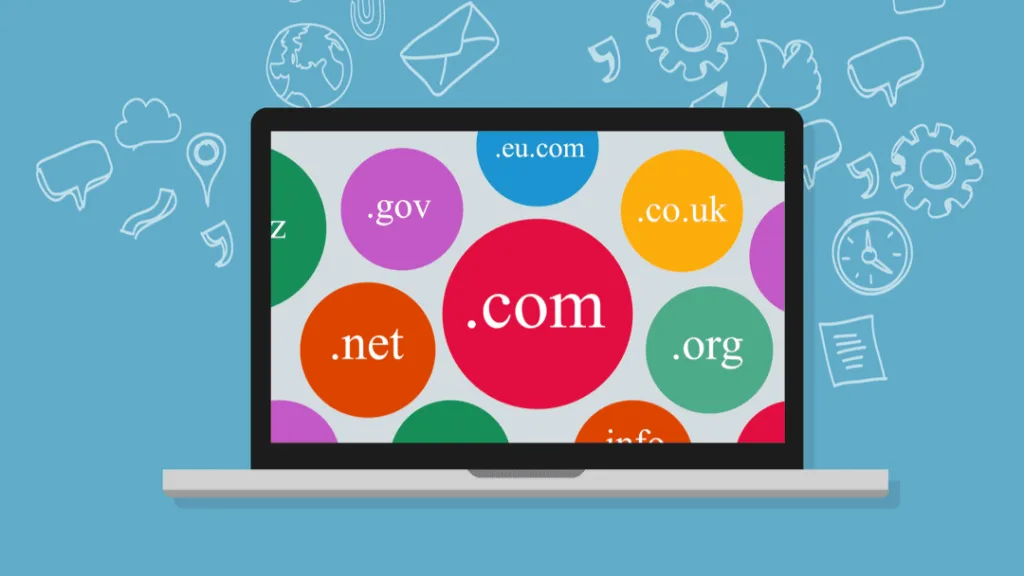
Your domain is your blog’s permanent address. Here’s what I learned from registering dozens of domains:
Domain Best Practices
- Keep it under 12 characters – Mine is MezMarketing.com
- Avoid hyphens and numbers – These can be confusing and are often associated with spammy sites.
- Make it brandable over keyword-stuffed – Choose a name that reflects your blog’s identity and is easy to pronounce
- Choose .com for trust and memorability extension – It’s the most recognized and trusted by users.
- Research its history – Ensure the domain hasn’t been previously used for spam or other undesirable purposes.
Example: Instead of “best-affiliate-marketing-tips-2025.com,” choose something like “profitpins.com” or “incomeinsider.com.”
Domain Registration Tips
Choose a domain that’s short, memorable, and brandable over keyword-stuffed options. When you start your blog with Bluehost, getting your domain during signup simplifies everything with one login and one bill.
Pro tip:
For more in-depth tips on choosing the perfect domain name, I trust this resource, Samantha North,“How To Choose A Domain Name That’s Perfect For Your Blog (11 Expert Tips)”
For helpful tips on picking a domain that’s short, memorable, and brandable.
Bottom line:
Choosing the right domain is important because it sets the tone for your blog, makes your site easy to find, and helps build credibility with your audience from the very start, but don’t stress too much over the perfect domain. Your content and consistency matter more than having the ideal web address.
Step 3: Complete Your WordPress Blog Setup with Bluehost
When you start your blog with Bluehost, their setup wizard makes this incredibly simple:
Account Setup Process
- Choose your plan (The Bluehost starter plan for most beginners)
- Enter your domain (new or existing)
- Create an account with your information
- Skip extras (you don’t need most add-ons initially)
- Complete payment and confirm
- Check your email for a confirmation from Bluehost; sometimes it lands in spam/junk folders
Automatic WordPress Installation
Bluehost installs WordPress automatically, but you’ll answer a few quick questions:
- Site Title: Your blog name (easily changed later)
- Tagline: Brief description of your blog
- Admin Username: Don’t use “admin”—pick something unique
- Strong Password: Use your browser’s password generator
Security note:
Always use unique passwords for every account. I store everything in Chrome’s built-in password manager for convenience and security.
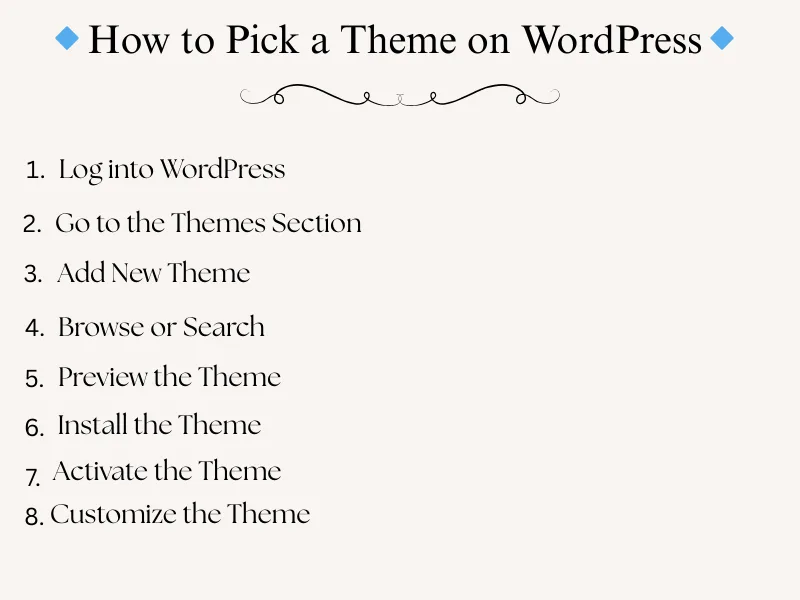
Step 4: Install Astra Theme for Fast Loading
After setting up your Bluehost account, you’ll want to make your site look good. Your theme affects everything from loading speed to mobile responsiveness.
Bluehost connects seamlessly with WordPress, allowing you to choose from thousands of free or premium themes. After testing dozens of themes, Astra consistently wins for bloggers who want to monetize.
Why Astra Theme?
- Lightning fast: Loads in under 1 second
- Mobile responsive: Looks perfect on all devices
- SEO optimized: Clean code that search engines love
- Beginner-friendly: No coding required for customization
- Monetization-friendly: Works with all major plugins when you start your blog with Bluehost.
Installing Astra
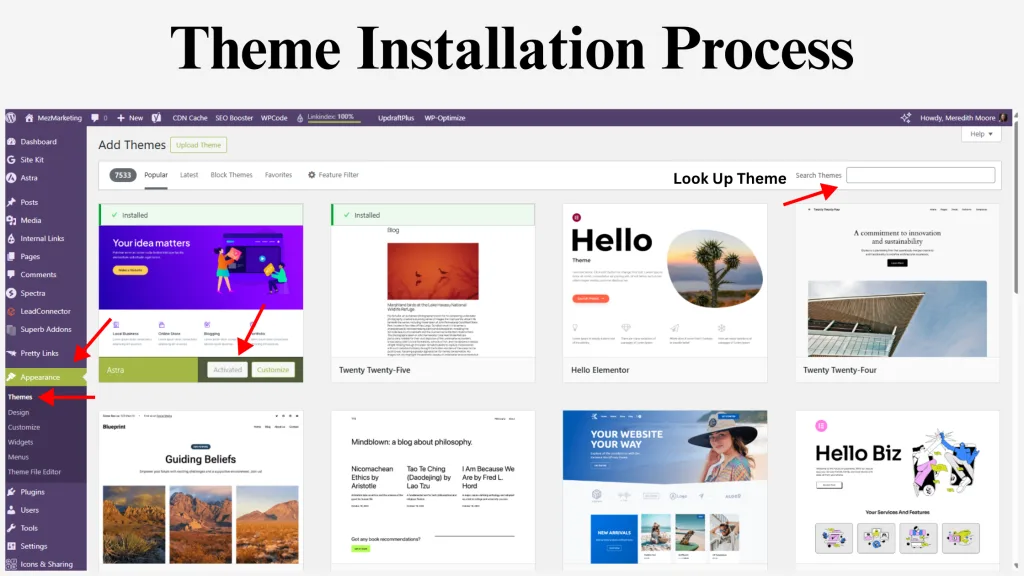
- In your WordPress dashboard, go to Appearance > Themes
- Click Add New
- Search for “Astra”
- Click Install, then Activate
Customization tip:
Astra’s free version handles everything beginners need. The clean design keeps readers focused on your content and affiliate recommendations.
Here’s an easy way to get started with the Astra theme. This Quick Starter Guide is really helpful. It walks you through the basic steps by step. making setup simple and stress-free. Watch it below!
Video credit: Astra Theme on YouTube. You can also watch it directly on their channel here.
Step 5: Start Blogging with Your First Money-Making Post
Your blog is live, but it needs content to attract readers and earn commissions.
Now the exciting part: creating the content! Your first post doesn’t have to be perfect; it just has to be published.
Once you have content, you can begin adding affiliate links, products, and resources to start monetizing. But remember, it all starts with signing up for Bluehost so you have a place to share your message with the world.
Here’s your roadmap to publish your first post after you start your blog with Bluehost:
Content Planning
Before writing, research what your audience actually searches for:
- Check Google Trends for trending topics in your niche
- Look at successful blogs for content ideas
- Focus on solving specific beginner problems
Want to save time while planning? Check out my post on automating blog tasks for ways to make content creation easier.
Your First Post Ideas
- Product review: Review an affiliate product you actually use
- Tutorial: “How to” guide solving a common problem
- Resource list: “Best [tools/resources] for [audience].”
- Getting started guide: Beginner’s guide to your niche topic
Writing and Publishing
- Create a compelling title with your target keyword
- Write valuable content that genuinely helps readers
- Add affiliate links naturally within a helpful context
- Include images to break up text and improve engagement
- Preview on mobile before publishing
Content Tip:
Posts with specific results perform better than vague advice. Instead of saying, “This tool is helpful,” share concrete outcomes like, “This tool helped me create 20 blog posts in 10 hours.” Darren Rowse of ProBlogger emphasizes the power of detailed, result-oriented content in engaging readers and building trust.
If you are struggling with content creation, I suggest you download this free checklist! It has helped me drastically, and it will do the same for you! You will discover simple steps to create content your audience will click on every time, without wasting hours guessing what works.
Common Setup Mistakes to Avoid
Learning from others’ mistakes saves time and money:
Choosing Hosting Based Only on Price
I started with the cheapest hosting and paid for it later through slow loading times and poor support. When you start your blog with Bluehost, the extra value saves hours of frustration. Cheaper hosts may look good upfront, but what you save in dollars you lose in performance, security, and peace of mind.
Overcomplicating Your First Blog
Keep it simple. One focused blog with valuable content beats multiple half-finished sites. Too many beginners waste energy designing fancy logos, testing dozens of plugins (I’m guilty of these two), or even trying to run two or three blogs at once. Your best bet is to master one blog first, then scale later.
Skipping Mobile Optimization
Over 60% of web traffic comes from mobile devices. Always preview posts on your phone before publishing. Astra handles mobile responsiveness, but you still need to check readability. A font that looks great on desktop might feel cramped on mobile, and long paragraphs can drive readers away. Always check mobile view.
Not Having a Clear Niche
“Affiliate marketing for everyone” doesn’t work. Pick a specific audience and problem to solve. A clear niche helps you stand out, attract the right readers, and keep content ideas flowing. Without focus, you’ll struggle to build authority, and your readers will struggle to see why your blog matters to them.
Next Steps After Launch
Your blog is live… Congratulations! Here’s what to focus on next:
Create Consistent Content
Publish 1-2 helpful posts weekly. Consistency beats perfection when you are building your audience’s trust.
Learn Basic SEO
Focus on writing for humans first, search engines second. Use descriptive titles and naturally include keywords your audience searches for. If you’re curious about how long SEO actually takes to start working, I wrote a post breaking it down so you can take these tips and apply them to rank high in Google faster.
Build Email List
Start collecting email addresses from day one. Email subscribers convert better than social media followers for affiliate products. To help with that, I put together these simple email list-building tips that show how to grow your list the smart way without feeling overwhelmed.
Track Performance
Set up Google Analytics to see which posts perform best, then create more similar content.
Remember: blogging success doesn’t come from one big step, but from small, consistent actions that stack up over time. Each post, each email, and each tweak brings you closer to your goals.
Frequently Asked Questions
Q: How much does Bluehost really cost long-term?
A: Bluehost offers promotional pricing for new customers, which includes a free domain and SSL certificate. After the initial term, hosting renews at the standard rate, which remains competitive considering the features included. Promotional pricing is subject to change, so it’s advisable to take advantage of the current offer while it’s available.
Q: Can I switch from Bluehost to another host later?
A: Yes, WordPress sites are portable. However, most successful bloggers stay with reliable hosts rather than constantly switching.
Q: Do I need coding skills for affiliate marketing?
A: Not when you start your blog with Bluehost. The platform handles hosting, WordPress manages content, and Astra creates beautiful designs, all without coding.
Q: How long before I see affiliate income?
A: Every affiliate journey is different. Some people start seeing commissions in just a few months, while for others it takes longer. The key is staying consistent with your content and focusing on helping your audience—when you do that, the results naturally follow.

Start Your Affiliate Blog Today
Setting up your affiliate blog doesn’t require technical expertise or a huge budget. When you start your blog with Bluehost, you get:
- Beginner-friendly hosting
- WordPress’s powerful features
- Astra’s professional design.
You have everything needed to launch your affiliate marketing journey.
The difference between dreamers and earners is taking action. Every successful affiliate blogger started exactly where you are now, with an idea and the courage to begin.
Ready to start your blog with Bluehost? Take advantage of their latest offers. (includes free domain for the first year and SSL certificate) and turn your passion into profit.
Let’s Hear From You!
I’m curious…
Which part of starting your blog with Bluehost excites you the most? Was it picking your domain, setting up WordPress, installing the Astra theme, or planning your first money-making post?
Drop your answers in the comments below. I’d love to hear, cheer on your progress, and help you take that first step toward launching your blog and earning with affiliate marketing!
And hey, if you’re ready to jump in today, you can start your blog with Bluehost and take advantage of their latest offers. using my special link. It includes your free domain for the first year and an SSL certificate. It’s the easiest way to get your blog live fast and start sharing your passion while earning affiliate income.
Let’s stay connected! You can follow me on social media for more tips, tutorials, and support. Your wins (even the small ones) deserve celebrating!
Thanks for hanging out today. Whether you’re walking away with a new strategy or a little motivation, just a friendly reminder that you’ve got this, I’m thrilled to be part of your blogging journey.
Here’s to launching your blog, creating your first posts, and watching your affiliate income grow! 🌱

Your Quick Action Plan: (If You Skipped to the End)
Take advantage of Bluehost’s latest offers → Free domain for 1st year + SSL → WordPress installs automatically → Add Astra theme → Create your first money-making post. Everything you need to start earning affiliate income in under an hour. Click here to get started now!
This post contains affiliate links. I may earn a commission at no extra cost to you. I only recommend tools I’ve used or thoroughly researched for beginners. See full disclosure here.
P.S. Share this post with a friend or family member who needs to hear this. It might just be the push they need to finally get started.
Must-Have Tools to Catapult Your Business!
- The Iceberg Effect – Free copy (just cover shipping)! Unravel affiliate marketing secrets that’ll flip your game. Grab it now!
- Affiliate Marketing Free Guide – Free, no-fluff guide to ignite your affiliate success in a snap. Get it here!
- Website Speed Optimization Plan – Free checklist with pro tips and tools to make your site lightning-fast. Download now!
- Free Report by Dean Holland – Discover why marketers fail online from a million-dollar mentor. Free must-read! Snag it here!
- Legal Templates for Entrepreneurs – Lock down your biz with pro-crafted legal docs for online pros. Secure yours now!
- ConvertKit – Skyrocket engagement with email funnels that convert like wildfire. Try it now!
- Bluehost – Turbocharge your site with fast, secure hosting to dominate the web. Power up here!
- Amazon Office Equipment & Supplies – Scoop up epic deals on office supplies to fuel your hustle. Shop now!
As an Amazon Associate, I earn from qualifying purchases—at no extra cost to you!




Hi Meredith – Wow! I’ve been blogging for almost two years now and I wish I had something like this to help me when I first started. This complete and thorough overview of not only blogging but providing an actual resource that is reputable and affordable adds tremendous value. I have been following you for some time now and each time I get more and more out of your content I’ve bookmarked several of your posts but find that it is much easier just to save your website name in case I need to refer to the many posts I’ve already bookmarked 🙂 . Thank you for always sharing your tips and wisdom with us! have a great week!
Wow, thank you so much for this, Ernie! 💙 Your words truly mean more than I can say. Knowing my content has been helpful, especially with your two years of blogging experience, is such an incredible compliment.
I’ve also been following you along the way and have seen you do wonderful things on your journey. It’s been inspiring to watch! The fact that you’ve bookmarked posts and even saved my site name tells me I’m on the right track, and I’m so grateful for that support.
If there’s ever something specific you’d like me to cover that could make your blogging journey easier, just let me know. I’d love to create it. Thank you again for being here and sharing your kindness. Wishing you a wonderful week too!
Hi Meredith,
Like Ernie mentioned, where were you a couple of years ago??? LOL!
All kidding aside, this is really a great way to show everyone that they can do this without breaking the bank.
We are bombarded by “make money online quickly” shinny objects from left, right and center and we sometimes forget that it’s the small starts – like a blog – that, over time, can bring us what we’re looking for.
Great explanation with step-by-step process; something everyone needs! Thanks!
Thank you so much for this thoughtful comment, Marc! You’re so right about all the shiny “make money online” offers. They can be very overwhelming if you don’t know what you’re doing. Starting small with something steady, like a blog, is what truly builds lasting results over time.
I’m so glad y step-by-step process was helpful for you, that was my goal. I wanted to make it simple and doable for anyone. Thank you again for your encouragement. It truly keeps me motivated to keep sharing! 😊
I agree with all the comments so far. The problem is choice-there are so many choices. But this one is a good one and a an option if we wish to develop another site for another blog, since we currently have only I blog on AS. Great advice! Thanks for sharing!
I know what you mean, Kate! There are so many choices out there that it can be tough to know which way to go. I agree, though, this is a solid option to keep in our back pocket if we ever start another blog. Thank you for your comment, I really appreciate you sharing this!